By Muhammad Ikram · checked 19 November 2026
PTA SIM Information System: How to Check SIMs on Your CNIC
The PTA SIM Information System is the official count of SIMs on your own CNIC: text your 13-digit CNIC without dashes to 668, or enter it at cnic.sims.pk.
Count the SIMs on your CNIC now
- Send your CNIC to 668 A count of your SIMs under each network name
- Open cnic.sims.pk The same count online, with no fee shown
- Call PTA on 0800-55055 If your operator does not remove an unknown SIM
On a phone, a message or call button opens your own app. Nothing goes out until you press send or call, and your network may charge.
The SIM Information System is run by the Pakistan Telecommunication Authority (PTA), and both of its routes give you the same thing: how many SIMs are registered against your CNIC, network by network.
Its website shows no fee and needs no login. It has no box for a mobile number either. The reply is a count, never a list of numbers or names, and entering someone else’s CNIC is not an owner lookup, because the service is for your own CNIC. Below we show our own 668 reply and explain what to do when the count is not what you expected.
The system in one glance. What you send: your own CNIC number, 13 digits, no dashes. Where: an SMS to 668, or the CNIC tab at cnic.sims.pk. What comes back: how many SIMs sit on that CNIC under Jazz, Telenor, Ufone, Warid and Zong, split into voice and data SIMs, with a total. Cost: the website shows no fee; PTA’s notices say the SMS may be charged. Limit: eight SIMs per CNIC, five of them voice SIMs. Who runs it: PTA, not the National Database and Registration Authority (NADRA).
What SIM information means, and which check gives which detail
Ask five people in Pakistan what SIM information is and you may get four answers. Mobile SIM information can mean the number of a SIM, the name it is registered in, the number of SIMs on a CNIC, or the network a number belongs to. Many shorten it to SIM info and mean any one of the four. Each detail has its own official check, so a SIM information check starts with one question: which detail do you want?
| Detail | What it means | Where to get it |
|---|---|---|
| Mobile number | The number people dial. Technical replies call it the MSISDN. | Your pack or account, your network’s own-number code, or the first field of the 667 reply. |
| Registered name | The person named in your operator’s record for that SIM. | A 667 text with the word MNP (Mobile Number Portability), sent from that same SIM. It works only for a SIM you hold. |
| SIMs on a CNIC | The total of SIMs registered against one CNIC, split by network. | 668 by SMS, or cnic.sims.pk online. This is the SIM Information System. |
| Network | The company that serves a number today. | Text 76367 with the letter N, a space, then the number. PTA prints the price as Rs 2 plus tax. |
| SIM card number (ICCID) | A serial number for the plastic card itself. | Printed on the card. It points to the card and never to the person who owns it. |
| IMSI | The network’s own code for your subscription. | Shown as IMSI in the 667 reply. You never need to dial it. |
| IMEI | The phone’s own 15-digit number, not the SIM’s. | Dial *#06#. Used for device checks, never for SIM ownership. |
So when a friend asks you to get SIM information, or to get SIM info on a number they saw, ask which row they mean before anything else. To find SIM information about your own SIM, you need two texts: 667 for the registered name and your number, and 668 for the count on your CNIC. Even then, you never get all SIM information in one reply, and no official service gives SIM card information for a SIM that is not yours. You can check SIM information online for one row only, the third, through the official form. Online SIM info for the registered name is not offered anywhere; that row comes from a text sent from the SIM itself.
People also look for a Pakistan SIM information website. There is exactly one official site, cnic.sims.pk, and it does one job: the CNIC count. Addresses that spell out the words SIM information and end in .com are not it, and the signs of a look-alike are further down this page.
What is the PTA SIM Information System, and who runs it?
The PTA SIM Information System is the Pakistan Telecommunication Authority’s count of the SIMs registered against one CNIC. You text your own CNIC to 668 or enter it at cnic.sims.pk, and it returns how many SIMs each network has against it. PTA, which regulates the mobile operators, launched it in October 2009 with two ways in: short code 668 by SMS, and a web link. The web side, the online SIM information system, is now the form at cnic.sims.pk.
Some people call it the SIM info system.
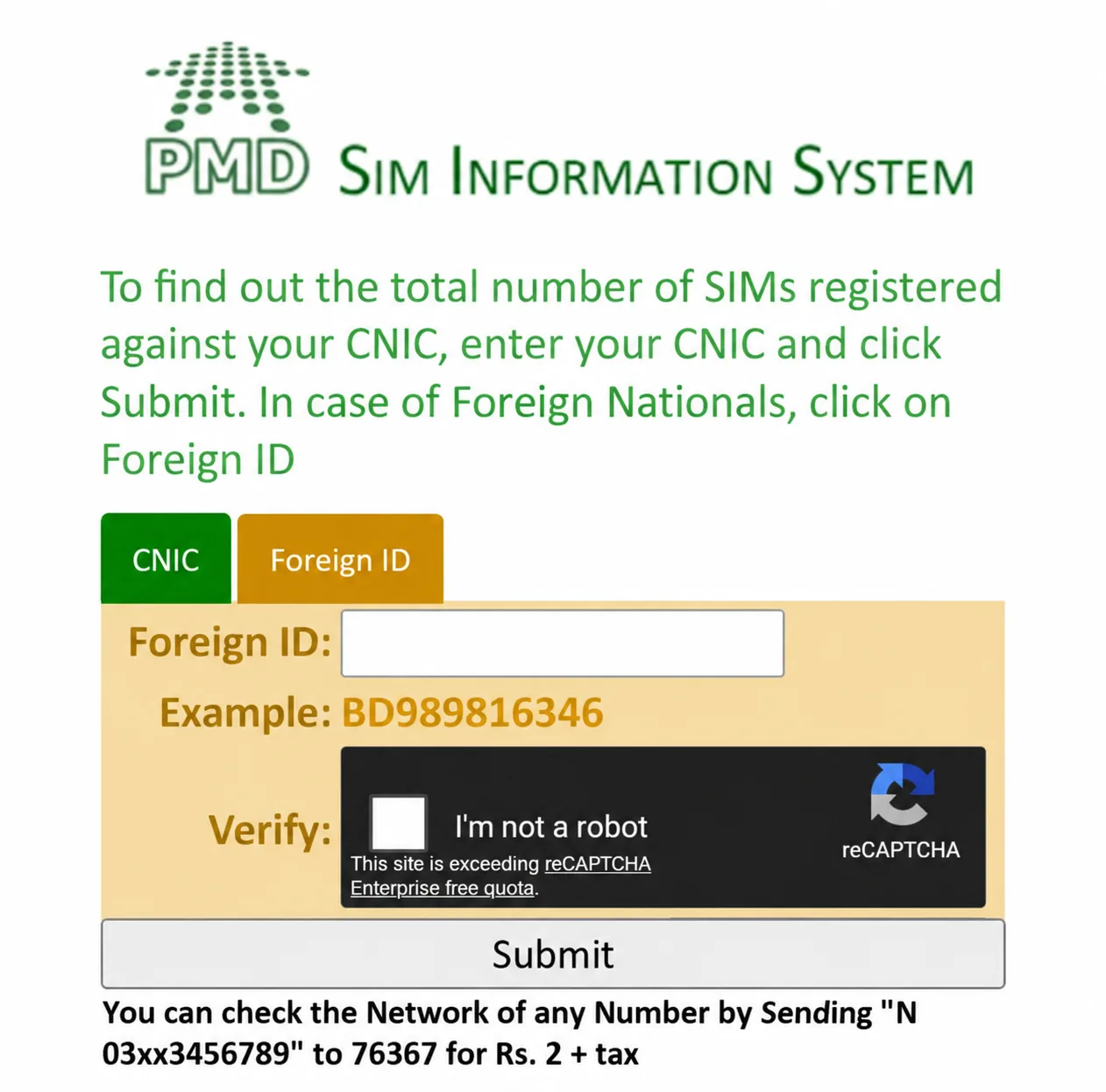
The system belongs to PTA, not NADRA. PTA has stated that it does not hold or manage subscriber data; the registration record of a SIM stays with the licensed operator that sold it. That is why a count is all the system can give. NADRA issues identity cards, and its published short codes do not include 668. One more name shows on the site: when we loaded it on 8 November 2026, its banner image carried the mark “PMD Sim Information System”, and the questions below explain what PMD is. Using the system needs no account, app, login or one-time code.
The flow is short. A CNIC goes in; a number of SIMs comes out. The system cannot start from a mobile number, it prints no phone numbers and no names, and it is no SIM owner details lookup. Running a check changes nothing on your CNIC.
Does it work with a mobile number?
No: the PTA SIM Information System accepts only a CNIC or a foreign national’s ID, so it cannot start from a mobile number. Looking for the SIM information system with number, or by mobile number, means looking for an input box the form does not have. Going from a SIM number to CNIC records is just as impossible.
With only a mobile number in hand, the one official detail you can get is its network, through 76367. If the SIM is in your own phone, 667 gives you its registered name, CNIC and number. No official check shows the person behind someone else’s number.
Do I need internet to check the SIMs on my CNIC?
Not for the text, only for the website. Using the SIM Information System online at cnic.sims.pk needs a phone or computer with internet and asks only for the CNIC. The 668 route needs no internet at all, just a plain phone and a SIM with a little balance.
Either way you check SIM by CNIC, never by phone number, and the SIM information on CNIC that comes back is the same count. If the two routes ever give different totals, save both results. The 668 reply itself points you to the network’s customer service centre for corrections, and that is the place to take a mismatch.
How to check SIMs on CNIC by SMS: send your own CNIC to 668
To get SIM information with CNIC number from any phone, smart or not, this is the route. Some call it an ID card SIM check, since the 13 digits printed on your ID card (CNIC) are all the system needs. Others say CNIC SIM check with number, after the short code it uses. 668 is an SMS short code, so it takes a text, not a call, and it is the CNIC SIM check number people mean.
- Start a fresh SMS. You are sending a message here, not dialling a code.
- Put 668 where the phone number usually goes.
- Type your own CNIC number as the whole message, all 13 digits, with no dashes or spaces.
- Compare each digit with your card before you send.
- Keep the reply, and note the date it arrived.
What goes into the SIM check? CNIC number only. Your mobile number does not belong there, and neither does the word MNP, which is the 667 request for a registered name. Can you check SIM on CNIC number alone, without the card in your hand? Yes: the system asks for the 13 digits and nothing more. PTA’s own words for the cost are “(charges may apply)”, printed beside 668 in its notice of 31 December 2025 with no amount, so keep a little balance on the SIM. No way to send a text? The online form gives the same count.
“Can I check SIM on my CNIC without internet?” is a fair question, and this text is the answer. The SIM on CNIC check by SMS works on any phone that can send a message, so it suits a parent without a smartphone too. It works as a self-service number check. CNIC holders run it on themselves, with no app and no visit. PTA itself advises people to check CNIC counts like this at regular intervals, especially for elderly women who may not use a mobile phone at all.
668 SIM check: how to read the reply
A 668 SIM check reply is one SMS of counts: five network lines, a TOTAL line and a pointer to the customer service centre, with no numbers and no names in it. After you send your CNIC to 668, the reply comes back in that form. Here is our own reply, received on 8 October 2026, broken down line by line, with n standing in for a number:
- Five network labels in a fixed order: JAZZ, TELENOR, UFONE, WARID, ZONG.
- Two numbers after each label, written like JAZZ:n,n. The first counts SIMs used for calls and internet (voice + data), while the second counts internet-only (data) SIMs.
- Zeros, not a blank, for any network where you hold nothing.
- A TOTAL line in the form TOTAL:n(nVoice+Data,nDataSIMs), with the grand total first and the same two kinds in brackets after it.
- A last line pointing you to the network’s customer service centre if a correction is needed.
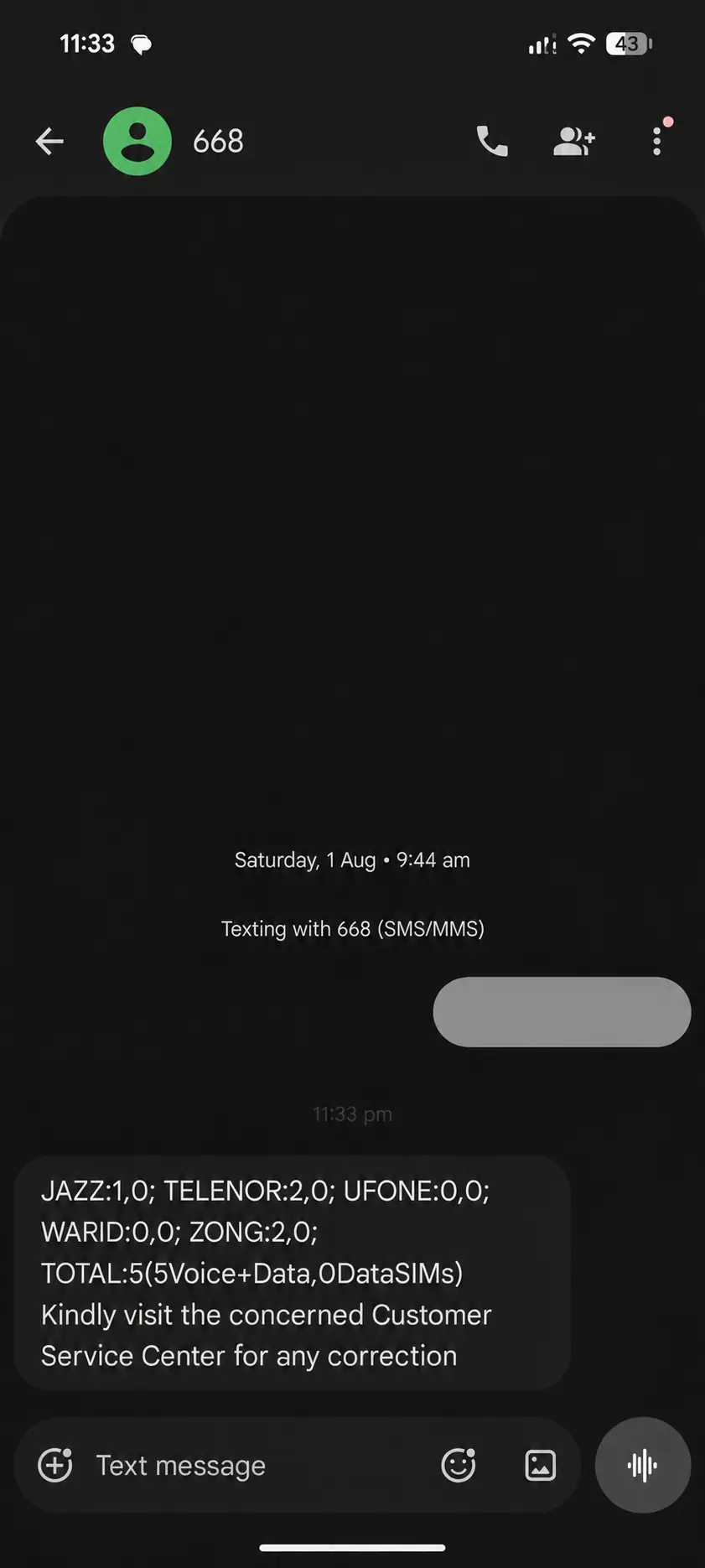
To check the SIMs registered in your name, start with the TOTAL. Treat it as complete in itself: every registered SIM, voice or data, already sits inside it. Adding the per-network counts on top would count the same SIMs twice, because each SIM already appears once, under its network. Look down the labels and you will find WARID but no Onic and no SCOM, and no official text says which line, if any, holds an Onic or SCOM SIM. That is why a claim that 668 “covers all six networks” does not fit the reply.
Nor does the reply carry anything but counts: no CNIC, no phone numbers and no names. Even so, the count is information about you, so keep the reply private.
CNIC SIM check online: cnic.sims.pk step by step
A CNIC SIM check online is the CNIC tab of cnic.sims.pk. Type your own 13-digit CNIC without dashes, tick the Verify box and click Submit, and the form shows the same count that 668 sends by SMS. The form asks for nothing else.
Spell the address out once so you know it by heart: the letters c, n, i, c, a dot, the word sims, another dot, then pk. Type it yourself rather than tapping a link from a message, because a link can lead anywhere, including to a copy of the form. Leave out the www as well.
When we fetched the www version printed on PTA’s own page on 5 October 2026, it failed its security certificate check, while cnic.sims.pk loaded normally.
- Open cnic.sims.pk. The CNIC tab is the one you want.
- Enter all 13 digits of your own CNIC, with no dashes or spaces.
- Tick the Verify box, the form’s test that a person and not a program is using it.
- Press Submit.
- Write the result down with the date.
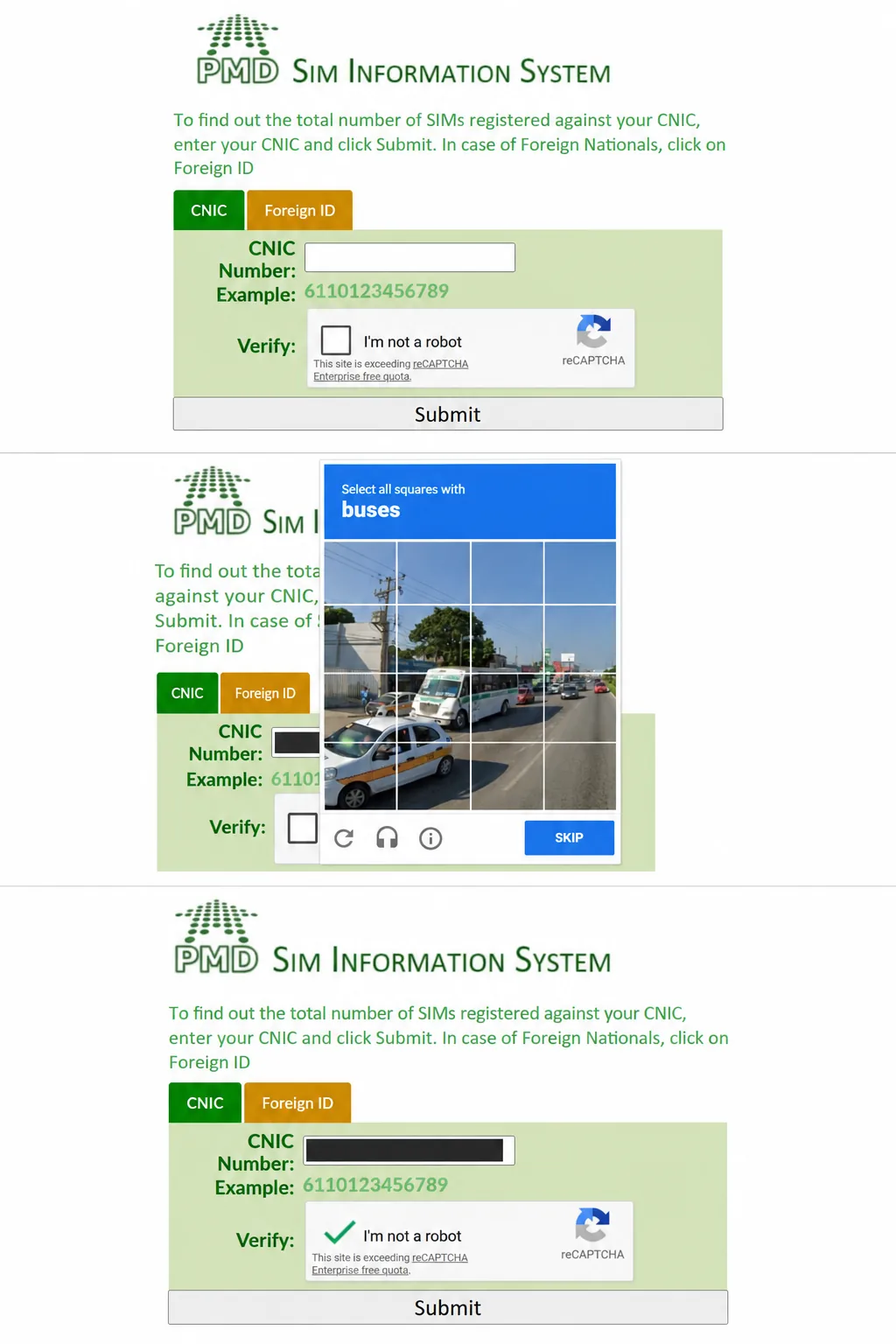
What comes back is a short table. Each network has its own row, two columns split the SIMs into Voice + Data and Data Only, and a Total SIMs line closes it. The form itself calls this the total of SIMs registered against your CNIC, and that is exactly what you get. Nothing on it mentions a fee, there is nowhere to pay, and nothing appears beyond those counts.
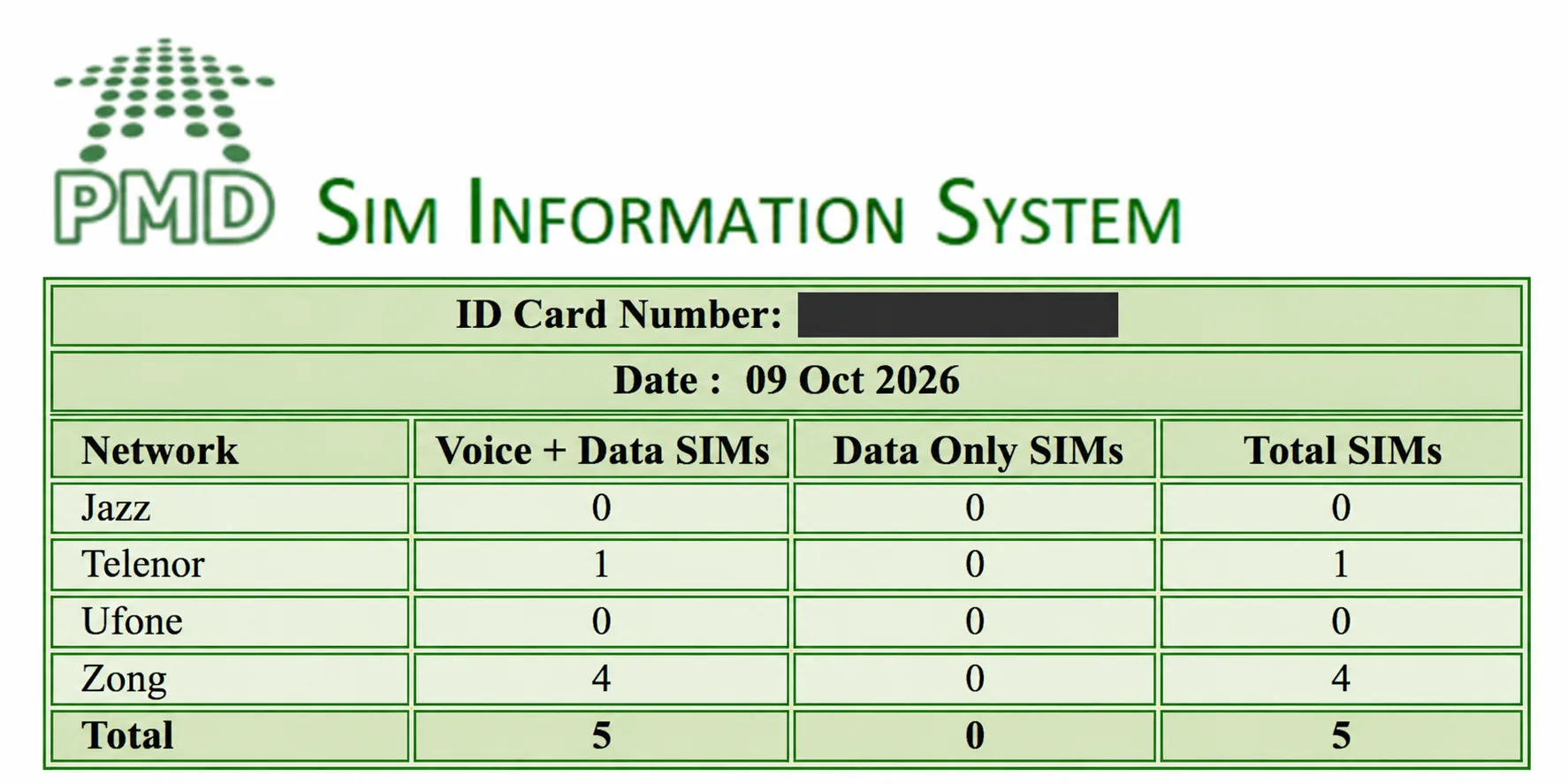
The online CNIC SIM check needs nothing more than the 13 digits and works the same on a phone or a laptop. To check SIM on CNIC online for an older relative, sit with them and let them type their own number, because the form is meant for checking your own CNIC. The form gives the same count as 668 and never the numbers themselves.
So the website runs the same check as the text, only on a screen, and it cannot look up a phone number.
Foreign ID and NICOP
The form’s second tab, Foreign ID, is for foreign nationals, whose SIMs are not registered on a CNIC, so the CNIC tab does not fit. Its box accepts between 3 and 50 letters or numbers. Type the same ID that the SIM was registered on, then pass the Verify box as on the CNIC tab. For a foreign national, this tab takes the place of the CNIC tab.
Under PTA’s rules a foreign national buys a SIM on a valid NARA ID, a passport carrying a valid visa, or a valid PoR card if the buyer is an Afghan national. NICOP is a different case. A NICOP holder can buy a SIM, yet neither this tab nor the 668 instructions mention NICOP at all, so we cannot say whether the check accepts one.
The official SIM information website, and how to spot a look-alike
One address and one code are official: cnic.sims.pk and 668. You can confirm the address on PTA’s own site, pta.gov.pk, which prints it on its “Biometric Verification” page and in its “SIM(s) Information” FAQ. Check the full address, not just how it ends; “cnic.” has to come straight before “sims.pk”. The genuine form has two tabs, CNIC and Foreign ID, one number box, a Verify box and a Submit button. Leave at once if you see any of these:
- An address that is not exactly cnic.sims.pk, for example one that ends in .com.
- A field asking for a mobile number.
- A request to sign in, download something, make a payment or start a chat.
- Promises of names, addresses or lists of phone numbers.
- A page that claims only to “explain” the check but still has its own CNIC box.
PTA warned in December 2023 about fake links in messages that asked people to check their SIM count through the link. The only SIM Information System address PTA publishes is cnic.sims.pk; no address spelling out “cnic sim info” or “siminfo” appeared on the PTA pages we checked on 8 November 2026. The safe habit is to use only the official address and the short code.
Is there any other online check? SIMs on CNIC are counted only at this address and through 668, so another site offering a CNIC check is not the official one. The real check never needs a mobile number or a password. A search for a SIM information system login is a warning sign in itself, because the real system has no login, no app and no SIM owner details search.
cnic.sims.pk with number: does the portal check a mobile number?
No. The cnic.sims.pk portal has two tabs, CNIC and Foreign ID, and neither has a box for a mobile number, so a cnic.sims.pk with number check has nothing to run on. The form asks for no login, no one-time code and no payment, and it offers nothing to download, so there is no cnic.sims app to look for. Type the address exactly: PTA’s pages print no other spelling of it, and sims.pk on its own is not the published address. The one number-based service the portal mentions is the separate 76367 text, which names a number’s network and nothing more.
Which SIM numbers are on my CNIC?
No official check lists the numbers on your CNIC online. 668 and cnic.sims.pk give only how many SIMs each network has registered against it. Finding which numbers they are means asking that network at its customer service centre, in person and for your own CNIC. A SIM number check on CNIC online or by 668 gives you a count, never the numbers themselves.
Neither route lists the numbers, and no official text promises a printed list or certificate of them. Each SIM is in the count only as part of a total.
“How do I check SIM number on my CNIC?” has a two-part answer: first the count, then a visit to the network named in the reply. The count shows that a SIM exists, not which number it carries, so you always need both steps. No official service or site turns a CNIC into a list of numbers; that question is for the company, and only for your own card.
When 668 was new, a PTA notice said people could get help with their numbers at the company’s customer service centre, and today’s reply still sends you there for corrections. After the CNIC check, SIM number questions belong at that centre. It is the one place where you might learn which numbers sit on your own CNIC, in person. PTA’s texts do not promise that it will show you more than the count. Still, you can ask on the same visit for any SIM you do not recognise to be blocked and removed.
If the reply names several companies, a full list means one visit to each, because no official service lists your numbers online.
| Channel | What you give | What you get | What it never gives |
|---|---|---|---|
| SMS to 668 | Your 13-digit CNIC number | A count per network, voice and data, plus a total | Phone numbers, names, addresses |
| cnic.sims.pk | Your 13-digit CNIC number, or a Foreign ID | The same count as a small table | Phone numbers, names, a login, a list |
| Customer service centre | Your CNIC and your fingerprint at the counter | Help with the SIMs on your CNIC; blocking and removal of a SIM you did not take | Anything about another person’s CNIC |
None of this works on another person’s card. PTA presents 668 as a check of your own CNIC, and no official channel looks up anyone else’s. The system has no box for a phone number either, so a number cannot lead you to a stranger’s name or CNIC.
Compare the count with the SIMs you remember
Before you go anywhere, make a list of every SIM you can explain. Think beyond your phone: the second slot of a dual-SIM handset, old packs at home, the SIM inside a tablet or Wi-Fi device, an eSIM, and SIMs you registered for family members. Next to each, write the SIM number, CNIC owner and who actually uses it. Then put your list beside the reply.
Suppose you know of two Zong SIMs and one Ufone SIM, but the reply shows two on Zong and two on Ufone. The extra Ufone SIM is the one to ask about, and only Ufone can say whether it is an old SIM of yours or a registration you never made. No website can list those numbers for you, which is why your own list matters.
The online form stops at the count. The numbers sit in the company’s own records, so the count is only the first step.
Bring the 668 reply or your online result as well, and keep your own mobile number, CNIC and the list together for the visit. At the centre, give your CNIC, compare what the staff can show you against your list, and ask about every SIM you cannot explain.
How to get a SIM that is not yours blocked and removed from your CNIC
If a SIM number check with CNIC turns up an unknown SIM, one you never took, PTA’s published advice is to go to that mobile company straight away, with your original CNIC. At the counter, say the SIM was activated without your consent and ask for it to be handled as a fraud claim, not as an ordinary disowning request. A SIM reported as activated by fraud must be blocked at once. Ask on the same visit for it to be taken off your CNIC, which the company does after confirming your identity by fingerprint. If the company does not act, call PTA’s complaint helpline on 0800-55055.
One rule worth knowing while you tidy up: since 31 December 2025, a SIM with no use for 180 days in a row may be switched off by the company, with notice. The number is then kept for another 180 days before it can go to anyone else. A SIM you want to keep should be used now and then.
How many SIMs can be on one CNIC? The limit is eight
The TOTAL in your reply is worth reading against one figure: eight. That is the most SIMs one CNIC may carry for personal use, all networks added together: three data-only SIMs plus five voice SIMs that handle calls and internet. PTA states those figures in its FAQ.
The rule itself sits in regulation 7 of the Subscribers Antecedents Verification Regulations, 2015 (PTA’s SIM rules), as amended on 17 November 2017. Those rules define a SIM to include an eSIM, which matters when you read your count against the cap. Foreign ID holders have the same cap of eight, and only corporate customers may go above it.
Both parts of the limit matter when you read your total. Five voice SIMs is a ceiling of its own. Once you hold five, a sixth voice SIM would break the limit even if your total is still under eight, though a data SIM may still be allowed.
The cap bites at the point of sale: Zong’s and Ufone’s terms say sellers check the number of SIMs on your CNIC before they offer a new one. You can run the same count yourself before the trip rather than find out at the shop. The cap itself has moved over the years, from ten connections in 2008 to eight since 2017.
Two claims about the limit do the rounds online, and both are wrong. One says PTA lowered it to six in December 2025, but regulation 7 has not changed since 2017 and PTA’s FAQ still gives eight. The other says SIMs over the limit get blocked automatically. PTA’s rules say no such thing, and the groups of SIMs that its Annual Report 2025 lists as blocked in bulk do not include SIMs held over the limit. If your total number of SIMs on CNIC is higher than you expected, deal with the SIMs you do not recognise yourself.
A third story is newer, and it is neither a rule nor a made-up claim. From 14 November 2026 several news sites, Business Recorder among them, said that PTA is weighing a voice limit of three SIMs per CNIC, down from five, and more data SIMs than today. None of them names its source at PTA. When we checked PTA’s regulations page and FAQ on 19 November 2026, neither carried such a change, so the eight above still held. The post on voice SIMs, data-only SIMs and the reported cut explains what the reports say and what applies to a fourth or fifth voice SIM already on a CNIC.
At the limit: what to do before you try again
A shop that turns you away for being at the limit has read the same count you can read yourself, so work through it in this order before going back.
- Recount. Send your CNIC to 668 again, or use the form, and work from today’s figure rather than an old one.
- Read the voice part on its own, against the five-voice ceiling above.
- Free a slot from a SIM you no longer use. Disowning happens only at the operator’s service centre or an authorised franchise, after your fingerprint match. A SIM in its first year cannot be disowned.
- Move a relative’s SIM into their name if they use one that sits on your CNIC. Both of you must attend for a change of ownership.
- Mind the wait between new SIMs on one CNIC: PTA’s notice of January 2024 sets seven days before the next new SIM, while its FAQ still prints eight hours, so ask the outlet which applies.
- Recount once more before the trip. PTA does not say how soon a removed SIM leaves the count, so check that the change shows before the seller checks it.
SIM information with number: what a mobile number can and cannot tell you
Many searches go the other way, from a phone number to CNIC details, and try to check CNIC number by mobile number. No official route does that. PTA runs no phone number to CNIC check, no operator offers one, and the SIM Information System cannot even accept a number as input. It goes from CNIC to count, never from SIM to CNIC.
Each official channel does one check: number, CNIC count or network. For a number that is not yours, the network is all you can learn. Text 76367 with N, a space and the number, and the reply names the company serving it today; PTA’s page prices that at Rs 2 plus tax. If the SIM is in your own phone, 667 tells you far more, because the record is yours.
No official service will check CNIC by mobile number for you, and an app that offers to find CNIC number by mobile number is offering what no official source provides. So is a site that promises a phone number, CNIC details and home address, or just a name. A caller-ID app, a prefix or a “live tracker” page does not identify the person behind a number either. Section 16 of the Prevention of Electronic Crimes Act, 2016 (PECA) covers using another person’s identity information without authority. If a number is troubling you, the right route is to report the caller, not to hunt for a CNIC.
My SIM information: the 667 check for the SIM in your phone
A search for my SIM information usually means one SIM, the one in your phone. The SIM Information System is the wrong tool for that, because it counts SIMs on a CNIC and says nothing about any single SIM. The check you want sends the letters MNP to 667 from that SIM, and its reply carries the SIM’s number, registered name and CNIC along with three technical fields.
Put the two together, 667 for the name and 668 for the count, and you have the whole picture of your own SIMs.
SIM number check: find the number of a SIM you hold
A SIM number check usually solves a simpler problem: you hold a SIM and do not know its phone number. Maybe it is a spare card, a SIM handed down in the family, or the one inside a Wi-Fi device. To check SIM number for a card like that, you do not need the SIM Information System at all.
Most networks publish a way to see it, used from that SIM; Ufone and SCOM publish none. Jazz, for example, lists *99# on its self-service dial codes page, and Onic shows the number at the top of its app’s home screen for signed-in existing customers.
You can also skip codes altogether. Ring or text a phone beside you and see which number shows up on it, or send MNP to 667, since the first field of that reply is your number. A total SIM number check is something else again: that is the 668 count from earlier on this page. Apart from 667, none of these tells you who owns a SIM.
PTA SIM verification and SIM status check: which one do you mean?
PTA SIM verification can mean three different things. It can mean the count of SIMs on your CNIC from 668 or cnic.sims.pk, explained above. It can also mean your operator’s verification-status code, sent or dialled from the SIM. Or it can mean re-verification by fingerprint at an authorised outlet. Decide which one you need before you check anything.
If the line itself has stopped working, make a call or send a text first, and the SIM block code page tells an operator block apart from a PIN or PUK lock.
Behind every registered SIM sits an entry held by the company that sold it: your name, your CNIC and the biometric verification, the fingerprint match, taken at the sale. A verification check asks whether that entry is complete and verified, which is a different question from the count. PTA keeps a page titled “How to Check Verification Status of Your SIM/CNIC” with one code per company, sent or dialled from the SIM itself.
Treat the codes with care. PTA’s page has no date and uses old company names. On our re-reads of 11 October and 8 November 2026 it still showed them, plus a Warid code from before the merger with Jazz. The companies do not repeat the codes on their own sites, so any of them may have stopped working. When a code gets no answer, ask your operator directly. A SIM that turns out to be unverified gets verified a second time at an authorised outlet of the company, with your fingerprint. CNIC SIM verification, in other words, happens at a counter, not on a website.
How to register a SIM on your CNIC
SIM registration happens at the counter: a registered SIM is one sold to you in person at an authorised outlet, and to register SIM on CNIC means exactly that sale. You leave with a CNIC-registered SIM in your name. PTA’s FAQ names franchises, registered shops, customer service centres and temporary sale points.
The count check described under the limit above comes first, and only after that the fingerprint match. You can also buy a SIM on a valid NICOP or SNIC instead of a CNIC, and foreign nationals use the documents listed under Foreign ID above.
What an expired, cancelled or deceased holder’s CNIC does to the SIMs on it
Since PTA’s 2026 rule changes, NADRA tells the operators when a CNIC expires, is cancelled or its holder dies, and each case has its own deadline. For an expired card, a 30-day warning comes first, and then outgoing service stops. SIMs on a cancelled card are blocked within five days, and a deceased holder’s SIMs have to move into a new name within 60 days.
For this system the practical step is to run the count again after you renew your CNIC and check that nothing on it has changed.
SIM number information with CNIC: ICCID, IMSI and the mobile number
Forms that ask for SIM number information with CNIC rarely say which number they want, and a SIM has three, none of them the same as your CNIC. The 667 reply prints two of them, the plastic card prints one, and the one most people mean is simply the phone number. Here is what each one is and where it comes from.
- ICCID: the serial number of the card, printed on it. Under the 2025 edition of the ITU standard it runs to 19 digits and begins with 89. An eSIM has one too, for the profile you download.
- IMSI: the number that identifies your subscription inside the network, up to 15 digits, beginning with 410, the code for Pakistan. It appears in the IMSI field of the 667 reply, and nobody dials it.
- MSISDN: your phone number in full. It starts with Pakistan’s country code 92, then a network code between 30 and 36, then eight more digits; within Pakistan, a 0 takes the place of the 92.
None of the three leads to the registered owner, and no official check takes a card’s serial number as its input. The card does not store your name or CNIC at all; those live in the operator’s registration record. That is why all SIM number information about your own SIM still comes from the 667 reply and not from the plastic. An app that reads SIM card details reads only the card in your hand.
Which check do you need?
Check SIM, on its own, does not say what you want checked, so here is the SIM check information in one list. Each official check takes one input and gives one output, and none of them turns another person’s number into a name or a CNIC. Match your question to its check:
- You want the name on the SIM in your phone: send MNP to 667 from it.
- You want to check all SIM numbers on your CNIC: send it to 668 for the count, then ask about the numbers themselves at the network’s service centre.
- You want to check SIM number online: cnic.sims.pk gives the count online, and online SIM checking stops there; no website lists your numbers or gives another person’s details.
- You want the network of a number: send N and the number to 76367.
- You want to know if a SIM is verified: use that network’s status code, or ask at the counter.
- You want the number of a SIM you hold: use that network’s own-number code, where it has one.
When people talk about a SIM check ID, they almost always mean the first or second of these: the ID is your CNIC, and the checks are 667 and 668.
When 668 does not reply, or the form will not open
A reply time for 668 is not stated by PTA, and nor is the period within which a new or removed SIM shows in the count. So a silence or an odd total has to be worked through by hand. Start with the message you sent, then the balance, then the address, in that order.
- No reply from 668: check that the message held only the 13 digits, with no dashes and nothing else. Check that the SIM has balance too, because PTA’s notices say the SMS may be charged. Then try once more, or use the website, which runs the same count.
- A SIM check on CNIC online that will not load, or a Verify box that fails: try another browser or connection, and check the address again. The real form is cnic.sims.pk and nothing else, and the 668 text is the other way to run the count while the site is down.
- A line under the Verify box about exceeding a reCAPTCHA Enterprise free quota: we saw it on the official form itself. It showed in our own renderings of 6 and 8 October and again on 8 November 2026. No official text explains what it means for the check, so if the box then fails, send the 668 text instead.
- Phone numbers missing from the result: neither route ever lists them. If you wanted the numbers themselves, ask at the network’s service centre.
- The two routes give different totals: nothing on screen says which one is right. Keep both results and show them at the network’s customer service centre.
- A foreign national whose ID is refused: use the Foreign ID tab with the exact ID the SIM was registered on, and ask the operator if it still fails.
- A count that shows SIMs you do not know: go to that network’s service centre with your CNIC, and if nothing happens, call PTA on 0800-55055. PTA’s complaint categories even include one for updating the SIM records linked to a CNIC, which it calls the 668 Database.
Questions people ask about the SIM Information System
Is the 668 SIM check free?
Online, as far as the form shows, yes: there is no fee on it and nowhere to pay. The SMS is different, because PTA’s notices attach a “charges may apply” note to 668 without naming an amount, so send it from a SIM with some balance.
How do I check the SIMs on my ID card?
Your ID card is your CNIC, so an ID card SIM number check online is the CNIC tab of cnic.sims.pk, and a text of the same 13 digits to 668 gives the same count. Foreign nationals use the Foreign ID tab instead.
Can I check the SIMs on someone else’s CNIC?
No. PTA describes 668 and the website as a check of your own CNIC, and nothing official exists for anyone else’s. If a SIM in someone else’s name is causing you trouble, the right step is a report to the operator or PTA, not a check.
Does 668 show the phone numbers on my CNIC?
No. It shows how many SIMs sit on the CNIC under each network, voice and data, with a grand total. Questions about the actual numbers go to the company the reply names, at its customer service centre.
Is cnic.sims.pk the same as 668?
Yes. They are the two channels of one system, and both give the same count. The website is handy when you have internet and no balance; the SMS is handy on a plain phone.
What does “apne CNIC pe kitni SIM hai online check” get me?
The count of SIMs on your own CNIC, from cnic.sims.pk in a browser or from 668 by text. The reply names each network with its count and gives a total; it never lists the numbers, and it cannot be run on anyone else’s CNIC.
Does NADRA run the SIM check?
No. The SIM Information System is PTA’s. NADRA’s part is the identity card itself and the fingerprint check that confirms a buyer at the point of sale, and 668 is not among NADRA’s own short codes.
What is PMD in the SIM Information System?
PMD is the Pakistan MNP Database (Guarantee) Limited. PTA’s MNP porting guidelines name it as the body that updates the 668 data after a number has been ported to another network. Its mark sits on the cnic.sims.pk banner, but the site does not say that PMD operates it, so the check itself remains PTA’s service.
Is the limit five, six or eight SIMs per CNIC?
Eight: five voice SIMs and three data SIMs. It was ten under PTA’s 2008 policy and five in the 2015 regulations; the amendment of 17 November 2017 set eight and is still in force. The “six since December 2025” claim has no official source.
How many mobile phones are registered on my CNIC?
The SIM count cannot tell you. Handsets are registered in a different PTA system with a count of its own. Dial *8484# to see the count of devices registered against your passport or other credentials, or text a phone’s IMEI to 8484 to check one handset. 668 and cnic.sims.pk count SIMs, never phones.
Do Jazz, Zong, Telenor and Ufone SIMs need different codes for the count?
No. One message to 668, or one visit to cnic.sims.pk, counts the SIMs on your CNIC across every company at once. The reply names the companies itself.
Is there a SIM Information System login, an app, or a mobile SIM information system?
No. The real system has no login, no account and no app. A page that asks you to sign in, install something or pay is not PTA’s form.
How do I check how many SIMs are on my CNIC?
Text your own 13-digit CNIC, without dashes, to 668, or enter it on the CNIC tab of cnic.sims.pk. Both give the same count, network by network, with a total; the steps are under 668 by SMS and the online form above.
Every SIM registered on the CNIC is in that count: voice SIMs, data-only SIMs, eSIMs and the SIMs in devices such as routers. How soon a newly activated or removed SIM shows in it is not stated by PTA, so after any change run the check again and compare.
How do I check if a SIM card is registered in my name?
Send MNP to 667 from that SIM. The reply carries the registered name and CNIC, so you can see at once whether it is in your name. For the SIMs in your name that you do not hold, 668 gives the count only; the network’s service centre can go further, and only for your own CNIC.
Can I print the result or use it as proof?
Keep the SMS or a screenshot for your own records by all means. Whether a bank, the police or a court will accept it is another matter: PTA has not said it counts as proof, so ask the office involved what it wants to see.
What happens if my CNIC shows more than eight SIMs?
PTA’s rules do not say that SIMs above the limit are blocked on their own, and its Annual Report 2025 lists no such group. Treat the extra entries as SIMs to explain: find the ones you do not recognise and have them removed at the operator’s service centre.
Does a work SIM from my employer count in my own 668 total?
PTA does not say. Under regulation 6 of its SIM rules, operators may sell SIMs in bulk to corporate customers only through their authorised representatives or customer service centres. Regulation 3(1)(h) lists who qualifies: the armed forces, embassies and foreign missions, Pakistani local organisations with an NTN, and companies or INGOs with a registration certificate or an NTN. The organisation hands over a Board resolution or authorisation letter naming the buyer and the number of connections it needs. It undertakes to issue them only to its employees, and reports the SIMs it has issued to the operator within seven days of the sale.
So a work SIM is sold to the organisation, not to you, yet neither the rules, PTA’s FAQ nor cnic.sims.pk states whether it shows in the employee’s own count. Run your count, and if a work SIM seems to be in it, ask your employer or the operator.
Is “SIM information with CNIC number” the same as “SIM owner details”?
No. SIM information with a CNIC number is the count from 668 or cnic.sims.pk. SIM owner details are the registered name and CNIC behind one SIM, which only the 667 reply shows, and only for a SIM in your own phone.
Why does the reply show WARID when Warid no longer exists as a company?
Because the reply keeps five network lines in a fixed order, and WARID is still one of them. SIMs sold under the Warid name before its merger with Jazz are counted on that line. Onic and SCOM have no line of their own, and no official text says where their SIMs are counted.
Can I check my CNIC details online?
For the SIMs on it, yes: cnic.sims.pk gives the count for your own CNIC. For the identity record itself, NADRA’s online route is its PakID app. NADRA describes it as the place to apply for, renew, reprint and track your documents, and looking a card up is not among the features it lists. NADRA says it authorises no other website or app for CNIC processing.
Can I find someone’s CNIC number from their name?
No. NADRA’s Services Charter says citizens’ personal information is used only for the purpose it was collected for and is not passed to third parties without proper authorisation. Its Verisys portal is for client organisations, which verify a card only with the holder’s consent through a one-time code. If someone is misusing your own name or CNIC, report it to the operator or PTA.
Sources and dates
This page rests first on PTA’s own texts: its FAQ on SIM counts and the limit, and its SIM regulations in the version updated to 11 September 2026. We also used PTA’s verification-status page (re-read on 11 October and 8 November 2026) and its MNP porting guidelines.
On 27 October 2026 we read its Biometric Verification page and its list of complaint types. On 28 October came its October 2009 launch notice, its Annual Report 2025 and the consumer protection rules as amended on 31 December 2025. Its notice of 31 December 2025, its Misuse of Credentials FAQ and its 2026 rules on CNIC status followed on 3 November. From NADRA we used its Services Charter and its statement on Verisys, both checked on 5 October 2026, and its PakID page, checked on 28 October 2026.
PTA’s SIM(s) Information FAQ, the SIM regulations and the porting guidelines were re-read on 8 November 2026, and so were its December 2023 notice on fake links and its 668 FAQ page. None had changed on the points this page uses. The FAQ and the regulations page were read again on 19 November 2026 for the reported cut to three voice SIMs, and neither had changed on the limit.
The rest comes from the cnic.sims.pk form, which we checked on 5, 6 and 8 October 2026 and again on 8 November 2026. We read the networks’ help pages between 26 October and 3 November 2026. Zong’s and Ufone’s SIM terms, the ITU-T E.118 standard for the card number and section 16 of PECA were all checked on 27 October 2026.
Jazz’s self-service dial codes page was re-read on 26 October 2026. First-hand, there is the 668 reply we received on 8 October 2026, plus a result a reader sent us on 9 October 2026. All of it was checked between 5 October and 19 November 2026, and every date stays on the page so you can judge how fresh a fact is before you rely on it.
Page updated 8 November 2026.