SIM Owner Details in Pakistan 2026: Check Your Own SIM, Your CNIC Count and Any Number’s Network
To check SIM owner details in Pakistan, send MNP to 667 from your own SIM; to count the SIMs on your CNIC, send the CNIC to 668 or type it into cnic.sims.pk. For a number’s network, send N and the number to 76367. Those are the official checks, and not one of them shows the person behind someone else’s number.
Everything on this page is about the official SIM owner details check in Pakistan, explained step by step: the exact message to send, what the reply really tells you, and what it costs, for your own SIM, your own CNIC, or a number you only want the network of. There is also a clear route for the day a name or a count comes back wrong, and an honest look at why the private “SIM data” and “live tracker” sites cannot do what they promise, however confident they sound.
Did you come here looking for Pak SIM Data, SIM database or Fresh SIM Database, or for live tracker SIM data? Read what those names really offer, and which official check will actually answer your question.
Written and checked by Muhammad Ikram · Page updated · Own 667 and 668 replies received 8 October 2026 · Key official pages re-read 27 October 2026
Fresh SIM Owner Details Now Opens Here
Fresh SIM Owner Details, the site at freshsimownerdetails.org.pk, has been redirected to this site since 19 November 2026, so its addresses now lead here. On this site you get the official checks, each with its exact message and what the reply means: MNP to 667 for your own SIM, your CNIC to 668 or the cnic.sims.pk form for the SIM count, and 76367 for a number’s network.
Your own SIM owner details, or the count on your own CNIC: those two are the checks you can actually run, so begin there. When the reply lands, don’t rush it. Read what it says, and what it doesn’t, before you decide that something in your record needs correcting.
SIM Owner Details Online Check: Pakistan’s Official Checks and How to Choose One
SIM owner details are the registration record your mobile company keeps for a SIM: the registered name and identity document. Reading your own SIM owner details takes one text, MNP to 667 from that SIM. To count the SIMs on your CNIC, send the CNIC to 668 or use cnic.sims.pk. No official check shows another person’s SIM owner details from a number.
When people say SIM owner details (some type it as one word, “simownerdetails”), they mean the registration record your mobile company keeps for a SIM: whose name it is in, and which identity document the SIM was issued on, checked against the National Database and Registration Authority (NADRA) at the sale. That’s all it is. The person holding the phone isn’t always the person named in that record.
There is no official “SIM owner details checker” website that hands you a stranger’s record, however many pages promise one; the official checks below, published by the Pakistan Telecommunication Authority (PTA) and the operators, are the only ones that exist. In Pakistan you can read this record for your own SIM, count the SIMs on your own CNIC, and find out which network any number uses. No official check shows the name, CNIC or address behind someone else’s number.
Only one of these official checks runs online, the CNIC count at cnic.sims.pk; the others are text messages.
Before you go anywhere near a search box, decide what it is you want to know, because once that is clear the right SIM owner details check more or less picks itself. People talk about a phone number, the SIM owner details and a CNIC SIM count as if they were one thing. They are three things, and each comes from a different official check. Send the wrong message to the wrong code and you get nothing useful back, just a wasted text.
Being threatened by a caller, or asked for money or a code? Skip all of this and go straight to the reporting steps. Lost the SIM? The lost-SIM steps come first. And if the SIM is still in your phone but calls stopped out of the blue, read what a dead SIM can mean before you assume the worst.
Key facts at a glance
- Your own SIM: text MNP to 667 from that SIM. What comes back is the number, the registered name, the CNIC, the IMSI, the activation date and the connection type, and that is the whole record (PTA porting guidelines; our own reply of 8 October 2026).
- Your own CNIC: text the 13-digit Computerised National Identity Card (CNIC) number to 668, or go to cnic.sims.pk when texting is a bother. Either way you get a count for each network and a total. Not a list of numbers, ever (PTA FAQ, re-read 11 October 2026).
- The limit: eight SIMs on one CNIC, three of them data-only (regulation 7 of PTA’s SIM rules, amended 17 November 2017), and PTA’s FAQ counts the other five as voice.
- Someone else’s number: no official check shows the owner. 76367 tells you the network and nothing more (Rs 2 plus tax), and operators must keep records confidential (regulations 16 and 19, licence condition 7.7).
- A SIM you never took: go to the operator’s service centre and report it as activated by fraud; it has to be blocked at once, and the first removal is free (SIM regulations; PTA notice of 10 November 2023).
- The law: PECA section 16, misuse of another person’s identity information, carries up to three years in prison or a Rs 5 million fine.
- Complaints: your operator first (three working days), then PTA on 0800-55055 or complaint.pta.gov.pk, then NCCIA on 1799 if it is fraud.
- 2026 changes: a one-year bar on disowning a new SIM (11 May), an eSIM price cap of Rs 1,500 (17 August), and a stop to new Onic sales (11 September).
Which official check do I need?
There is nothing to type here and nothing gets looked up. Open the line that matches your question and you’ll see the exact official check, the message to send, and what the reply can and cannot show.
Whose name is my SIM registered in?
Send MNP to 667 from that SIM. Back comes the number, registered name, CNIC, IMSI, activation date and connection type. Jazz charges about Rs 2 plus tax; the other networks publish no price. It cannot look up anyone else’s number.
How many SIMs are on my CNIC?
Your 13-digit CNIC, no dashes, texted to 668; or, if you would rather not send an SMS, typed into cnic.sims.pk. Back comes a count for each network plus a total (eight is the limit). What you won’t get is the phone numbers themselves; if an entry puzzles you, the operator’s service centre is the only place that can do anything about it.
Which network does this number use?
Send N, then a space, then the number to 76367 (Rs 2 plus tax). The reply names the network and nothing else.
Who owns this number that keeps calling me?
Nothing official will tell you, and no website or app can lawfully tell you either, whatever its homepage says. Here is what you can do instead: find out the network (76367), let a caller-ID label screen the call, and report the number, first to your operator, then to PTA (0800-55055), and on to NCCIA (1799) if there is fraud or a threat in it.
There is a SIM on my CNIC that I never took
Take your CNIC to that operator’s customer service centre, report the SIM as activated by fraud, and ask for it to be blocked and removed. The block is immediate and the first removal is free. Get a complaint number and a date by which it will be done.
My SIM or phone is lost
Block the SIM within 24 hours (Jazz 111, Ufone 333, Zong 310), block the handset by its IMEI in PTA’s Lost and Stolen Device System, tell your bank and your mobile wallet, and report the loss to the police.
What is my own SIM’s number?
On Jazz, dial *99#. Zong users can send MYNO to 777 or dial *8#. On any network, send MNP to 667 and read the MSISDN field, or simply ring another phone and read your number off its screen.
What is the difference between 668, 667 and 76367?
Pick the SIM owner details check by the answer you’re after. 668 counts the SIMs on your CNIC. 667 shows the record of the SIM that sends the message. 76367 names the network a number uses. cnic.sims.pk is the online version of the CNIC count. None of the four results tells you what the other three would.
| Check | What you send or enter | What comes back | What it does not show |
|---|---|---|---|
| 668 | Your own 13-digit CNIC number as a text message, with no dashes | A count of SIMs under each network name, plus a total | The phone numbers, who is using each SIM, or any caller’s identity |
| 667 | The word MNP, sent from the SIM you want to check | That SIM’s registration record: number, name, CNIC, IMSI, activation date, connection type | Anything about a number you type in; it is not a reverse lookup |
| 76367 | N, a space, then any mobile number | The network serving that number today | The owner’s name, CNIC, address or location |
| cnic.sims.pk | Your own CNIC (or Foreign ID) typed into the official web form | The total number of SIMs registered on that identity | A list of numbers, an owner report, or anything at all about another person |
PTA regulates telecoms in Pakistan, and every check on this page comes either from PTA or from an operator. It runs the SIM Information System (the 668 count and the cnic.sims.pk form) and publishes the 76367 format. The 667 message sits in PTA’s Mobile Number Portability (MNP) porting guidelines, and Jazz, Ufone, Telenor and Onic repeat it in their own guides. We sent our own 667 and 668 messages on 8 October 2026, checked the sources between 5 and 10 October 2026 and re-read the key official pages on 11 October 2026. You’ll find the privacy-edited replies in the next two sections.
How to check SIM owner details by number or by CNIC
By number: for a SIM that is yours, the route is MNP to 667 from that SIM, and the reply names the person and the CNIC it is registered on. Got nothing but a number and curious about its network? That is what 76367 is for. And if it is the person behind a number that isn’t yours that you are after, no official check will give you that, so read why, and what you can do instead.
By CNIC: send your own CNIC to 668 or use the online form. What you get is a count of SIMs with each network, not a list of numbers. For the numbers themselves, the mobile company named in the reply is the one to ask, at its service centre, though no official text promises that it will list them for you.
Can I check someone else’s SIM details? What is actually possible
Most people searching for SIM owner details are asking about someone else’s number: usually an unknown caller or a number that keeps messaging, often a fraud they suspect. Here is the honest answer, item by item, with the official route wherever one exists.
| What you want | What exists | What to do |
|---|---|---|
| The owner’s name, CNIC or address | No official check, website, SMS or app gives it. Operators have to keep SIM owner details confidential, and only investigators with a court order or other lawful authority can obtain them. | Don’t pay a site or app for it: you cannot verify the result, and it may be invented or out of date. Read SIM owner details by number. |
| Which network the number uses | Yes, through PTA’s SMS to 76367, Rs 2 plus tax. | Text N, a space and the number to 76367. |
| A name label for the caller | Caller-ID apps show crowd-sourced labels, which are not SIM owner details. Jazz and Zong both say their caller-name services do not draw on customer records. | Use the label to screen calls and nothing more; it proves nothing about who rang. |
| To stop or punish the caller | Yes. Complain to your operator, then PTA, then NCCIA for fraud, blackmail or threats. | Keep the number, the dates and your screenshots, then follow the reporting steps. PTA blocks scam numbers; NCCIA investigates. |
| Whether a number sits on your own CNIC | Partly. 668 counts the SIMs on your CNIC, and the operator can act on an entry you do not recognise. | Send your CNIC to 668, compare the count with the SIMs you know about, and report any extra SIM at the operator’s service centre. |
A SIM owner details check is about the registered person. A CNIC SIM check is about how many SIMs sit on one identity card. Keep those two apart and most “SIM owner details online check” pages become easy to judge: a page that promises you a stranger’s name from a number is promising something no official system provides.
Before you check: get the right input ready
Each SIM owner details check wants exactly one input, and mixing them up is an easy way to get nothing back. For the own-SIM check, the SIM has to be in your phone with a little balance on it. The CNIC count wants your own 13-digit CNIC number, typed without the dashes. The network check asks for nothing but the mobile number. So don’t put a CNIC into a phone-number box, and don’t send MNP when a count is what you are after.
- Dual-SIM phone? Choose the sending SIM before 667 goes out, because the reply describes whichever SIM sent the message, not the other one.
- No SMS? Use cnic.sims.pk for the count. There is no online form for the 667 record.
- Checking for a parent or relative? It is their CNIC and their check, so do it with them and keep the result between you.
- Another document? The portal has a Foreign ID tab. For a NICOP, PTA’s FAQ says you can buy a SIM with it, but neither the form nor the 668 instruction mentions NICOP, so the check may not take it.
SIM missing, or unable to send anything? Then the lost-SIM steps or official support are where to go, not a check. Also, before a single message goes out, check what that exact code will cost you, since the cost section shows which checks are free and which are paid, and that changes from one network to the next.
Who holds SIM owner details, and who can see them?
| Who | What they hold or can see |
|---|---|
| Your mobile company | The full record for its own customers. PTA’s rules say it must keep those records confidential. |
| NADRA | Confirms who the buyer is when a SIM is issued, through the Biometric Verification System (BVS) fingerprint check. Since 11 September 2026, operators must also send the SIM’s number to NADRA once that check is done. NADRA lists no public service that tells you who a number belongs to. |
| PTA | The regulator. On 9 September 2025 it said it neither holds nor manages subscriber data. Since 31 December 2025 it can order operators to send it consumer data and reports whenever it needs them. |
| Courts and investigators | They can get records only by the routes the law gives them. Read the law section. |
| You | Your own record and nothing else: the 667 SIM owner details reply for the SIM in your phone, and the SIM count for your own CNIC. |
The 2026 rule changes that affect your check
| Date | What changed | What it means for you |
|---|---|---|
| 31 December 2025 | Unused-SIM rule: a SIM that goes 180 days with no use may be suspended, with notice, and the number is then held for another 180 days before it is reassigned. Consumer rules amended as well: evidence has to go with a complaint, there must be 24-hour helplines, and a fix is due within three working days. | Keep the SIMs you use active, and keep screenshots whenever you complain. |
| 10 February 2026 | PTA announced that calls to 0800 numbers are free from any mobile. | PTA’s helpline 0800-55055 costs you nothing. |
| 11 May 2026 | No SIM sales, issuance or activation between midnight and 6 a.m.; a new SIM cannot be disowned in its first year, and after that year disowning has to be completed within 24 hours. | A fraud SIM is still blocked at once. Only voluntary disowning has to wait. |
| 17 August 2026 | eSIM price cap of Rs 1,500 including taxes and verification, with up to ten free device moves. | Don’t pay more than Rs 1,500 for a new eSIM or for a conversion. |
| 11 September 2026 | PTA ordered a stop to new Onic sales and activations, and the SIM regulations were updated (fraud SIMs, and the devices used to issue them, are blocked at once; SIM numbers go to NADRA after verification). | Existing Onic customers move to Pak Telecom Mobile Limited (PTML), the company that also runs Ufone. Your SIM owner details do not change. |
You won’t find a box for a number or a CNIC on this guide, and it runs no SIM owner details search of its own. It explains the official checks and links you to them. Our name says “check”, and that is all this page does: it points you to the official checks. The newest record is always the one your own operator holds.
Jump straight to the answer for the search you typed: SIM owner details online check · check SIM owner details · SIM owner details by number · Pak SIM Data · Fresh SIM Database · live tracker SIM data · live tracker.
Check Your Own SIM Owner Details: Send MNP to 667
To check your own SIM owner details, send MNP to 667 from the SIM you want checked. The reply is your SIM owner details: that SIM’s number, registered name, CNIC, IMSI, activation date and connection type. It works on Jazz, Zong, Ufone, Telenor and Onic and costs about Rs 2 plus tax (Telenor’s sheet: Rs 2.39). It cannot look up anyone else.
The SIM sitting in your phone has SIM owner details of its own, and you can read them with a single text. You type MNP, you send it to 667 from that SIM, and you wait. Your mobile company replies with the record it holds for that number, the name and the CNIC it is registered on included. That is the official SIM owner details check for your own SIM, and it’s PTA’s number-porting guidelines, not any one operator, that set both the message and the reply format.
Send the MNP message from the SIM you want to check
- If the phone holds two SIMs, check which SIM is set to send, because that SIM has to be the one you want checked.
- Open the same Messages app you use for everyday texts and start a new message.
- Where the number goes, type
667and leave it at that. - Type
MNP. Capitals or small letters, either works. - Send it, and keep a little balance on the SIM, because the message can be charged.
- Read the SIM owner details reply and keep it to yourself: it carries your full CNIC.
MNP, number portability, means moving your number to another network and keeping the number. PTA’s porting guidelines require this check before a number can move. Sending MNP to 667 moves nothing by itself; a real move needs more steps, including forwarding the reply to the new company and a fingerprint check at its outlet. So read your SIM owner details by all means, but don’t forward the reply unless you truly want to change networks.
The message has no room for another number, so 667 cannot hand you another person’s SIM owner details; it works only for the SIM that sends it. Got several SIMs? Check each one on its own. And do check the SIM owner details of any SIM you didn’t buy in person yourself: a used number, a SIM passed on inside the family, or a SIM that arrived already active. Do it before you open a bank account or a mobile wallet on that number.
Does 667 work on Jazz, Zong, Ufone, Telenor and Onic?
Yes. PTA sets the message for every network that takes part in porting, so it isn’t a Ufone-only code. Jazz and Ufone print the step on their own porting pages. Onic’s port-in guide told people moving a number to Onic to text MNP to 667 from their current SIM. Telenor lists it in an undated self-service code sheet as a SIM-ownership check.
Zong publishes no instructions of its own, though the guidelines list its porting code. SCOM, the mobile brand of the Special Communications Organization (SCO), publishes nothing and the guidelines list no SCOM code, so we cannot confirm 667 on SCOM. One more limit: the check is for individual connections, not company (corporate) accounts.
| Source | What it says | Note |
|---|---|---|
| PTA porting guidelines | Set the MNP message and the six-field reply format that every operator follows. | The official basis of the check. |
| Jazz | MNP to 667 is step one of moving a number to Jazz. Lists Rs 2 plus tax per SMS. | That price is Jazz’s; other networks may differ. |
| Ufone | Describes the reply as “Mobile Number, Name, CNIC & SIM Number”. | Ufone’s own words for the same six-field reply. |
| Onic | Told people moving a number to Onic to text MNP to 667 from their current SIM. | PTA ordered a stop to new Onic sales and activations on 11 September 2026; Onic’s site still showed order buttons on 8 October 2026. |
| Telenor | Lists MNP to 667 as a SIM-ownership check with a charge of 2.39. | The sheet is undated, so confirm the current charge with the operator. |
What does 667 (MNP) return exactly? The six fields
The SIM owner details reply is a single message with six labelled parts. PTA’s guidelines set this layout, and the reply we got on 8 October 2026 matched it to the letter:
MSISDN:(your number),NAME:(name on record),CNIC:(CNIC on record),IMSI:(SIM subscription number),ACTIVATION-DATE:(DD-MM-YYYY),CONNECTION-TYPE:(PRE, POS or PIR)
| Label | Meaning | What to check |
|---|---|---|
| MSISDN | Your mobile number. MSISDN is just the technical label for it. | It must be the number of the SIM you sent from. |
| NAME | The name the SIM is registered in, exactly as the operator holds it. | Your own name. A small spelling difference is not proof of a problem; a different person is. |
| CNIC | The full 13-digit CNIC the SIM is registered on. | Your own CNIC number. |
| IMSI | The subscription number inside the network. Ufone’s guide calls this fourth field the “SIM Number”. It is not your phone number and not the handset IMEI. | Nothing to match; it is a technical field. |
| ACTIVATION-DATE | The day the SIM was activated, written day-month-year. | Your own records, if you ever need to question the entry. |
| CONNECTION-TYPE | PRE = prepaid. POS = postpaid without international roaming. PIR = postpaid with roaming. | Not a voice-or-data label. Ours showed PRE. |
Our own 667 reply, personal values hidden
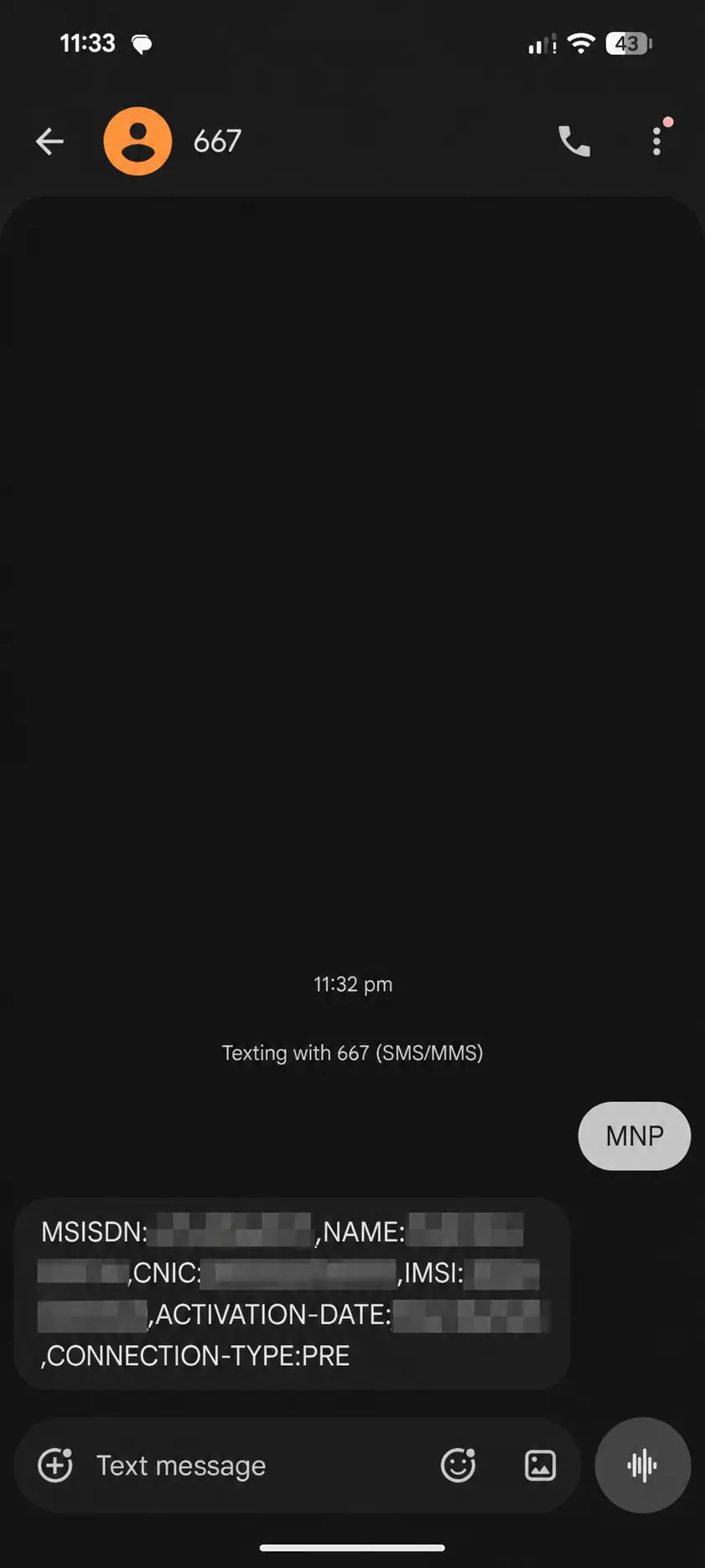
In our SIM owner details reply the name and the full CNIC sat there in clear text; nothing was masked. So handle that reply the way you would handle your CNIC card itself. Keep it private, and if you ever share a screenshot, cover the CNIC first. There is no address field in it, no call history and no list of your other SIMs. For the number of SIMs on your CNIC, use 668.
What the 667 message costs
Jazz prints Rs 2 plus tax per SMS in its port-in steps. Telenor’s undated sheet prints 2.39 including tax. PTA’s guidelines set no price, so one network’s figure doesn’t fix another’s, and Zong, Ufone and SCOM publish no price for it at all. Keep some balance, note it before and after you send, and ask your operator if the charge matters to you. We haven’t tested the billing ourselves.
No reply, or a name that is not yours
- No reply. Check three things: that the message said MNP, that it went to 667, and that it left from the right SIM with some balance on it. PTA’s guidelines mention 15 minutes, but that figure is for the companies handling a port, not a promise to you. If nothing arrives after a fair wait, call your operator’s helpline from the network support list.
- The reply looks slightly off. A spelling that differs from your card, a message that got cut off, or an activation date older than you remember: none of that, on its own, proves the SIM owner details belong to someone else. Ask your operator first, then act.
- The name or CNIC is not yours. The SIM may be in a relative’s name, or in a stranger’s. PTA says using a SIM registered in another person’s name is against the rules, and the registered person stays responsible for it. Either bring it into your own name with an ownership transfer, or, if you never agreed to that registration in the first place, report it.
- A field is wrong in your own record. Follow the correction steps and hold on to the dated reply.
I sent MNP to 667 from my own SIM on [date]. The MSISDN field matches my number, but the [NAME or CNIC] field does not match my records. Could you check the registration and tell me how I can get it corrected?
Does the SIM owner details reply show the whole registration record?
No. The SIM owner details reply shows the six fields above and nothing more. The operator may hold other information, such as the address on your subscriber form, but the SMS doesn’t return it, and a missing field is no proof that the operator holds no such record. If you need something the reply leaves out, ask the operator through its official process. Don’t buy a private “full report” to fill the gap; it can neither change nor prove the operator’s record.
SIM information with a number: what 667 can and cannot do
When people search “SIM information with number” or “SIM number details”, they usually mean one of two things. Is it the number in your own phone? Then 667 gives you the full SIM owner details. Someone else’s number? Then 667 cannot help, because the message carries no number and works only for the SIM that sends it. For another number, the only official information is its network; for an unwanted caller, use the reporting steps.
For Onic, read the 11 September 2026 order before you treat an older port-in guide as current. We haven’t confirmed 667 from an Onic SIM. Onic is a PTML (Ufone) brand, so ask Ufone support, or check again once your number has moved to PTML.
Sources: PTA MNP Porting Process Guidelines; the Jazz, Ufone and Onic port-in pages; Telenor’s self-service sheet; our own 667 reply of 8 October 2026. We checked the sources between 5 and 10 October 2026 and re-read Jazz’s FAQ on 11 October 2026.
SIM Owner Details by CNIC: Pakistan’s 668 Check Counts the SIMs on Your CNIC
For a CNIC SIM check, text your own 13-digit CNIC number, no dashes, to 668. Back comes a count of your SIMs under JAZZ, TELENOR, UFONE, WARID and ZONG, plus a total; eight SIMs per CNIC is the limit. Phone numbers and SIM owner details are never listed. Spot an extra SIM you do not recognise? Go to that operator’s service centre.
A CNIC SIM check is the other half of SIM owner details in Pakistan: it tells you how many SIMs are registered on your ID card. Send your own CNIC number to short code 668 and one reply comes back with a count under each network name. PTA runs the service, and it’s the first thing to do if you suspect a SIM was taken out in your name. The reply is a count and nothing else: it never lists the phone numbers or the SIM owner details of each line. A “check CNIC” or “SIM registered on my CNIC” search means this count.
CNIC SIM check by SMS: send your CNIC to 668
- Open a new text message; this one is a text you send, not a code you dial, which is easy to mix up.
- In the recipient field, type
668. - Now your own CNIC number, all 13 digits of it, without dashes and nothing else in the message.
- Read the digits back against your card before you press send.
- Read the reply and save it with today’s date on it.
What you send is the CNIC number, not your mobile number and not the word MNP. MNP belongs to the 667 SIM owner details check. PTA’s notices say charges may apply, so keep some balance on the SIM. If you can’t send a text, use the online form; it gives the same count.
How to read the 668 reply (a count, not SIM owner details)
The whole reply is one message. Our own reply of 8 October 2026 was laid out like this, where n stands for a count:
- Five network names appear, and always in the same order: JAZZ, TELENOR, UFONE, WARID, ZONG.
- Against each name sit two counts, like
JAZZ:n,n. The first is SIMs for calls and internet (voice + data); the second is internet-only (data) SIMs. - A network where you have no SIMs is still listed, with zeros.
- The TOTAL line gives your total, then the same two kinds in brackets:
TOTAL:n(nVoice+Data,nDataSIMs). - The last line asks you to visit the concerned customer service centre for any correction.
Our own 668 reply, personal values hidden
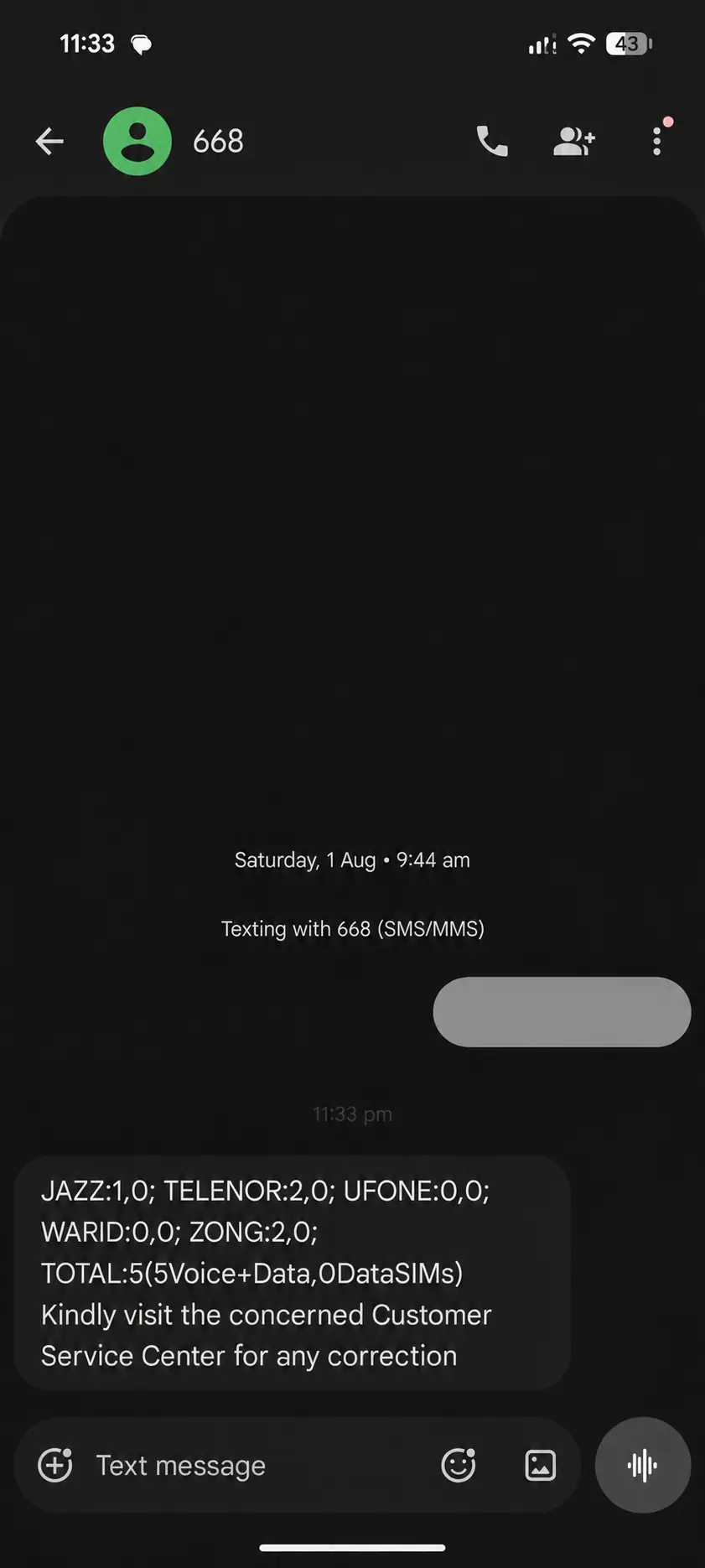
Read the TOTAL as exactly that, a total. It is a count of SIMs, not a list of SIM owner details, and the counts under each network are already inside it, so don’t add them on again. The reply has a WARID line but none for Onic or SCOM, and no official text says where an Onic or SCOM SIM is counted. Claims that 668 “covers all six networks” don’t match the reply.
How many SIMs can one ID card (CNIC) have? The limit is eight
One CNIC may hold up to eight SIMs for personal use, counted across all networks: five voice SIMs (calls and internet) and three data-only SIMs. PTA gives those figures in its FAQ, and the limit itself sits in regulation 7 of PTA’s SIM rules (the Subscribers Antecedents Verification Regulations, 2015). An eSIM counts like any other SIM. Foreign ID holders get the same eight, and only corporate customers may hold more.
So five voice SIMs is the voice limit even when your total is still under eight: a sixth voice SIM is over the limit, though a data SIM may still be possible. Before any sale, Zong’s and Ufone’s terms say the seller checks how many SIMs your CNIC already carries.
PTA’s FAQ and SIM rules still gave this limit when we read them on 19 November 2026. By then a cut of the voice part from five to three had only been reported, as something PTA was thinking about. The section on SIM rule changes, further down this page, explains the report.
| Year | Limit per CNIC | Source |
|---|---|---|
| 2008 | Ten mobile connections | PTA policy at the time |
| April 2014 | Five SIMs across all companies | Government answer printed for the Senate meeting of 17 April 2014 |
| 2015 | Five | PTA’s SIM regulations as first issued |
| 17 November 2017 | Eight, of which three data-only | Amendment to regulation 7, still in force |
The claim that PTA cut the limit to six in December 2025 is simply wrong: regulation 7 was last changed in 2017, and PTA’s FAQ still says eight. Nor do PTA’s rules say that SIMs above the limit get blocked automatically. If your count is higher than you expected, act on the SIMs you don’t recognise yourself.
Compare the count with the SIMs you remember
Start by writing down every SIM you can account for. The one in your phone, obviously, but also spare cards in a drawer, a SIM in a tablet, router or Wi-Fi device, an eSIM, and any SIM you registered for a family member. Then compare. Say you remember one Jazz SIM and one Zong SIM, but the reply shows three on Jazz and one on Zong. Those two extra Jazz entries need explaining. The count alone can’t tell you whether they’re forgotten SIMs or someone else’s registrations; for the SIM owner details of each line you have to ask the operator.
| Network | Count in the reply | SIMs you can explain | Question to resolve |
|---|---|---|---|
| Jazz | 3 | 1 | What are the other two registrations? |
| Zong | 1 | 1 | Nothing to explain. |
Note the date, the method and the count, leave unknown entries as unknown, and never guess the SIM owner details behind an entry. Don’t guess a number either, and don’t call a difference “fraud” before the network has looked into it. If the difference stays, follow the steps for a SIM that is not yours. If nothing came back at all, use the failed-check help; silence is not the same as zero SIMs.
Because the check shows no numbers, the same total can hide two problems at once: a SIM you don’t know may be on your CNIC while one of your own SIMs sits on someone else’s. If one SIM worries you, read its SIM owner details with 667 from that SIM.
Which mobile numbers are on my CNIC? A count, not a list
Neither 668 nor the online form lists the numbers behind the count, or their SIM owner details. The mobile company named in the reply is the one to ask. An early PTA notice on 668 said people could visit the company’s service centre for help with the numbers. PTA doesn’t promise that the company will show you more than the count, though, and no official text promises a printed list or a certificate of your numbers.
So a “CNIC se mobile number”, CNIC mobile number check or find-SIM-number-by-CNIC request really has two parts: run the count first, then ask the network at its service centre. While you’re there you can also have a SIM you don’t recognise blocked and removed. For someone else’s CNIC there is no official check at all; PTA describes 668 as a check of your own CNIC.
What happens to a SIM you stop using, and to its SIM owner details
PTA changed its rules on unused SIMs on 31 December 2025. After 180 days in a row with no use, a company may temporarily suspend the SIM, switching it off for a while, with notice. For the next 180 days nobody else can get that number, and the company has to message you before it goes to a new customer.
A switched-off SIM can be switched on again before it is cut off for good; the rule sets no fee and no number of days for that, so ask your company. If you are going away for a long stretch, write to your company before you leave and give the reason, travel for instance, so that the number is kept in safe custody.
Can you print the reply or use it as proof? You can keep the text or a screenshot as your own record, but PTA hasn’t said it counts as proof for a bank, the police or a court, so ask the office concerned what it accepts.
Sources: PTA’s FAQ on the SIM count and the SIM limit; PTA’s SIM regulations as updated to 11 September 2026; PTA notices of November 2023 and 31 December 2025; our own 668 reply of 8 October 2026. We checked the sources between 5 and 10 October 2026, re-read PTA’s SIM-limit FAQ on 11 October 2026, and read the FAQ and the SIM regulations again on 19 November 2026.
SIM Owner Details Online Check: PTA’s SIM Information System (cnic.sims.pk) Gives the Count
The SIM Information System at cnic.sims.pk is PTA’s online CNIC SIM check. On the CNIC tab, enter your own 13-digit CNIC, tick the Verify box and press Submit; the page shows the total SIMs registered on it. There is no login and no fee, and no box for a mobile number, because it gives a count, not SIM owner details or numbers.
What is the SIM Information System?
The SIM Information System is PTA’s public service for counting the SIMs registered on a CNIC. It began in October 2009 with the 668 SMS code and a web link; today the web form lives at cnic.sims.pk. Most people shorten the name to the SIM info system or the CNIC SIM information system. Whatever you call it, it does one job: it tells you the total number of SIMs on the identity you type in. That’s all. It is not a SIM owner details lookup. You get no list of numbers and no names, you cannot start from a mobile number, and nothing on your CNIC changes because you looked.
Whose system is it? PTA’s, not NADRA’s. NADRA issues the identity cards, and its own list of short codes does not include 668. At the top of the form you’ll see the letters PMD, the Pakistan MNP Database company; its role is explained in the SIM Information System guide linked above. You need no login, no account, no app and no one-time code to use it.
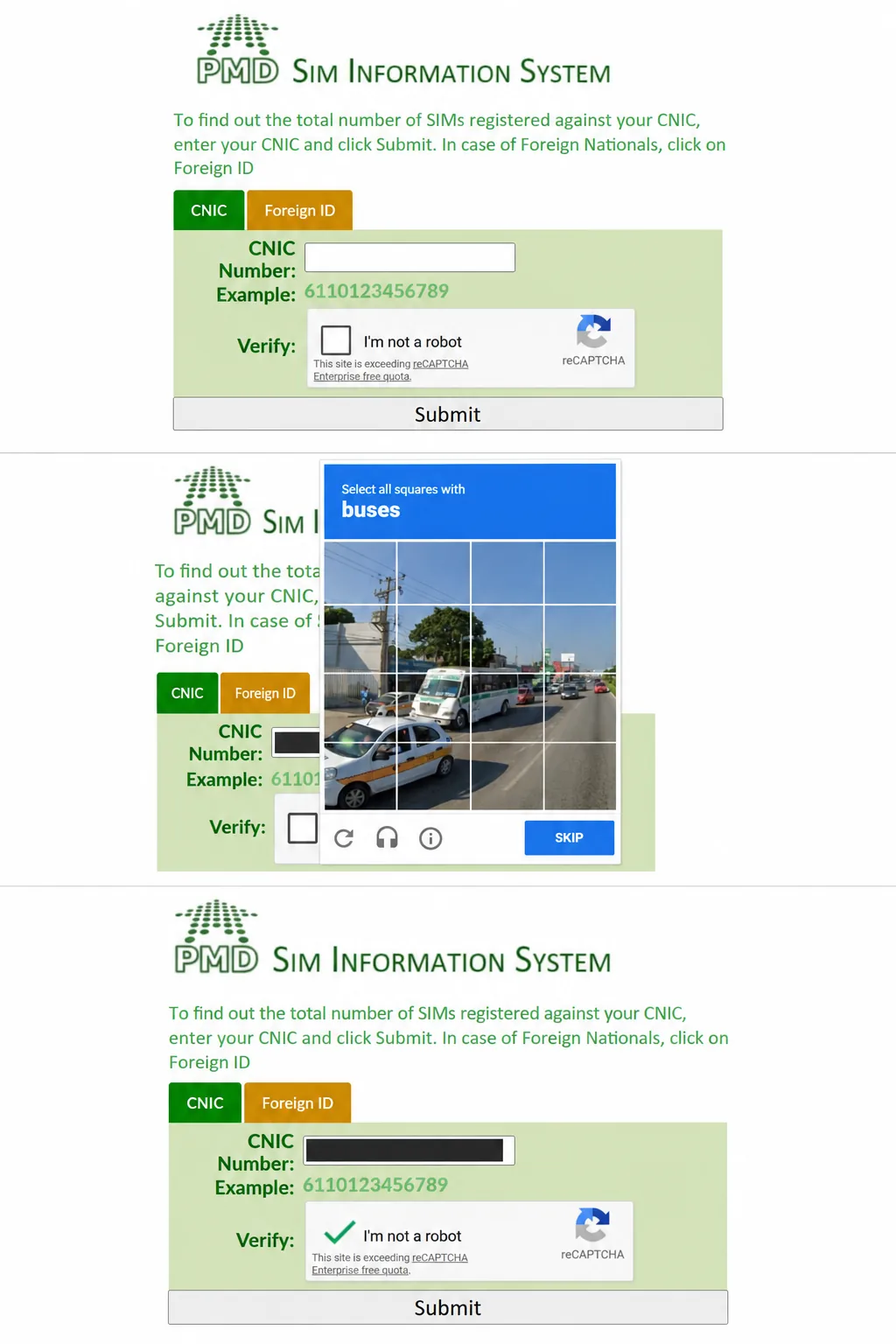
Online SIM check on cnic.sims.pk, step by step
- Type cnic.sims.pk into the address bar with your own fingers; a link that arrived in a message could just as easily lead to a look-alike site.
- Keep to the CNIC tab and put in your own 13 digits, no dashes, no spaces.
- Tick the Verify (reCAPTCHA) box; that is the form checking a real person is sitting there.
- Press Submit.
- Read the count and write it down with today’s date.
See the form’s on-screen steps
How to read the online result
The result comes back as a small table, as the reader-supplied example below shows: one row for each network, columns for Voice + Data SIMs and Data Only SIMs, and a Total SIMs line. In that example Telenor shows 1 and Zong shows 4, for a total of 5, and every other row shows zero. Those are the values from that one screenshot. They are not a limit and they are not your result; we haven’t yet run the online check on our own CNIC.
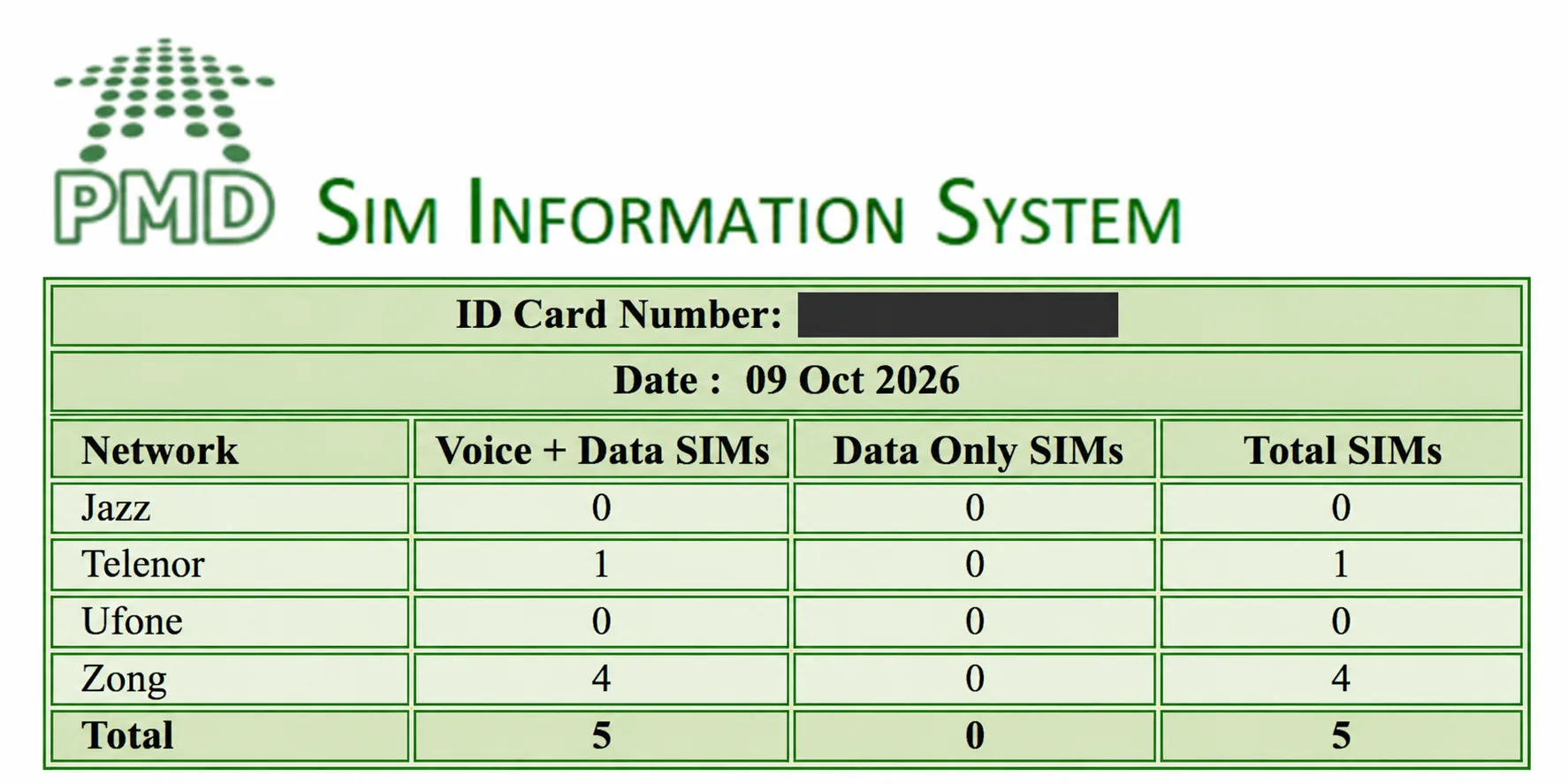
In the form’s own words, it gives you “the total number of SIMs registered against your CNIC”. No fee is shown and there is no payment box. If the SMS count and the web count don’t agree, nothing on your screen tells you which one is right. Save both and take them to the network’s customer service centre, which is what the 668 reply itself asks you to do.
The official address, and how to spot a look-alike
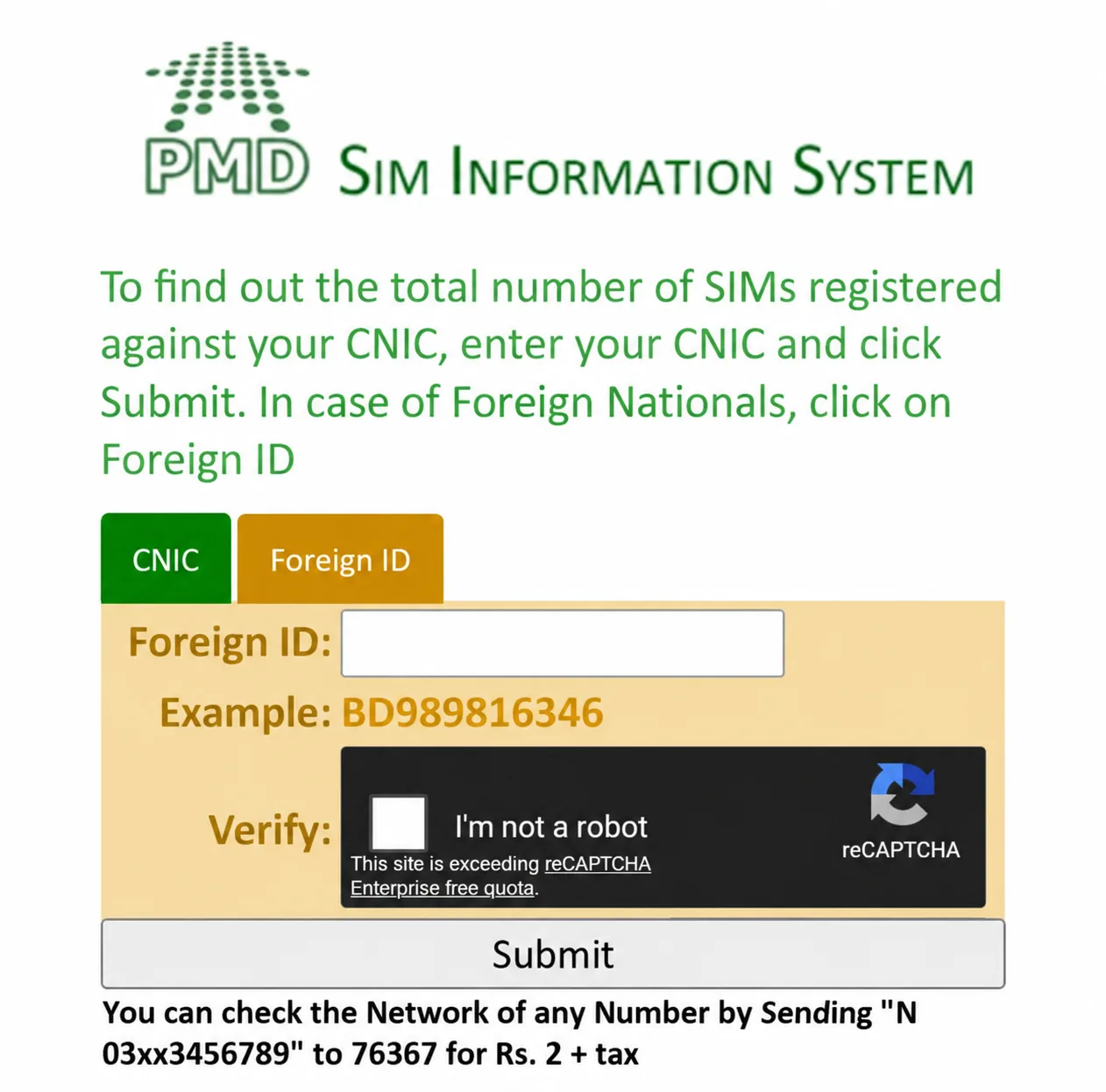
The official website is cnic.sims.pk and the official code is 668. If you want to confirm the address, PTA’s own site, pta.gov.pk, lists it under “Biometric Verification” and again in the “SIM(s) Information” FAQ. Read the whole address, not just the end: it must have “cnic.” right before “sims.pk”. The real form has one box for a 13-digit CNIC, a Foreign ID tab, a Submit button and a reCAPTCHA box. It has no SIM owner details search. Any one of these signs means you’re not on the real form:
- The address is anything other than cnic.sims.pk, or it ends in .com.
- There is a box for a mobile number.
- You are asked to log in, install something, pay, or open a chat.
- The page promises names, addresses or a list of phone numbers.
- The page only “explains” the check, yet has its own box for your CNIC.
Back in December 2023 PTA warned about fake links going round by message, telling people to check their SIM count at the link. Stick to the official address and the short code. If you ever catch yourself searching for “SIM Information System login”, stop: the real system has no login and no SIM owner details search.
Foreign ID and NICOP
If you are a foreign national, use the form’s second tab, Foreign ID. Its box takes 3 to 50 letters or numbers. Enter the ID the SIM was registered on, then tick the box as before. PTA lists these documents for a foreign national’s SIM: a passport with a valid visa, a valid NARA ID, or a valid PoR card for an Afghan national. A NICOP holder can buy a SIM, but neither the Foreign ID tab nor the 668 instruction says a word about NICOP, so you can’t be sure the check will accept it.
See the Foreign ID tab
SIM owner details online check: count or registered name?
People who search for a SIM owner details online check usually want one of two things. If you want to know how many SIMs sit on your CNIC, this form is that online check. If you want your own SIM owner details, meaning the name your SIM is registered in, no online form gives you that; send MNP to 667 from the SIM instead. And if you want someone else’s details from their number, no website, official or private, can lawfully hand you that; read what a number can and cannot tell you.
Never type your CNIC into any site or app that offers “SIM data” or SIM owner details, whatever address it uses. PTA says the check is for your own CNIC, but neither the form nor the SMS asks for any proof that the CNIC is yours. Your CNIC number is the only key, so keep it to yourself.
Keep a useful SIM owner details check note
A short private note is all you need: date → method → result → entry to investigate. Add a line for any SIM you bought, returned or transferred between one check and the next. If the page does not open, note the error and send the SMS instead; see check problems and fixes. If you’re outside Pakistan, try the website first. A PTA notice from the service’s launch said the web link can be used from outside the country, but nothing on cnic.sims.pk today says so, and we haven’t tested it.
Sources: cnic.sims.pk form text; PTA FAQ “SIM(s) Information”; PTA “Biometric Verification” page; PTA notice of 22 December 2023. We checked the sources between 5 and 10 October 2026 and re-read cnic.sims.pk on 11 October 2026. At no point did we enter anyone else’s identity.
SIM Number Check: Find the Mobile Number of a SIM You Hold
To find your own SIM’s number, dial *99# on Jazz, send MYNO to 777 or dial *8# on Zong, or send MNP to 667 on Jazz, Zong, Ufone, Telenor or Onic and read the MSISDN field. The old trick still works too: call another phone and read the number off its screen. The number itself says nothing about the SIM owner details.
It happens more often than you would think: a SIM in your hand and no idea what its phone number is. A spare card you kept, a SIM passed down in the family, the SIM inside a Wi-Fi device. A SIM number check, or SIM number check code, finds that number. It’s a different question from the SIM owner details, which is about whose name the SIM is in; for that, send MNP to 667. The SIM owner details reply from 667 happens to start with your number, though, so it doubles as a number check on any network that supports 667 (not documented for SCOM).
Find your own number on Jazz, Zong, Ufone, Telenor, SCOM or Onic
| Connection | How to see your number | Note |
|---|---|---|
| Jazz phone SIM | Dial *99# from the Jazz SIM; Jazz’s self-service dial codes page lists it. | Jazz does not say whether it charges. |
| Zong phone SIM | Zong’s self-care page gives two options: text MYNO to 777, or dial *8#. | Zong does not say whether it charges. We re-read the page live on 26 October 2026. |
| Ufone phone SIM | Ufone publishes no code (re-checked on 26 October 2026). Look at your SIM pack or account, or ask support on 333 from a Ufone SIM or on 033-11-333-100. | Expect support to ask you identity questions. |
| Telenor phone SIM | Telenor’s self-service sheet, which carries no date, lists *710# with an Own Number Status option, and an SMS to 7421 for “SIM Number/CLI”, with no keyword and no charge stated. The 667 reply shows the number as well. | Because the sheet is undated, the menu may have changed since Telenor joined PTML. |
| Onic (existing account) | Open the Onic app while signed in; the guide says your number sits at the top of the home screen. | Existing customers only; see the September 2026 order. |
| SCOM (SCO) phone SIM | SCOM publishes no code (re-checked on 26 October 2026). Go by your own records or ask SCO support. | Do not try another network’s code on a SCOM SIM. |
| Zong MBB data SIM | Read the pack, or follow the MBB steps below. | This gives you the broadband line’s number, not a name. |
Two ways need no code at all. Call or text a phone sitting next to you and read your number off its screen. Your phone’s own SIM settings sometimes show the number too. What does not exist is a free, zero-balance or universal code that works on every network.
Find a Zong mobile broadband (MBB) number
MBB means mobile broadband: the SIM inside a Wi-Fi or USB internet device. Zong’s MBB guidance gives these ways to work out which line you have:
- Read the MBB number off its SIM holder or pack.
- Connect to your own MBB device, open its settings page at
192.168.8.1in a browser, and choose Show my MBB Number. - From the Zong master number linked to the account, dial
*6767#, pick Show MBB Number, and the number arrives by SMS. - Put the MBB SIM into a handset, dial
*8#, then put it back in the device.
The master number is the Zong number that was linked to manage that MBB account. Lost the jacket, and none of these worked? Zong says to take the device to a Zong service centre or franchise, or to call 310 from a Zong line. Everything here identifies a broadband line, mind you; nothing here shows the SIM owner details.
Two SIMs: select the right line first
With two SIMs in the phone, choose which SIM you mean before you dial, text or call. Then compare what comes back with the pack or the account record, and label the SIM somewhere private. A name typed into your phone’s SIM settings is only a label that you or someone else chose; it says nothing about the SIM owner details.
A mobile number is what people dial. The SIM card number (ICCID) identifies the card itself, and the registered name lives in the operator’s record. For the SIM owner details, use the own-SIM check; for the card numbers, see SIM information explained.
How do I find my SIM’s mobile number quickly?
Start with your own pack or account record, then try the network code above, then fall back on calling another phone. On a dual-SIM phone, make sure you’ve selected the line you mean. Finding the number doesn’t confirm the SIM owner details; for that you need the 667 reply, which shows both the number and the name.
Sources: Jazz self-service dial codes page; Zong customer self-care page and Zong MBB FAQs; Telenor self-service sheet (undated); Ufone support pages; SCO website; Onic own-number guide updated 9 September 2026. We checked the sources between 5 and 10 October 2026 and re-read the Jazz, Zong, Ufone and SCO pages and the Telenor sheet on 26 October 2026.
Check a SIM by Number: Which Network a Mobile Number Uses (76367)
To check which network a mobile number uses, send N, a space and the number to 76367. PTA’s SIM check page lists this SMS at Rs 2 plus tax. The reply names the network and nothing else: no SIM owner details, no CNIC, no address, no location. Do not trust the prefix instead, because a ported number keeps its digits.
If you want to check a SIM by number, the only thing any official service will tell you is the network of a number, meaning the company that serves it today. PTA’s own SIM check page, cnic.sims.pk, lists a paid SMS for exactly that. The page promises nothing more: no SIM owner details, no CNIC, no address and no location.
What is 76367 used for? The network of a number
- Start a new SMS, with
76367as the recipient. - In the message, type the letter
N, then one space, then the full 11-digit mobile number, which gives you something likeN 03XXXXXXXXX. Each X here stands for one digit; you do not send any letter X. - Look over the number and the charge, then send.
- The reply gives you the network name.
The page prints the charge as Rs. 2 + tax, which means the tax is added on top. That was still the price when we re-read the page on 11 October 2026; prices do change, so glance at the page before you send. The note about this SMS sits under the form’s Foreign ID tab and says you can check the network of any mobile number this way. We have not sent our own test message to 76367.
Why the first digits do not settle the network
Thanks to MNP (number portability), a mobile number can move from one network to another and keep every one of its digits. A prefix such as 0300 or 0333 therefore tells you only which company was first handed that block of numbers; it says nothing about who serves the number now. When the current network matters, send the SMS. The prefix reference lists the codes PTA gave each company in 2008 and the ranges the operators sell today.
Knowing a number’s network is not the same as knowing the SIM owner details, and it doesn’t tell you who made a call. For your own SIM owner details, read the 667 check. For the SIMs on your CNIC, use 668. If an unwanted caller is the problem, follow the reporting steps; you report to your own operator, so you don’t even need the caller’s network first.
Old Telenor, Ufone and Onic numbers
PTCL bought Telenor Pakistan on 31 December 2025 and joined it with Ufone under PTML. Onic is PTML’s digital brand, and PTA stopped new Onic sales on 11 September 2026. No official page says what name the network SMS now returns for an old Telenor or Onic number, so take the reply as the operator gives it. See what changed for your SIM.
A prefix is a clue; the SMS is the answer. Neither gives you SIM owner details. See the network-prefix reference for the listed codes and for how a Pakistani number is put together.
Source: cnic.sims.pk, text under the Foreign ID tab, re-read 11 October 2026.
SIM Information Explained: SIM Details Online Check, ICCID, IMSI, IMEI and the Registered Name
SIM information means one of two things: the SIM owner details the operator holds, or the numbers on the card itself. The ICCID identifies the card, the IMSI the subscription inside the network, and the MSISDN is the mobile number people dial. Your phone has the IMEI. The registered name is not on the card; it sits in the operator’s record.
What do SIM info, SIM information, SIM details and SIM card details mean?
SIM stands for Subscriber Identity Module, the card or built-in profile that identifies your line to the network. In Pakistan, SIM information nearly always means the SIM owner details of a SIM, that is, the person and the identity document it is tied to. But it can also mean the numbers printed on or stored in the card, the mobile number, or the network.
People use SIM info, SIM details, SIM owner details and SIM card details for all of these; a search for SIM details online, SIM check details or a SIM information check means the same. So before you pick a check, decide which of those you actually need.
A SIM details online check, in the official sense, is the count at cnic.sims.pk and nothing more; the registered name comes only by text, from 667.
| Information | Meaning | Where to get it |
|---|---|---|
| Mobile number | The number people dial. In a technical reply it is labelled MSISDN. | Own-number methods, or the first field of the 667 SIM owner details reply. |
| Registered owner (SIM holder) | The person named in the operator’s registration record. | The 667 reply for your own SIM. If there is a mismatch, report the exact field to the network. |
| CNIC SIM count | How many SIMs are registered on one identity card. | 668 or cnic.sims.pk. Remember that a count is not a list of numbers. |
| Network | The company that serves the line today. | The 76367 SMS. |
| SIM card number (ICCID) | The card’s own serial number, printed on the plastic. | Read it off the card. It identifies the card, not a person. |
| IMSI | The subscription number inside the network; Ufone’s 667 guide calls this fourth field the “SIM Number”. | The IMSI field of the 667 reply. Technical only. |
| IMEI | The phone’s own 15-digit identity number. | Dial *#06#. It is used for device checks, not for SIM ownership. |
What does “SIM information with number” mean?
A search for SIM information with number starts from a mobile number. If the number is yours, the 667 reply gives you its full SIM owner details. If it isn’t yours, the only official information you can get is its network, from 76367. A caller-ID label, a CNIC count or a prefix will not identify the person behind a number. For “SIM info by CNIC”, the count methods tell you how many SIMs sit on your identity; for “SIM information by SIM number”, first decide whether you mean the card’s ICCID or the dialling number.
Where is the ICCID on a SIM card? ICCID, IMSI and MSISDN explained
A SIM carries its own numbers for SIM identification, quite separate from your mobile number. Printed on the card is the SIM identification number, the ICCID (integrated circuit card identifier), which the international standard ITU-T E.118 calls the serial number of the SIM. On an eSIM the same number identifies the downloaded profile. Not one of the numbers on the card leads to its SIM owner details, and no official check accepts a card number anyway.
| Number | Identifies | Where you see it | How it is built |
|---|---|---|---|
| ICCID | The SIM card or eSIM profile | Printed on the card | 19 digits in the 2025 edition of E.118. It starts with 89 (telecom), then comes a country code, an issuer number, the card’s own number and a check digit. Older cards may follow an older version of the standard. |
| IMSI | Your subscription in the network | The IMSI field of the 667 reply | Up to 15 digits. In Pakistan it starts with the mobile country code 410, then a network code from PTA, then the part your company assigns. You never dial it. |
| MSISDN | The line people call | First field of the 667 reply, or your own-number check | Country code 92, then a two-digit network code (30 to 36), then eight digits. Inside Pakistan a 0 stands in for 92, giving 11 digits. |
The standards keep IMSI and MSISDN apart: either one can change without the other, and neither changes the SIM owner details. The owner’s name and CNIC are not among the card’s numbers at all; they sit in the operator’s registration record. Software that reads SIM card details is reading the card in your hand, no more, so it cannot tell you the SIM owner details either.
Is a SIM ID number the same as a phone number?
No. A field labelled “SIM ID” or “SIM number” can mean the ICCID, the IMSI or the mobile number, depending on who wrote the form. Read the full label. If someone asks you for your “SIM ID”, ask them which number they mean. To find the number people dial, use the own-number methods; a long code off the card is not it.
PTA check (DIRBS): what the phone registration check is, and how it differs from my SIM check
DIRBS is PTA’s device system; it checks a phone by its IMEI and tells you whether the handset is PTA-approved, blocked or reported stolen. A CNIC SIM check counts the registrations on an identity card. To check a phone, text its IMEI to 8484, or use the DIRBS website or app; dialling *8484# shows how many phones are registered on your passport. Neither one shows SIM owner details.
Glossary: SIM owner details and related terms
- CNIC
- Computerised National Identity Card: the national ID card that NADRA issues. Its 13-digit number is the key the SIM count works from.
- USSD code and SMS short code
- A code you dial, such as *99#, is a USSD code. A number you send a text to, such as 668 or 667, is an SMS short code. You cannot swap one for the other.
- SVMS
- A name some websites give to a “subscriber verification” database supposedly behind the SIM checks. PTA’s public pages name only the SIM Information System (668 and cnic.sims.pk), so treat any “SVMS stores your data” claim as unverified.
- NADRA
- The National Database and Registration Authority. It issues identity cards and confirms who a buyer is when a SIM is sold.
- PTA
- The Pakistan Telecommunication Authority: the regulator that sets the rules for mobile companies and publishes the SIM Information System (668 and cnic.sims.pk).
- Operator
- Your mobile company: Jazz, Zong, Ufone, Telenor (now part of PTML), SCOM or Onic.
- SIM ownership
- The registered name the operator holds. Using or carrying a card does not change that name; only an ownership transfer does.
- MNP
- Mobile Number Portability, which means moving to another network while keeping your number.
- eSIM
- A SIM built into the phone and downloaded as a profile. Under PTA’s rules it counts as a SIM.
- MBB
- Mobile broadband: the SIM in a Wi-Fi or USB internet device.
- Biometric verification
- Checking a person’s identity against NADRA’s record by fingerprint whenever a SIM is sold, replaced, transferred or disowned.
- Subscriber record
- The operator’s SIM owner details for a SIM. A subscriber is the person who subscribes for a telecommunication service. The person holding the phone and the subscriber on the record can be two different people.
- Record mismatch
- A field in your own record that does not match your documents. Report the exact field to the operator.
- Port-in request
- A request to move your number to another network. Reading the 667 reply and completing a port are two separate steps.
- Disowning
- Asking the operator to take a SIM off your CNIC. A SIM you never took out is reported as fraud instead.
- Complaint reference
- The number your operator or PTA gives your complaint. Keep it; you will need it to follow up.
Is “SIM owner detail” or simownerdetails the same as SIM owner details?
Yes. SIM owner details refers to the registered name and CNIC behind one SIM, which only the 667 reply from that SIM shows. SIM owner detail, SIM owner details, SIM owner information and SIM holder details all point to the same person: the one named in the operator’s registration record. The joined spelling “simownerdetails” that turns up in some web addresses means the same thing and leads to no different check. When it is the registered name you want, the own-SIM method is the one; when it is a count, go with the CNIC method.
Sources: ITU-T E.118 (09/2025) and E.212 (06/2024); 3GPP TS 23.003; PTA porting guidelines; PTA FAQs; PTA DIRBS/DVS pages. We went through these between 5 and 10 October 2026.
So the SIM owner details look wrong, or the count does, or a line has gone dead. First find out which operator the SIM actually belongs to. Write down dates as you go. Then pick the route below that matches your problem, not the one that sounds quickest.
SIM Check Not Working? Fix a Failed 668, 667 or Online Check
When 668 stays silent, check the format and the balance, make sure you sent a text, then try the form at cnic.sims.pk. Form will not open? Send the SMS. A failed attempt is not a result; it does not mean zero SIMs or wrong SIM owner details. PTA has a complaint type for a count the operator will not fix.
When one official route for your SIM owner details or your SIM count goes quiet, switch to the other. If 668 sends nothing back, open the form at cnic.sims.pk, and if the form will not load, send the SMS instead. A failed attempt is not a result. It doesn’t mean you have zero SIMs, and it doesn’t mean your SIM owner details are wrong. All it means is that you have nothing yet. Look for your problem in the table below, then take the step beside it.
| What you see | Check first | What to do instead |
|---|---|---|
| No reply from 668 | Three things. Was the message your 13-digit CNIC with no dashes? Did it go to 668 as a text, not a call? And does the SIM have balance? | Use the online form. Check what the charge is before you send again. |
| The website will not open, or it shows a security warning | The address has to be exactly cnic.sims.pk. If the version with “www” gives a warning, try it without the “www”. Check that other sites open. | Send the SMS to 668. If the page dies before a count appears, you have no result. That is not the same as zero SIMs. |
| The form will not take your CNIC | The box wants 13 digits and nothing else: no dashes, no spaces. | Type it again that way, or fall back on the SMS. |
| A line under the Verify box says the site has passed its free limit | Whether a count still comes through. | If it does not, send the SMS to 668. |
| The SMS count and the online count differ | Compare the dates on the two results and note any SIM change that happened in between. | Keep both results. If they still disagree at your next check, take both to the network’s customer service centre. |
| The count looks out of date: a new SIM is missing, or a SIM you removed still shows | PTA does not say how quickly the count changes after a SIM is added or removed. PTA’s porting guidelines do say the 668 data is updated once a number move completes. | Check again in a few days. If it’s still wrong, complain to the operator; PTA’s complaint list has a type just for updating the 668 record. |
| 667 sends no useful SIM owner details reply | Which SIM sent the message (on a dual-SIM phone it is easy to pick the wrong one), whether the text said MNP, and whether that SIM has balance. | Give it a fair while, then call your operator with the date, the SIM you sent from and the exact reply or error. |
| 667 does not show a CNIC total | Whether what you wanted was the line’s record or a count. | Use 668 for the count. The two codes do different jobs. |
| The SIM owner details in the 667 reply look wrong | That the MSISDN field shows the SIM you actually sent from. | Keep the reply to yourself and follow the correction steps. |
| A recent change does not show yet | The date of the request, your receipt and the reference. | Use the reference to follow up and ask whether the change ever went through. |
If you are outside Pakistan: checks from abroad
Try the website first. Back in 2023 a PTA press release said the web link works from outside Pakistan. Nothing on cnic.sims.pk, and nothing about 668, says so today, and a roaming SMS may fail or cost you more than you expect. Note the error and the country you are in for the support request. A failed attempt from abroad gives you no count at all.
When the operator will not correct the count
Take it to PTA. Its list of complaint types has one called “Updating SIM Records Associated with CNIC (668 Database)”. File it through the PTA complaint system and attach your operator’s complaint number, both dated results and a list of the SIMs you do recognise. If neither 668 nor the form works at all, PTA’s toll-free helpline 0800-55055 is your next step.
Report a failed 667, 668 or online check to support
Before you contact support, write down the method, the date and time, the network, which SIM you used, whether the phone shows the message as sent, and the exact reply or error, word for word. A report that support can act on reads something like this: “I sent MNP to 667 from my Jazz SIM on [date and time]. The message was sent, but I received [no reply or error]. Please confirm the next step.” Check the charges before you repeat a paid message. If the count still has entries you can’t explain, carry on with the unknown-SIM steps.
Unknown SIM on Your CNIC: How to Get It Blocked and Removed
If your CNIC count shows a SIM you never took, its SIM owner details carry your CNIC without your consent. Take your CNIC to that operator’s customer service centre, report it as activated by fraud, and ask for it to be blocked and removed. The block must be immediate, the first removal is free, and you leave with a complaint number.
Somebody may have taken out a SIM on your CNIC without you knowing, so that your CNIC sits in its SIM owner details. PTA calls this an illegal SIM (its releases of 31 December 2025 and 19 March 2026 say “unauthorized SIMs”), and tells consumers to approach the operator at once and to report it on 0800-55055, at complaint.pta.gov.pk or in the CMS app. So if your 668 count shows more SIMs than you can explain, PTA’s advice is simple: go to that SIM’s mobile company straight away.
Once you report the SIM as activated by fraud, the company must block it. Getting it removed from your CNIC is a separate request, and you make it at the same visit. Whoever is named in the SIM owner details answers for what that SIM is used for, so don’t wait.
What should I do if an unknown SIM is registered on my CNIC? Six steps
- Keep the result. Save the 668 text or take a screenshot of the online count, date and all. Note which network shows the extra SIM; the reply lists the count company by company. The count does not give you the number, and you don’t need the number to complain.
- Check your own SIM owner details list first. Go through the spare phone, the old SIM packs in a drawer, any SIM in a router or Wi-Fi device, an eSIM, and every SIM you registered for a family member. Recent replacements, closures and transfers belong on the list too.
- Go in person to that company. Visit its customer service centre or an authorised franchise, and take your original CNIC. Removal from your CNIC happens only there, after biometric verification (a fingerprint check). An ordinary shop cannot do it, and neither can SMS, an app or a helpline. Where the unknown SIMs are spread across more than one company, each SIM gets reported to the company that issued it.
- Say what happened, in the right words. Tell them, in so many words, that the SIM was activated without your knowledge, and ask the company to block the SIM and take it off your CNIC. Call it a fraud claim, not an ordinary request to disown. Both routes take a SIM off your CNIC, but a different rule and a different charge apply to each.
- Ask for a complaint number and a finish time. The company must give you both before you leave the counter. PTA’s rules say an operator has to give every complaint its own number and tell you how long the fix will take, normally no more than three working days.
- Check again later and follow up. Run 668 again after a few days. If the SIM is still there, use the complaint number to ask what was actually done. If the company does nothing, take the complaint to PTA, which will ask you for that number.
What the rules say about a fraud SIM on your CNIC
PTA’s SIM regulations (regulation 12-A) say a SIM you report as activated by fraud must be blocked straight away, and PTA may direct the company to take it off your CNIC and correct the 668 record. A newer rule, regulation 12-B, in force from 11 September 2026 repeats the immediate block and goes a step further: the devices used to issue or activate such a SIM must be blocked by their IMEI numbers as well. The seller, not you, answers under PECA section 17 for issuing a SIM without the verification PTA requires.
The company may tell you the SIM was verified with your fingerprint. A fingerprint match on its own does not settle the matter. In July 2026 PTA issued an enforcement order against one mobile company in exactly this kind of case. Its point was that a match with NADRA’s data is not enough. The buyer has to come to an authorised sale point in person, and the fingerprint device has to be used lawfully. The company stays responsible for every SIM it sells, whatever way the sale was made.
Fraud claim or ordinary disowning: what the difference is
| Fraud claim (a SIM you never took) | Ordinary disowning (a SIM you no longer want) | |
|---|---|---|
| When to use it | Someone activated the SIM without your knowledge or agreement. | You took the SIM yourself and now want it off your CNIC. |
| Timing | Report it immediately. There is no waiting period. | Since 11 May 2026 a new SIM cannot be disowned during its first year. Once that year is up, the company must complete the request within 24 hours of your fingerprint match. PTA’s FAQ and Ufone’s terms still print the older 60-day wait, so expect to see both figures. |
| Charge | Free the first time, under PTA’s notice of November 2023, provided the SIM was put on your CNIC illegally. | Up to Rs 200 if you have had the SIM for under six months, under the same 2023 notice; PTA has not explained how this charge squares with the one-year bar. |
| Where | In person, at the company’s customer service centre or an authorised franchise, with your CNIC in hand and a fingerprint check. | |
Nothing in PTA’s texts says whether the one-year disowning rule holds up the removal of a fraud SIM. Say plainly that you never took the SIM, and ask for the fraud route by name.
Your fingerprint was checked but no SIM was handed to you
If a verification went through at a shop but you never got the SIM, write down the date of the visit, the company, and the outlet’s name and address. PTA asks for those details, plus your CNIC number, in a complaint. Use the PTA complaint route, because that SIM may already be live with your SIM owner details on it.
A clear SIM owner details complaint message
I checked my own CNIC SIM count on [date] using [668 or cnic.sims.pk]. It shows [network and count]. I recognise [known count] SIMs on that network. I did not take out the other [number] SIM(s) and I do not know their numbers. Please block them, remove them from my CNIC, and give me a complaint number and the date by which this will be done.
Can I remove a SIM from my CNIC while abroad?
Not through the mobile company. Removal needs you at the counter in person for a fingerprint check, and PTA’s pages describe no online route and no way to send someone in your place. What you can still do is complain to PTA online, through its app or by phone; one of its complaint types covers the use of a CNIC to activate a SIM without permission. Get the company’s complaint number first, over its helpline, then file with PTA. A PTA release at the system’s launch said it can be used from outside the country.
If the SIM is a Telenor or Onic one, it now sits with PTML, the company that also runs Ufone, so ask which PTML centre handles your number before you travel. For the next stage of any complaint, use the evidence and follow-up checklist.
Sources: PTA SIM regulations updated to 11 September 2026; PTA notices of 10 November 2023 and 31 December 2025; PTA gazette notification of 11 May 2026 (announced on PTA’s X account on 24 May 2026); PTA enforcement order of July 2026 (saved copy); PTA consumer complaint pages. We checked these sources between 5 and 10 October 2026.
SIM Registration and Verification Status: Check and Correct Your Own SIM Owner Details
A SIM counts as verified when the seller checked you against NADRA by fingerprint. PTA’s page lists the status codes: CNIC to 6001 on Jazz, any SMS to 7751 on Telenor, V to 7911 on Zong, *336# on Ufone. To correct your own SIM owner details, go to the operator’s service centre; a SIM in someone else’s name needs an ownership transfer.
A SIM is registered when its operator holds SIM owner details for it. It is verified when the seller checked the buyer against NADRA’s data at the time of the sale, usually by fingerprint. People say “SIM registration check”, check SIM registration or “CNIC SIM verification” and mean three different things by them: the SIM count, whether one particular SIM is verified, and NADRA’s check of the identity card itself. None of those is the SIM owner details check; that one is 667. This section deals with the second, and with how to correct your own SIM owner details.
How do I check my own SIM owner details?
Send MNP to 667 from the SIM itself. The NAME and CNIC fields in the reply are the registration. In Roman Urdu, “sim kis ke naam par hai?” asks exactly this question. Compare the reply against your own documents rather than the name saved in your phone’s contacts, which proves nothing. Should a field be wrong, note the date and the exact field before you go anywhere near the operator.
Is my SIM verified? How to verify, and the BVS registration status codes PTA lists
PTA’s page “How to Check Verification Status of Your SIM/CNIC” gives one code per company, and you use it from the SIM itself:
| Company (name on PTA’s page) | What to do from the SIM |
|---|---|
| Jazz (Mobilink) | SMS your CNIC number to 6001. The SIM has to be on that same CNIC. |
| Telenor | Send any SMS at all to 7751. |
| Zong (CMPak) | SMS the letter V to 7911. PTA marks this one free of charge. |
| Ufone | Dial *336# and press 1 in the menu that opens. |
That page of PTA’s carries no date and uses old names such as Mobilink. It still listed these codes when we re-read it on 11 October 2026, along with an old Warid code (CNIC to 789) from the days before Warid merged into Jazz. Jazz, Zong and Ufone don’t list these codes on their own pages, and with Telenor now part of PTML, any one of them may well have stopped working. If a code gives you nothing, ask your operator about the status of that SIM. If a SIM turns out not to be verified, have it verified again at the company’s authorised outlet.
Biometric verification: what happens at the counter
PTA lists six SIM tasks that use the fingerprint match: a new SIM, a duplicate SIM for your number, an ownership transfer, moving your number to another company, re-verification, and disowning. Its guidance describes an authorised outlet with an MBVS scanner and an authorisation card or letter, and it puts a maximum of two successful finger or thumb scans on one SIM transaction. Since December 2022 the system itself picks which fingers to scan, not the person behind the counter. Never give fingerprints on paper, or for a prize or a gift; PTA says no such scheme needs a fingerprint.
If your fingerprints will not match, keep the exact error and tell support before you travel anywhere. For an expired or renewed CNIC, NADRA deals with the card, and the operator deals with its SIM record. PTA says people who cannot complete biometric verification because of old age or amputation can be served by administrative verification at service centres and selected franchises. Bring the original CNIC.
How to register a SIM on your CNIC
Go in person to an authorised outlet. PTA’s FAQ names four kinds: customer service centres, franchises, registered shops and temporary sale points. Give your 13-digit CNIC number; PTA says the number alone is enough and you don’t need the card or a photocopy. The seller first checks that your CNIC is still under the eight-SIM limit, and only then takes the fingerprint match.
A SIM can be bought on a valid CNIC, NICOP or SNIC, while foreign nationals use a passport with a visa, a NARA ID or a PoR card. Someone under 18 can get a SIM provided NADRA holds their biometric record and the check goes through, though PTA says nothing about which document they need or whether a parent has to come along, so ask the centre.
- Since 11 May 2026, selling, issuing, activating or re-issuing a SIM between midnight and 6 a.m. has not been allowed.
- PTA’s notice of January 2024 set a seven-day wait before another new SIM can be issued on the same CNIC. PTA’s FAQ gives eight hours for a duplicate, an ownership transfer or a port, and it still prints eight hours for new SIMs as well, so ask the outlet which wait applies to you.
- A SIM that NADRA has verified must be activated within 24 hours of your request.
- If you use a SIM that is in someone else’s name, you don’t register it again; what changes is its owner. See how to put a SIM in your own name.
What an expired, cancelled or deceased holder’s CNIC does to the SIMs
Under PTA’s rules as changed in 2026, NADRA tells the operators when one of three things happens to a CNIC:
- The CNIC expires. You get a warning 30 days ahead. After that, outgoing services such as the calls you make stop until you renew the card. Service comes back when either NADRA or you tell the company the card has been renewed, whichever happens first.
- The CNIC is cancelled or taken away. The SIM is blocked within five days, unless NADRA reports a change in that time.
- The holder dies. On a deceased person’s CNIC, the operator texts the numbers and asks for the SIMs to be moved into a new name within 60 days. If that is not done, the SIMs are blocked. Only a blood relative or the spouse can take them over.
These are not small numbers. PTA’s Annual Report 2025, covering July 2024 to June 2025, puts the SIMs blocked on the CNICs of people who had died at more than 3.2 million, with another 783,000 on expired CNICs and 69,000 on cancelled ones. NADRA, for its part, said in April 2026 that about 4.5 million cards due for renewal were still carrying more than 8.1 million active SIMs. So keep your CNIC valid. Some websites claim unverified SIMs are blocked in stages after 30, 60 or 120 days; PTA’s rules contain no such timetable.
Does a working SIM mean its registration is correct?
No. A SIM can make calls and receive codes all day while its SIM owner details name somebody else. Does the service work, what do the SIM owner details say, and is the SIM verified: three separate questions, with three separate answers. When support uses a word like unverified, blocked or “record mismatch”, write it down exactly as said, ask which field or check it refers to, and be clear about whether a replacement, a transfer or a correction is what you are after.
Correct your own record: three cases
Case A: the SIM owner details show someone else’s name. What you need is an ownership transfer. Both people go together, in person, to the company’s service centre or an authorised franchise, both carry their CNICs, and both give fingerprints. The full rules, the timings and the special routes for an owner who is abroad or has died are in the ownership-transfer section.
Case B: the SIM owner details are yours, but the name or CNIC is wrong or out of date. Go to your operator’s service centre or a NADRA centre; PTA’s rules send people there when their details don’t match NADRA’s data. Ask what to bring. No official page sets out the exact correction steps, so get the operator’s own list. Before you go, have the affected number to hand, along with the date of your 667 check, the exact field that is wrong and what you want done about it.
Case C: your number was put in another person’s name without your agreement. Tell your operator at once that you never agreed; this counts as a dispute. Jazz’s FAQ says it accepts such a dispute only within 30 days of the change, so don’t sit on it. You can also complain to PTA under the type “Unauthorized Transfer of Connection/Ownership”. Ufone’s dispute procedure asks the parties to bring original proof documents, including the Computerized Subscriber Antecedent Form (CSAF), to a service centre; if a number was ported into Ufone without permission, register the complaint with the previous operator first.
Once it is done, send MNP to 667 again from the SIM and keep the new SIM owner details reply, date and all. Phone approval (DIRBS) is about the handset; it does not change the registered SIM owner. For an overseas registered person, a business SIM or a deceased relative, see special cases.
Sources: PTA pages on verification status (undated) and biometric verification; PTA SIM(s) Information FAQ; PTA SIM regulations updated to 11 September 2026; PTA Annual Report 2025; NADRA release of 9 April 2026; Jazz FAQs; Ufone Code of Commercial Practice. We checked these between 5 and 10 October 2026, and went back to PTA’s verification-status and biometric pages on 11 October 2026.
Help With Your Own SIM by Network: Jazz, Ufone, Telenor, SCOM, Onic and Zong SIM Owner Details
Problems with your SIM owner details go to your own operator, called from your own SIM: Jazz 111 or 777, Zong 310, Ufone 333, SCOM 355, Telenor 345. The operator must give your complaint its own number and fix it within three working days. Telenor lines are now PTML lines, and since PTA’s September 2026 order Onic serves existing customers only.
Your mobile company is the one that holds your SIM owner details, so it’s the first place to go when the name is wrong, a SIM you don’t recognise shows up, your SIM is lost, or a check fails. PTA’s rules make every operator run a complaint helpline day and night, give each complaint its own number, and tell you how long the fix will take, which is normally three working days at most. Make the call from your own SIM, spell out what you need done, and get the complaint number written down before the call ends.
| Network | Helpline from that SIM | Other published routes | Note |
|---|---|---|---|
| Jazz | 111 prepaid, 777 postpaid | Complaints through the SIMOSA app; WhatsApp 0300-3008000; 111 to block a stolen SIM (*8822# restores a deactivated number); 111 300 300 with a city code if you are calling from another network | Jazz’s FAQ says the complaint ID comes by SMS. |
| Zong | 310 | UAN (051) 111-222-111; online complaint form | Rs 2 plus tax each time a call is put through to a service officer; calls to the UAN cost normal package rates. |
| Ufone | 333 | 033-11-333-100; service centres for disputes | An ownership dispute means a visit with original documents, including the CSAF. |
| Telenor (now PTML) | 345 | Telenor’s website and account support | The 345 line comes from Telenor’s undated code sheet, so confirm the current route now that the merger has gone through. |
| SCOM (SCO) | 355 | SCO’s website and service centres in AJK and Gilgit-Baltistan | Say which region you are in and which service you mean. |
| Onic (existing accounts) | In-app chat | 051-111-339-111; happiness@onic.pk | New sales stopped on 11 September 2026; ask which PTML team now looks after your number. |
Jazz: check, compare and correct your record
On your own Jazz number, *99# shows you the number itself, and MNP sent to 667 brings back your SIM owner details. For a CNIC count, use 668. If the name is wrong, a SIM turns up that you cannot explain, or a check fails, open SIMOSA, go to Support, submit a complaint, pick the issue and describe what doesn’t match. The complaint ID arrives by SMS; keep it.
For a stolen SIM, Jazz lists 111 from any Jazz number, WhatsApp, its app or a franchise, free and immediate; *8822# restores a deactivated number. Jazz’s privacy notice (October 2026) also offered Sensitive Tagging at an Experience Center. It stops any action on your number at franchises and shops, though it can’t stop someone getting a new SIM on your CNIC somewhere else.
PTA’s table for August 2026 lists Jazz at 76,303,155 subscribers, the largest network in the country. PTA table and reporting date.
Zong: your own SIM’s record
Zong SIM owner details are read from the Zong SIM itself, by sending MNP to 667 from it; no Zong channel gives them for someone else’s number.
An MBB device has its own number steps. A wrong name, a transfer or a dispute starts on 310 from your Zong SIM, the UAN or Zong’s online complaint form; keep the reference you are given.
PTA has Zong at 56,651,585 subscribers for August 2026. PTA table and reporting date.
Ufone: read the reply and handle a dispute
Ufone’s porting page describes the 667 SIM owner details reply as mobile number, name, CNIC and SIM number. Read your SIM owner details for your own line and leave it there; don’t forward the reply unless you actually want to change networks. For an error, call 333 from Ufone or 033-11-333-100. For a disputed registration, Ufone’s commercial practice code sends both parties to a service centre with original documents, including the CSAF, so confirm the list before you go. If a number was ported into Ufone without your permission, complain to the previous operator first.
PTA records 31,789,597 subscribers under Ufone for August 2026, with Telenor counted separately. PTA table and reporting date.
Telenor: the line is now a PTML line
On 31 December 2025 Telenor Pakistan was sold to PTCL, and it has since been merged into PTML, the company that runs Ufone, under a scheme the Islamabad High Court approved on 30 June 2026 and PTCL announced on 1 July 2026. None of that moved your SIM owner details anywhere. The registration is the same as before, the 668 count was still showing a TELENOR line in October 2026, and should 667 give no reply from a Telenor SIM, PTML support is the place to ask.
For a correction, a replacement or a transfer, use the support offered for your line and ask which PTML centre now handles your number. If a case moves between teams, keep the earlier complaint reference.
PTA still shows Telenor as a row of its own for August 2026: 44,304,611 subscribers. PTA table and reporting date.
Onic: existing customers only
Existing subscribers only: PTA’s order of 11 September 2026 told PTML to stop new Onic sales, activations and SIM or eSIM issuance, and gave it three months to move existing customers across to PTML. Older app guides, and an “Order SIM” button that is still visible, do not change that.
Onic’s own-number guide, last updated 9 September 2026, says your number sits at the top of the app once you are signed in. Still have an account? Then the in-app chat or 051-111-339-111 is the way in; ask which authorised PTML team now looks after your SIM owner details, and whether any migration notice applies to you. See the order and migration limits.
SCO and SCOM support in AJK and Gilgit-Baltistan
With SCO (SCOM) as your provider, start by naming your region and the service, and make clear whether it is a phone SIM or a broadband line you are asking about. Call 355 from a SCOM SIM, or the numbers on SCO’s contact page, and ask which office takes your request, which documents it accepts and who has to come in person. SCO publishes no SIM-ownership page of its own, and a code printed for another network is not a SCOM method.
In PTA’s table the SCO entry stands at 2,123,734 subscribers for August 2026. PTA table and reporting date.
Official WhatsApp help for your own account
Jazz lists a WhatsApp self-service line at 0300-3008000: you send “Hi” and pick the account, bill or bundle option. It helps with your own account only; it is not a lookup for any number you like. Keep identity documents and private replies out of the chat.
PTA’s Digital Assistant on WhatsApp
PTA announced a menu-based Digital Assistant on WhatsApp at 0315-0055055 in a release dated 25 February 2026. What it gives you is general guidance on telecom services and complaints. PTA’s website also has a chat box called PTA RAABTA, which calls itself “your PTA digital assistant” and says its answers are general information. Neither one returns a SIM count, SIM owner details or anybody’s record. For a count use 668; for your own name use 667; for a formal complaint use PTA’s CMS.
Prepare for a support call or visit
Have the result or the error, the date you checked and any earlier reference in front of you before you call. For a visit, confirm the centre, the document list, who has to attend and any fee for the exact task. If the line can’t make calls, use a published telephone number or online support. An old SIM pack or reply that carries the Warid name is a Jazz line now, and a Telenor label means PTML.
An identity-card problem belongs with NADRA, an unresolved telecom complaint with PTA CMS, and fraud with the reporting steps. A bank, wallet or email problem needs that provider’s own help desk.
Onic order: new requests and existing-account help
Check current permission before any new Onic request. The signed order of 11 September 2026 directed PTML to stop Onic’s new sales, activations and SIM/eSIM issuance, along with subscriptions, marketing and commercial services. Its three-month window, counted from the day the order was received, is for moving existing customers to PTML. The official sources we read on 10 October 2026 showed no later authorisation and no stay.
If you have an existing Onic account, ask the published support channels which PTML team handles your SIM owner details, and keep the reference they give you. No universal post-order replacement or eSIM-transfer process has been published.
Pakistan’s mobile networks: PTA subscriber figures for 2026
PTA’s monthly table showed August 2026 as its latest month when we read it on 10 October 2026. The figures are subscriber entries, not unique people, and they are no help at all for checking anyone’s SIM owner details.
| PTA table label | July 2026 | August 2026 |
|---|---|---|
| Jazz | 75,960,362 | 76,303,155 |
| Ufone | 31,499,193 | 31,789,597 |
| Zong | 56,474,691 | 56,651,585 |
| Telenor | 44,325,040 | 44,304,611 |
| SCO | 2,196,909 | 2,123,734 |
| Total | 210,456,195 | 211,172,682 |
PTA still lists Ufone and Telenor as separate rows. Add their August entries together and you get 76,094,208, but that is our arithmetic from the table, not a figure PTML has published. Onic has no row of its own. The company-changes section explains why brand, operator and table label have to be kept apart.
Sources: operator websites and FAQs; PTA Telecom Consumers Protection Regulations as amended 31 December 2025; PTA release of 25 February 2026; PTA Monthly Mobile Cellular Subscribers table. Sources checked between 5 and 10 October 2026; Jazz’s FAQ, Zong’s contact page and PTA’s complaints page re-read 11 October 2026. We made no support call for this guide.
SIM Complaints: Evidence, Operator Steps and the PTA Complaint System
Go to your operator first, whether the problem is SIM owner details, a count or a caller, and get a complaint number. If nothing happens within three working days, take it to PTA at complaint.pta.gov.pk, in the PTA CMS app, or on 0800-55055, quoting that number. Keep screenshots, dates and references, because PTA’s rules say a complaint without evidence is not accepted.
A complaint about your SIM owner details, your SIM count or a caller goes to your operator first, and to PTA only if the operator doesn’t fix it. The order matters, because PTA’s complaint process asks for the complaint number your operator gave you. Keep the evidence from day one: PTA’s consumer rules, as amended on 31 December 2025, say a complaint without strong evidence is not accepted.
Build the evidence pack for a SIM owner details complaint
- What you checked: a 668 count, a 667 SIM owner details reply, a service problem or a call you received.
- What you saw: the actual count, field, error or message, with the date and time. Take screenshots with the number showing.
- What you expected: the SIMs you know are yours, or the correct SIM owner details taken from your own documents.
- What happened since: any recent replacement, closure, transfer or port, or an earlier reply from support.
- What you want: a block, a removal, a correction, an investigation or just an explanation.
- For a caller: the number, every date and time, any name or office the caller claimed to be from, and any payment you made, with its amount, account and transaction reference.
If you don’t know the number of the disputed SIM, say so and describe the difference in the count instead. Do not add a guessed owner name or one taken from a caller-ID app, and don’t accuse anyone. Keep identity documents and the original replies private, and share them only through the official process.
Step 1: complain to your operator
- Call the helpline from your own SIM (the list by network), or use the operator’s app or a service centre, and say exactly what you need done.
- Ask for the complaint number and write it down. PTA’s rules say the operator must give every complaint its own number and tell you how long the fix will take: “as soon as possible but not later than three working days”. The same rules allow a delay when more details are needed or fraud is suspected, so don’t bank on three days.
- If three working days pass with no reply, or the problem is still there, take it to PTA.
Step 2: take the complaint to PTA
PTA gives you three ways to complain: online at complaint.pta.gov.pk, which PTA calls its Complaint Management System (CMS); the PTA CMS app for Android and iPhone; and the toll-free helpline 0800-55055, open every day from 9 AM to 9 PM. PTA announced on 10 February 2026 that calls to 0800 numbers are free from any mobile phone. Install the app from the store link in PTA’s own consumer-complaints FAQ, not from whatever a search throws up.
- Make a profile. The website asks for your full name as written on your CNIC, your CNIC number, the number of a SIM registered on your own CNIC, your city and a password. A one-time code then goes to that number.
- Choose the complaint type. PTA’s manual names four kinds: telecom services, DIRBS (phone sets), a stolen phone or IMEI, and unlawful online content. A SIM, count or caller problem goes under telecom services.
- Fill the form. It wants the operator, the type of service, the nature of the complaint, a short summary and any attachment. Add the operator’s complaint number and the date you lodged it. For a fraud or offensive call, give both numbers, yours and the caller’s, with the date and time, and attach a screenshot.
- Track it. Log in and open “In Process Complaints”, or call 0800-55055 and quote your complaint number, mobile number or CNIC.
PTA’s complaint types include “Unauthorized Transfer of Connection/Ownership” and “Unauthorized Issuance of Duplicate SIM”. There is also a type for use of a CNIC to activate a SIM without permission, and one called “Updating SIM Records Associated with CNIC (668 Database)”. Pick whichever is closest. Your complaint goes to the operator’s focal person, comes back to PTA once the operator has acted, and PTA then either closes it or sends it back for more work. PTA’s release of 11 September 2026 announced an upgraded CMS app with a new section for reporting suspected fraud linked to mobile numbers.
No SIM in your own name? The online sign-up needs one, so call 0800-55055 instead. PTA’s rules also allow a complaint by post, courier, fax or a visit to a PTA office, but only in exceptional circumstances. If PTA doesn’t solve it either, PTA’s complaint-handling mechanism names a PTA complaint officer as its contact point for the Wafaqi Mohtasib, the federal ombudsman.
Follow up with the same reference
Every time you follow up, quote the complaint number. Then ask three things: which action has been completed, what is still outstanding, and how the result will be confirmed. A reply that says “received” confirms receipt and nothing more; it doesn’t mean your SIM owner details have changed. If new evidence turns up, ask whether it can be added to the open complaint. Keep any later 668 count or 667 reply along with its date.
What the outcome message actually confirms
| Message | Meaning | Your next check |
|---|---|---|
| Received or reference issued | Your request has been logged, nothing more. | Ask what its status is and what happens next. |
| More information needed | The provider needs something from you before it can go on. | Confirm what they need and send it through the official process. |
| Action completed | Some action was taken. | Read which line or record it touched, then run the check again. |
| Closed without a clear explanation | A status on its own leaves your issue open. | Quote the reference and ask for the finding and the escalation route. |
Report an ownership change promptly. Jazz’s FAQ says a dispute about a number or SIM transferred without consent must be lodged, with evidence, within 30 days of the change. That is Jazz’s own condition, not a deadline for every complaint, but it shows why waiting is a risk. Corrected SIM owner details are not a legal finding, and they are not a refund. For suspected cybercrime or a payment loss, use the NCCIA and bank steps as well.
Sources: PTA complaints FAQ and contact page; CMS user manual; PTA releases of 10 February 2026 and 11 September 2026; PTA Telecom Consumers Protection Regulations as amended 31 December 2025; Jazz FAQs. Sources checked between 5 and 10 October 2026; PTA’s complaints page and Jazz’s FAQ re-read 11 October 2026. We filed no complaint for this guide.
Lost SIM or Stolen Phone: Block the SIM, Block the Handset, Protect Your SIM Owner Details and Accounts
If your SIM or phone is lost, block the SIM with your operator within 24 hours: Jazz 111, Ufone 333, Zong 310. Next, block the handset through PTA’s Lost and Stolen Device System, using its IMEI. Then protect your bank and wallet accounts and report the loss to the police. Only the registered person gets the replacement, after biometric verification.
If your SIM or your phone is lost or stolen, do three things, in this order: block the SIM with your operator’s SIM block code or helpline, block the handset through PTA, and report the loss to the police. PTA’s SIM rules say you must report a lost or stolen SIM to your operator and have it blocked immediately, and not later than 24 hours. If you don’t, and the SIM is then used in a crime, the person named in the SIM owner details is the one held responsible. PTA does not trace or recover phones; it blocks them.
Step 1: block the lost SIM at once
| Operator | How its own pages say to block | Change of SIM (new card, same number) |
|---|---|---|
| Jazz | Call 111 from any Jazz number, or block it by WhatsApp, in the Jazz World app or at a franchise; free and immediate. If the SIM turns up, *8822# restores the number. | Rs 550 |
| Ufone | Call 333 from a Ufone number, or go to a service centre, for a temporary block. You have to pass any three identity checks, such as your name, CNIC number or last recharge. | Rs 300 |
| Zong | Zong’s pages print no blocking code, so call 310 from a Zong number or (051) 111-222-111 and ask for the block. | 400 (Zong’s table prints no currency sign) |
| Telenor (PTML) | Report it on 345 or through account support. | Not listed |
| SCOM | Report it on 355 or at an SCO centre. | Not listed |
The prices are the ones printed in October 2026. Each code has to be dialled from a SIM of that operator; from another network, use the published telephone numbers in the support table. By rule, every operator keeps a complaint helpline open round the clock. Tell them whether it is only the SIM that is missing or the whole phone, give the number and the name in its SIM owner details, and for each request note the time, the reference and the confirmation.
A new SIM on the same number. The person in the SIM owner details has to pass fingerprint verification for the replacement; Ufone also offers home delivery in listed cities. No SIM can be issued or activated between midnight and 6 a.m., but blocking is not issuing, so a block is never held back. Jazz says its ordinary replacement needs you there in person, with your fingerprints.
Step 2: block the stolen phone’s IMEI through PTA
File a request in PTA’s Lost and Stolen Device System on the PTA CMS app or website. Have ready your name, your father’s name, your CNIC number and your city. Then add the mobile number that was used in the phone during the last six months (registered on your own CNIC) and the phone’s IMEI, or both IMEIs if it has two. The form also asks for the brand, model and colour, and the reason, place and date of the loss.
PTA sends a one-time code to the SIM that was in the phone, which is why you get the replacement SIM first. An FIR number is optional on the form.
A reference number then comes by SMS. A blocked phone will not work on any Pakistani network, and on an approved dual-IMEI phone, blocking one IMEI blocks the other too. When PTA launched the system in 2021 it said a reported phone is blocked within 24 hours after checks. Only the person who filed the request can ask for it to be unblocked, through CMS with the reference and CNIC; PTA says it unblocks within 24 hours after checks. If you can’t file online, call 0800-55055 or visit a PTA office.
The IMEI without the phone. Dial *#06# today, while you still have the phone, and write the IMEI down; the box and the receipt usually show it as well. For an Android phone on your Google account, Google’s finder also shows the IMEI in the device’s settings.
Step 3: protect your accounts, then report to the police
- Tell your bank, your wallet and your email provider if that number receives their codes. Blocking a SIM does not sign out an app that is still open on the phone. JazzCash’s terms ask customers to notify both the operator and wallet support.
- Try the phone’s own finder first: Find Hub or Find My. If it shows where a stolen phone is, don’t go there yourself; Apple’s guidance is to contact the police.
- Report the loss or theft to the police, or to CPLC in some cities, as PTA advises; with an iPhone, the police may well ask for the serial number.
- For every request, hold on to the time, the reference and the confirmation.
Whatever a caller says about having found the phone, never share recovery codes with them. The blocking, closure and transfer guide helps you choose the right follow-up request.
Service stops while you still have the SIM
A SIM that suddenly goes dead while the phone itself still works can mean someone has taken a duplicate SIM for your number, or moved your number to another network. That is a SIM swap, and the State Bank lists it, with identity theft, among the tricks used in digital banking fraud.
Ring your operator straight away and say, in plain words, that you never asked for a new SIM or a port. From another phone, send the network check; if it names a network you never chose, the number has been moved. Tell your bank as well if it sends codes to that number. PTA’s complaint types include “Unauthorized Issuance of Duplicate SIM” and “Unauthorized Transfer of Connection/Ownership”.
Losing service on its own does not prove a takeover: an expired CNIC also stops outgoing service. Ask the operator which of the two it is, and check the SIM owner details of any replacement SIM with 667 once you have it. For a CNIC count you can’t explain, use the unknown-SIM steps; for a lost CNIC card, apply to NADRA for a duplicate and run the SIM count now.
Sources: PTA SIM regulations updated to 11 September 2026; PTA Lost & Stolen Device System FAQs and 2021 launch notice; Jazz, Ufone and Zong help and price pages; State Bank press release of 18 May 2023; Apple and Google lost-device pages. Sources checked between 5 and 10 October 2026.
SIM Ownership Transfer, Disowning, Blocking and Replacement: The Rules
Only an ownership transfer changes the SIM owner details, and it takes both people at the operator’s service centre with their CNICs and their fingerprints. Porting, a duplicate or handing the card to someone changes nothing. A new SIM cannot be disowned in its first year; a SIM you never took is reported as fraud at once.
SIM owner details change in one place only: at the operator, after it has checked the person against NADRA’s record. Handing a working SIM to someone else changes nothing, however long they keep it. So start by naming what you actually want. Blocking stops the line being used; disowning or closure ends the registration altogether. A replacement does nothing more than give you a new card for the same number. An ownership transfer is what puts a different person into the SIM owner details, while porting moves the number to another network and leaves the name on it alone.
| Action | Purpose | Confirm with the operator |
|---|---|---|
| Block | Stop the line being used after a loss, or when you suspect misuse. | That the line really is blocked, and how to get it restored or replaced. |
| Disown or close | End a registration you no longer want. | That the registration itself is closed, not just the service switched off. |
| Replace (duplicate SIM) | A new card for the same number after loss or damage. | The fingerprint check, the price, and that you keep the same number. |
| Transfer ownership | Put a different person’s name on the record. | Who has to attend, which documents to bring, the waiting rules, and how you will know it is done. |
| Port (MNP) | Move to another network and keep your number. | The new network’s own steps. A port never changes the registered person. |
What changes the SIM owner details
The rules below come from PTA’s Subscribers Antecedents Verification Regulations, 2015, as updated to 11 September 2026.
| What happens | Does the owner change? | The rule |
|---|---|---|
| Ownership transfer (change of ownership) | Yes. It is the only event here that does. | Both people go through a NADRA fingerprint check. A NADRA check at every transfer has been the rule since 2017. |
| The registered person dies | Only if a relative takes the SIM over. | The operator texts the person’s numbers and asks for the SIMs to be moved into a new name within 60 days; if nobody does, they are blocked. |
| Duplicate SIM | No. | The same person is put through the NADRA check again. |
| Porting to another network | No. | The new network checks the same person’s fingerprints at its own outlet. A number cannot be ported in its first 60 days, and the same 60-day wait applies after a port-in or an ownership change. |
How to change SIM ownership into your name (Case A)
- The current owner and the new owner go together, in person.
- Go to the company’s service centre, or to a franchise the company has authorised for transfers. An ordinary shop cannot do this.
- Both of you bring your CNICs, and ask the company beforehand what else it wants to see.
- Both of you give fingerprints for the NADRA check.
- The SIM owner details now show the new owner. Afterwards, send MNP to 667 from that SIM and keep the reply.
Timing. If the number was ported, or got a duplicate SIM, in the last 30 days, the company cannot take the request yet. Once it takes it, it has 12 working hours to finish, or 36 working hours for what the rules call special numbers. After the change your CNIC has its own wait before its next SIM request (see the waiting times). If your CNIC has expired, renew it first: the rules ask for a valid NADRA identity card number and a NADRA check.
When the owner is outside Pakistan. The owner doesn’t have to fly back: the rules accept a no-objection letter (NOC) from them, along with a copy of their CNIC, a copy of their passport and proof that they live abroad. The new owner still has to go in person.
If the owner has died. Only a blood relative, or the husband or wife, can take the SIM over. Bring the death certificate and the SIM itself, plus something that shows the relationship, such as a CNIC or a family registration certificate. If the SIM has been lost, bring an original lost-item report instead. Ufone’s own checklist also asks for the applicant’s CNIC, an active SIM and the recharge or call history.
If your fingerprints will not scan. PTA says service centres and certain franchises have another way of checking people whose fingerprints cannot be read; take your original CNIC along. NADRA announced a face-verification certificate on 31 December 2025, issued from 20 January 2026 for Rs 20 and valid for seven days. Whether operators accept it for SIMs, PTA hasn’t said.
Fee. In October 2026, Jazz, Zong and Ufone printed no fee for an ordinary transfer on their own pages, so ask at the counter. One catch in Ufone’s terms: a discounted number bought on its website or app cannot change owner for a year after activation.
SIM disowning: the one-year (365-day) rule and the Rs 200 charge
If you want to give up a SIM you took out yourself, ask for voluntary disowning at the company’s service centre or an authorised franchise; it needs your fingerprint. Since 11 May 2026 a newly activated SIM cannot be disowned in its first year (the 365-day disowning window). After that first year, the company has to finish the request within 24 hours of your fingerprint match. PTA’s FAQ and Ufone’s port-in terms still print the older 60-day wait, so ask which rule the operator applies. Under PTA’s notice of November 2023, a company may charge up to Rs 200 to disown a SIM you’ve held for less than six months.
You’ll read on some pages that a new SIM cannot change owner for 365 days. That isn’t in the official text: the one-year limit is on disowning, not on transfer. A SIM you never took out at all is a different matter, a fraud claim, which you report straight away and which is free the first time.
Reactivation, recycled numbers and a used phone
Old SIM turned up in a drawer, and you fancy using it again? Before anything else, ask the operator whether the number is even still yours. Under the unused-SIM rule a line that sits unused for 180 days may be switched off, and after a further 180 days the number may go to a new customer. Still having the plastic card proves nothing about who holds the number now.
Buying a used or second-hand phone? Have the seller take their SIM out, and test the handset with your own. Run PTA’s IMEI check first. A number that comes with the phone should not be left sitting in the seller’s name: read its SIM owner details with 667, then transfer it as in Case A. With an eSIM, get the operator’s steps for your device before you move anything; deleting the profile from a phone does not change the SIM owner details and does not close the registration.
Before you give up any number, work through the linked-account checklist while the number still works. And read the operator’s SMS carefully: “request received” does not mean “registration closed”. People mistake the one for the other all the time. The proof is a later 668 count that matches the completed request.
Sources: PTA SIM regulations updated to 11 September 2026; PTA SIM(s) Information FAQ; PTA notice of 10 November 2023; PTA gazette notification of 11 May 2026 (announced on PTA’s X account on 24 May 2026); NADRA release of 31 December 2025; Jazz, Zong and Ufone pages and terms. We checked these sources between 5 and 10 October 2026.
SIM Registration Help for Overseas Pakistanis, Foreign Nationals and Special Cases
If the person named in the SIM owner details is abroad, a transfer can still go through: it needs a no-objection letter, CNIC and passport copies and proof of residence, with the new owner attending in person. After a death, a blood relative or spouse may take the SIM over within 60 days. Foreign nationals use the portal’s Foreign ID tab.
Most SIM owner details problems get solved the same way: at a service centre, with the registered person standing there and a fingerprint check. Things get harder when the registered person is abroad, has died, is a child or a foreign national, or when the SIM belongs to a business. Start by putting a name to the task: a count, a name check, a replacement, a closure or a transfer. Next, tell the operator who is registered, where that person is, and what kind of line it is, and get the documents and the attendance rule confirmed in writing before anybody books a journey.
Can overseas Pakistanis check their SIMs from abroad?
Start with the online count at cnic.sims.pk. Back in 2023 a PTA release said the web link works from outside Pakistan. Nobody has said the same about 668, and an SMS sent while roaming may fail, or cost you more than at home. The 667 SIM owner details check is harder still from abroad: the SIM has to be in a phone, and the message has to actually reach the network, which it may never do. If it fails, keep the error message, note the country you were in, and expect support to ask for both.
For a replacement or a change while the registered person is abroad, the rules give you one route only: an ownership transfer with a no-objection letter, described below. Getting a fraud SIM removed can’t be done from abroad. Filing a PTA complaint can.
Prepare for a special registration request
| Your situation | Prepare and request |
|---|---|
| The registered person is abroad | For a transfer, the owner sends a no-objection letter (NOC) together with a copy of their CNIC, a copy of their passport and proof that they live abroad. The new owner goes in person with their own CNIC and gives fingerprints. For an overseas Pakistani buying a new SIM, Jazz’s FAQ lists presence with an original NICOP. |
| The registered person has died | Decide whether you need closure or transfer, and say so. Only a blood relative or the spouse may take the SIM over. Bring the death certificate, the SIM, a document that shows the relationship (a CNIC or family registration certificate), and an original lost-item report if the SIM is lost. PTA’s regulation gives 60 days from NADRA’s notice before the SIMs are blocked; operator pages do not print that period. |
| A SIM is used by a minor | Someone under 18 can get a SIM if NADRA holds their biometric record and the check succeeds. PTA does not name the document or say whether a parent has to attend, so ask the centre. Be clear about who uses the line and who is registered on it. |
| You are a foreign national or visitor | Run the count from the portal’s Foreign ID tab. For a SIM, PTA lists a passport with a valid visa, a valid NARA ID, or a valid PoR card for Afghan nationals; Jazz lists presence with an original passport and visa. |
| It is a business (corporate) SIM | The 667 check is built for individual connections. Have the business account details and proof of authority ready, and ask the operator who is allowed to act for the account. |
| Your CNIC has expired or a fingerprint check fails | NADRA deals with the card; the operator deals with the SIM. An expired CNIC stops outgoing service after a 30-day warning. Keep the exact error message and see the fingerprint help. |
When age or amputation prevents a fingerprint check
PTA says that people who cannot complete biometric verification because of old age or amputation can get SIMs through administrative verification at customer service centres and selected franchises. Take the original CNIC with you. NADRA’s face-verification certificate (announced 31 December 2025, issued from 20 January 2026 for Rs 20, valid seven days) is a NADRA document, and PTA has not said whether operators accept it for SIM tasks. Before anyone travels, ask the operator about your exact task, the documents and which location can handle it.
Help a relative with their SIM owner details without losing track
Ask their permission first, go through the steps together, and let them hold their own CNIC and read their own replies. PTA points in particular to elderly women who may never use a phone: a CNIC whose holder has no phone can carry SIMs that nobody notices, so run the 668 count for them. Keep the task, the provider, the reference number and what was asked for written down in one place. Being a relative does not get you past the operator’s identity checks.
A request that works well is: “The registered person is abroad and needs [a replacement / a transfer]. Can this be arranged with an NOC? Which documents are needed, and who must attend?” Keep the reply before you book anyone’s travel. For AJK and Gilgit-Baltistan, use SCO (SCOM) support; for Onic, use PTML’s authorised support. From here you carry on with the registration check, with transfer or closure, or with replacement after loss.
Sources: PTA SIM regulations updated to 11 September 2026; PTA SIM(s) Information FAQ; PTA biometric verification page; Jazz FAQs; Ufone transfer checklist; NADRA release of 31 December 2025. We checked these sources between 5 and 10 October 2026.
eSIM in Pakistan: PTA’s Price Cap, Phone Moves and Registration
Under PTA’s order in force from 17 August 2026, a new eSIM or a conversion costs at most Rs 1,500 including taxes and verification, and up to ten moves between phones are free. You collect an eSIM at the operator’s centre after biometric verification, then scan a QR code. It carries SIM owner details and counts as a SIM on your CNIC.
An eSIM is the SIM that lives inside the phone itself, downloaded as a profile instead of handed over as a plastic card. Getting one is not so different from getting a SIM card: operator’s centre or franchise, biometric verification, and then a QR code to scan. Under PTA’s rules an eSIM is a SIM like any other, so it has SIM owner details just as a card does and it counts towards the cap on your CNIC. What PTA does not say is how an eSIM shows up in the 668 reply.
PTA’s eSIM price rule: Rs 1,500 and ten free moves
Signed on 5 August 2026 and in force from 17 August 2026, PTA’s order puts a ceiling on what you pay for a new eSIM, or for turning a physical SIM into an eSIM: Rs 1,500 including taxes and verification charges. That ceiling holds across Pakistan, AJK and Gilgit-Baltistan alike. The same order allows up to ten free moves of an eSIM profile from one phone to another. It sets no annual reset and no price after the tenth move; the one-year review it mentions is of the sale price. Moving a profile doesn’t create new numbers.
| Operator | Published wording | What to check |
|---|---|---|
| Jazz | Rs 1,500 on its eSIM page; Rs 5,000 for a new number and Rs 2,000 for an existing one in its FAQ (27 October 2026) | Its pages disagree; the FAQ figures exceed the cap, which already includes taxes and verification. Ask for an itemised bill. |
| Ufone | Rs 1,500 in its price line; Rs 2,000 in its FAQ and terms | The page contradicts itself. The higher figure is not an allowed issuance price under the cap. |
| Zong | Rs 1,500 at customer service centres | Zong says you can rescan the same QR after switching phones or after deleting the profile. |
| SCOM (SCO) | Issued at its centres after biometric verification; price not read | SCOM says a new phone needs a new QR code. The PTA cap applies in AJK and Gilgit-Baltistan as well. |
| Telenor (PTML) | No current price published | Ask before you pay anything; the cap still applies. |
| Onic | Older offer pages are not a purchase route | PTA stopped new Onic SIM and eSIM issuance on 11 September 2026. |
How an eSIM is issued: Ufone’s published sequence
- Go to a Ufone service centre or franchise, or one of the self-service booths on its list.
- Get through the biometric (BVS) registration; Ufone then hands you an eSIM jacket with a QR code on it.
- Scan that QR with the phone you want to activate, going by the Apple or Android instructions for that particular model.
- The QR is yours alone, so keep it private, and hang on to the receipt. If the phone is lost or stolen, Ufone says a new QR has to be issued at a service centre or franchise.
Jazz, Zong and SCOM describe the same pattern: centre or franchise, fingerprint check, QR code, and the same SIM owner details you would have with a card. If an eSIM set-up screen asks for an “address”, it does not mean where you live. It means the SM-DP+ server address that sends the profile, defined in the GSMA eSIM specification SGP.22. It comes inside your QR code.
How to move an eSIM to another phone
- Tell the operator precisely which of these you are doing, since each has its own steps: switching phones, replacing a lost phone, resetting a phone, or asking for a new number.
- Ask how many of your ten free moves are left and what the procedure is. Jazz’s FAQ says nothing about moving an eSIM, so ask Jazz directly; Zong lets you rescan; Ufone needs a new QR after a lost phone; SCOM needs a new QR for a new phone.
- Don’t delete the profile from the old phone until the operator has confirmed the order of steps, and keep that confirmation.
Checking the SIM owner details of an eSIM
The SIM owner details on an eSIM are the same as on a card. You read them by sending MNP to 667 from the eSIM line, and 668 does the count as usual. How an eSIM is labelled in that count is something no official text explains, so when the total disagrees with your own list, hand the operator your eSIM details and ask it to account for the entry. And remember that deleting a profile from a phone does not close the registration.
Sources: PTA determination on eSIM charges, 5 August 2026, and its 7 August release; Jazz, Ufone, Zong and SCOM eSIM pages; GSMA SGP.22 v3.1. We checked these sources between 5 and 10 October 2026, and Jazz’s eSIM page and FAQ again on 27 October 2026.
12 Official Ways to Check SIM Owner Details and Get Help
Choose by what you need. MNP to 667 gives your own SIM owner details; 668 or cnic.sims.pk gives your CNIC count; *99# shows a Jazz number; Zong’s MBB routes identify a broadband SIM. SIMOSA or the helpline logs a Jazz issue, the service centre handles removals and transfers, and PTA’s CMS takes over once the operator has let three working days pass.
Pick the method by the result you need. Nobody needs all twelve. Methods 1 to 6 read something back: your SIM owner details, a count, or a number. Methods 7 to 11 get you help with an account or a registration problem. Method 12 is for the complaint your operator did not solve. If all you want is a number’s current network, that is the separate 76367 SMS.
Compare the 12 SIM owner details and support methods
| Method | Best for | Result |
|---|---|---|
| 1. MNP to 667 | Your own SIM owner details, meaning the registered name and CNIC | The six-field record of the SIM that sent the text. Not a reverse lookup. |
| 2. CNIC to 668 | How many SIMs sit on your CNIC | A count under each network, plus a total |
| 3. cnic.sims.pk | The same count, on a screen instead of an SMS | Total SIMs on the identity you entered |
| 4. Jazz *99# | Your own Jazz number | Shows your number on screen, not the registered name |
| 5. Existing Onic app account | Your Onic number, or help with migration | Account number and support. New sales are restricted. |
| 6. Zong MBB routes | The number of your broadband SIM | The MBB number, nothing more |
| 7. SIMOSA complaint | A Jazz account or registration problem | A complaint ID, sent by SMS |
| 8. Jazz WhatsApp | Self-service on your own account | A bill, bundle or account menu |
| 9. PTA Digital Assistant | General telecom guidance | Menu guidance only, not a record lookup |
| 10. Operator helpline | A failed check, a lost SIM, a wrong name, an unwanted caller | A complaint number and whatever the operator does next |
| 11. Service centre | Removal, transfer, duplicate, disowning, disputes | A fingerprint-verified change to the record |
| 12. PTA CMS | A complaint your operator did not solve | A PTA complaint reference, then follow-up |
Read your own SIM owner details with MNP to 667
Use this when the SIM is sitting in your phone and you want to know whose name it is in. PTA’s porting guidelines set the same message for every network, and Jazz, Ufone, Onic and Telenor all repeat it. The reply describes the SIM that sent the text, so it can’t look up another person’s number.
Before you start
Put the SIM in your phone with a little balance on it. On a dual-SIM phone, pick it as the sending SIM first.
What to do
- Open Messages and start a new text to
667. - Type
MNPand send it from that SIM. - Read the reply somewhere private. It lists your number, name, CNIC, IMSI, activation date and connection type.
- Check the name and CNIC against your own documents. Don’t forward the reply to any porting code unless you really do want to change networks.
- What you get
- The six-field SIM owner details of that one SIM, full CNIC included. It is not a list of every SIM on your identity.
- Cost
- Jazz prints Rs 2 plus tax per SMS. Telenor’s undated sheet prints 2.39. PTA sets no price, so ask your operator.
- If it does not work
- Check which SIM sent it, what you typed and the balance. No reply does not prove the SIM is unregistered. Call your operator and ask.
Source: PTA MNP Porting Process Guidelines; operator port-in pages; the reply we received ourselves on 8 October 2026. Read the full section.
Send your own CNIC to 668
Send 668 to count the SIMs registered on your CNIC. The reply gives a count under each network name and a total. If you suspect somebody took out a SIM in your name, this is the first thing to do. It does not return SIM owner details or numbers.
Before you start
You need your 13-digit CNIC number and a SIM with some balance on it.
What to do
- Start a new SMS to
668. - Your CNIC number goes in as plain digits, no dashes anywhere.
- Send, read what comes back, and file the reply away with the date.
- Set the counts against every SIM you can account for. If there is a SIM you can’t explain, follow the six steps.
- What you get
- Counts for JAZZ, TELENOR, UFONE, WARID and ZONG, each split into voice + data and data-only, then a total. The limit is eight SIMs per CNIC.
- Cost
- PTA says charges may apply but names no amount, so keep some balance on the SIM.
- If it does not work
- Check the digits and the number you sent to, then try the online form. If a network shows a SIM you don’t recognise, ask that network to investigate. Don’t guess its number.
Source: PTA FAQ on the SIM count; PTA notices of 2023 and 2025; the reply we received ourselves on 8 October 2026. Read the full section.
Check the count at cnic.sims.pk
PTA’s SIM Information System gives you the same CNIC count on a screen, useful when you can’t send a text. Enter your own CNIC or Foreign ID. It returns the total SIMs on that identity; it cannot find SIM owner details behind a number.
Before you start
Type the address in yourself rather than following a link. The real form has a CNIC box, a Foreign ID tab, a Verify box and a Submit button. There is no login.
What to do
- Open cnic.sims.pk and stay on the CNIC tab, or switch to Foreign ID if that is what you hold.
- Put in the 13 digits and leave the dashes out.
- Tick Verify, press Submit.
- Note the total, whatever network rows it shows, and the date.
- What you get
- The total number of SIMs registered against the identity you entered, as PTA describes it. Note any network rows the result shows too.
- Cost
- The form shows no fee and has no payment box. Only your usual data cost applies.
- If it does not work
- Check the address and the digits, and try it without “www”. If it still fails, send 668. Never upload your CNIC to some unrelated “SIM database” site.
Source: cnic.sims.pk form text and PTA FAQs, read 10 October 2026. Read the full section.
Read your Jazz number with *99#
Jazz’s own-number code is for the day you’ve forgotten the number of the Jazz SIM in your phone. The number on screen tells you which line you are using. It does not show the SIM owner details.
Before you start
Use the Jazz SIM you want to identify, and on a dual-SIM phone select that SIM first.
What to do
- Open the dialler and enter
*99#. - Send it from the Jazz SIM and read the number that comes up.
- For the registered name, use 667.
- What you get
- Your own Jazz number, the way Jazz’s self-service dial codes page lists it.
- Cost
- Jazz does not state any charge.
- If it does not work
- Ring another phone and read your number off its screen, or dig out the SIM pack. Don’t try another network’s code on a Jazz SIM.
Source: Jazz self-service dial codes page, read 26 October 2026. Read the full section.
Read an existing Onic account and get migration help
If you already have an Onic account, the app guide (updated 9 September 2026) shows your number at the top of the signed-in dashboard. PTA’s order of 11 September 2026 stopped new Onic sales and SIM or eSIM issuance, so this card is for existing accounts only.
Before you start
Use your own existing account, and keep any PTML migration notice you were sent.
What to do
- Sign in to the Onic app and read the number at the top of the dashboard.
- For the SIM owner details, it is MNP to 667, sent from the Onic SIM.
- Questions about the account or the migration go through the in-app chat or
051-111-339-111, where you should ask which PTML team now handles your number. - Keep the notice and the reference. An “Order SIM” button in the app is not permission for new issuance.
- What you get
- The number on your existing account, and a support reference.
- Cost
- Buying new is not recommended. No post-order fee is published.
- If it does not work
- Read the order and migration scope first, then go through PTML’s authorised support.
Source: Onic guides and PTA’s signed order, read 10 October 2026. Read the full section.
Find the number of your Zong MBB SIM
A Zong broadband device has a number of its own. Zong’s MBB FAQ gives four ways to read it from the device or the linked master number. None of them is a universal code for every Zong phone SIM.
Before you start
Keep the MBB device, its pack, or the linked Zong master number to hand.
What to do
- Read the pack, if you still have it.
- Connect to the device, open
192.168.8.1and choose Show my MBB Number. - From the linked Zong master number, dial
*6767#and choose Show MBB Number. - Or put the MBB SIM in a handset, dial
*8#, then put it back in the device.
- What you get
- The broadband line’s number. If you want its SIM owner details too, put it in a handset and send MNP to 667 from it.
- Cost
- No charge is published for any of these routes.
- If it does not work
- Take the device to a Zong centre or franchise, or call
310from a Zong line and ask.
Source: Zong MBB FAQs, read 10 October 2026. Read the full section.
Submit a Jazz complaint in SIMOSA
Go to SIMOSA when you need Jazz to look into wrong SIM owner details, an extra SIM or a failed check, and want a complaint ID. Submitting only records the problem; the correction comes once Jazz acts.
Before you start
Keep the result or error, its date and any earlier complaint ID.
What to do
- Open SIMOSA and choose Support.
- Submit a complaint and pick the issue from the list.
- Say what you checked, when, what came back wrong and what you want done.
- The complaint ID arrives by SMS. Keep it; you’ll need it to follow up.
- What you get
- A complaint ID and a logged request. Under the rules the operator has three working days to respond.
- Cost
- The app needs data, and no submission fee is listed.
- If it does not work
- Call 111 if you are prepaid, or 777 if postpaid. A stolen SIM needs the blocking route, not a complaint form.
Source: Jazz FAQs, read 10 October 2026. Read the full section.
Use Jazz’s official WhatsApp help
Jazz publishes a WhatsApp self-service line for account, bill and bundle questions about your own connection. It is not a lookup for any number, and it does not replace an investigation into a disputed registration.
Before you start
Confirm the contact on Jazz’s official FAQ first, and use it for your own account only.
What to do
- Check
0300-3008000against Jazz’s FAQ. - Send “Hi” and pick the option you need from the menu.
- For a wrong registration or an extra SIM, go through SIMOSA or the helpline instead, and keep the complaint ID.
- What you get
- The account menu Jazz describes, nothing beyond it.
- Cost
- Internet data only.
- If it does not work
- The FAQ lists the other routes, so go back to it. And if a chat starts asking for documents or codes you were not expecting, stop right there.
Source: Jazz FAQ on WhatsApp self-service, read 10 October 2026. Read the full section.
Ask PTA’s Digital Assistant for guidance
PTA’s WhatsApp assistant gives menu-based guidance on telecom services and complaints, and that is all it does. Use it to find the right official route. It does not return a count, a name or anyone’s record, and it does not file a formal complaint for you.
Before you start
Check the number against PTA’s release of 25 February 2026. Keep private documents out of your first message.
What to do
- Start a WhatsApp chat with
0315-0055055. - Pick the information option, or the complaint-guidance one.
- Never send a CNIC, an OTP, a password or an eSIM QR in the chat.
- Use 668 for a count and 667 for your own name. A formal complaint goes to PTA CMS.
- What you get
- Guidance, within the assistant’s published purpose.
- Cost
- Internet data, nothing else.
- If it does not work
- Go straight to the complaint route. A chat that went nowhere is not a result.
Source: PTA release of 25 February 2026 and pta.gov.pk, read 10 October 2026. Read the full section.
Call your operator’s helpline
Call the helpline when a check fails, the SIM owner details come back wrong, the SIM is lost, or a caller is bothering you. Name the exact task once you get through: blocking, replacing and correcting are three different requests, even for the same number.
Before you start
Keep your number, the result or error, the date and any earlier reference in front of you. Call the network that serves the line now.
What to do
- Ring from your own SIM: Jazz 111 or 777, Zong 310, Ufone 333, SCOM 355, Telenor 345.
- Explain what you need, then answer the identity questions they put to you.
- Before hanging up, ask for the complaint number and how long the fix will take.
- Write both down. The rules give the operator three working days.
- What you get
- A logged complaint with a number of its own, or the operator’s action on the spot.
- Cost
- Zong prints Rs 2 plus tax for a call that reaches an officer. The rules cap helpline charges at PTA’s rate.
- If it does not work
- Try the published telephone number or online support, keep the reference, and go to PTA once three working days have passed.
Source: operator contact pages; PTA consumer regulations as amended 31 December 2025. Read 10 October 2026. Read the full section.
Go to the service centre or authorised franchise
Every change to SIM owner details needs you there in person for a fingerprint check. Removing a SIM from your CNIC, disowning and an ownership transfer happen at the operator’s customer service centre or an authorised franchise. A duplicate SIM or a re-verification can be done at any authorised outlet. No app or helpline can do these for you.
Before you start
Confirm which centre, who has to attend and any fee before you set off. Bring your original CNIC. For a Ufone ownership dispute, bring the original documents, the CSAF included.
What to do
- Tell the operator the exact task and ask which centre handles it.
- Bring the documents, your dated check result and any complaint number you already have.
- Give no more than two successful finger scans for one SIM transaction, and never on paper.
- Get the complaint number and the finish time before you leave. Afterwards, check the SIM owner details or the count again.
- What you get
- A fingerprint-verified action on the record: a block, a removal, a transfer, a duplicate or a disowning.
- Cost
- Fraud removal is free the first time. Disowning costs up to Rs 200 within six months. Replacement cards cost between Rs 300 and Rs 550; no transfer fee is published by Jazz, Zong or Ufone.
- If it does not work
- Ask them for the reason, and for the complaint number. A problem with the identity card itself is NADRA’s to fix; a complaint nobody resolves goes up to PTA.
Source: PTA SIM regulations; PTA biometric guidance; Ufone Code of Commercial Practice; operator price pages. Read 10 October 2026. Read the full section.
File an unresolved complaint with PTA’s CMS
PTA’s Complaint Management System is for when the operator did not register your complaint, did not respond within three working days, or replied without actually fixing anything. PTA will ask you for the operator’s complaint number, so have it ready.
Before you start
Have the operator reference ready, plus the date of your check, the result or error, and what you asked the operator to do. The online profile, by the way, needs a SIM registered on your own CNIC.
What to do
- Go to complaint.pta.gov.pk or the PTA CMS app, or call 0800-55055.
- Make a profile with your name, CNIC, a SIM on your CNIC and your city, then confirm the one-time code.
- Choose the complaint type, name the operator, add the operator’s complaint number and its date, and attach your evidence.
- Track it under “In Process Complaints” and keep the reference safe.
- What you get
- A PTA complaint reference. PTA checks what the operator did, then closes the case or sends it back.
- Cost
- The helpline is toll-free, and no filing fee is listed.
- If it does not work
- PTA names a complaint officer at its head office as its contact for the federal ombudsman. Cybercrime goes to NCCIA, not PTA.
Source: PTA complaints pages and CMS manual, read 10 October 2026. Read the full section.
Once you have a result, go to the matching section to read it properly and see what comes next. Keep your CNIC digits, SIM owner details replies and account messages out of public posts.
A caller-ID label, a “SIM database” claim and the location of a phone are three quite different things, even though searches lump them together. Match what you type into the search box with what can really be checked.
SIM Owner Details by Number: Why No Official Check Shows the Owner, and What You Can Do
No official check shows the SIM owner details behind someone else’s number, meaning the name, CNIC or address; PTA’s 76367 SMS gives only the network. A caller-ID name is a crowd-sourced label, not the registration. When a caller bothers, cheats or threatens you, keep the evidence, then report the number to your operator, next PTA, and to NCCIA on 1799 for fraud.
What does checking SIM owner details by number mean?
A search for SIM owner details by number online, usually prompted by an unknown number, can mean two very different things. If the number is in your own phone, you can read its full SIM owner details yourself by sending MNP to 667 from that SIM. If the number belongs to someone else, no official check in Pakistan shows the owner’s name, CNIC or address, online or by SMS. PTA’s count check starts from a CNIC, not from a number. PTA’s network SMS tells you the network and nothing more. NADRA lists no service that works from a mobile number, and nor does any other official body.
Even so, a number is not completely mute. The table below sets out the number details it does tell you, and which SIM owner details it keeps hidden.
SIM number details at a glance: what a number shows and does not show
| A number shows | A number does not show |
|---|---|
| How it is put together: the country code 92, a two-digit network code (30 to 36), then eight more digits. | The SIM owner details, meaning the owner’s name, CNIC or address. |
| Which company PTA first handed its code to in 2008 (see the prefix table). | The other SIMs sitting on the owner’s CNIC. |
| The network it is on today, from the 76367 SMS. | The date the SIM was issued or activated. |
| A caller-ID app’s label, if the app has one for that number. | Who it has called or texted, and when. |
| Where the phone is right now; see whether a number can be tracked. |
How can I legally find the name of an unknown caller in Pakistan?
Not by any route open to the public: your mobile company holds the record, and the rules tell it to keep that record confidential. PTA’s consumer rules (regulation 16), its SIM registration rules (regulation 19), its standard mobile licence (condition 7.7) and its 2025 data-security rules (regulation 82) all say the same thing. Each allows only a short list of exceptions, such as the customer’s consent, a legal requirement, debt collection or fighting crime, and a public lookup is not on any of those lists. That is also why there’s no “number to CNIC” or “SIM number se CNIC check” service: the CNIC sits under the same confidentiality rules.
Investigators get records through court orders and warrants under PECA, and the Federal Government can authorise interception under section 54 of the Telecommunication Act. PTA itself said on 9 September 2025 that it neither holds nor manages subscriber data. The full sections, penalties and routes are set out in the law section.
A caller-ID name is not the registered name
| What you see | What it tells you | What it cannot prove |
|---|---|---|
| A saved contact name | Only the label saved in your own phone against that number. | The SIM owner details, or who actually made the call. |
| A caller-ID app or service name | A label pulled from a crowd-sourced database, and the operators do not say how that database was built. Jazz and Zong each sell a service of this kind, and both say the names do not come from their customer records. | Who the SIM is registered to, or who is really calling. |
| A network from 76367 | The company that serves the number today. | A name, a CNIC, an address or a location. |
| A result from a lookup site or app | One of three things: something the site made up, a name another user typed in, or an old copy from an unknown source. Nobody outside the site can tell which. | The operator’s record, or who is on the line right now. |
Check SIM owner name by mobile number online: what can you confirm?
For your own SIM, yes: the 667 reply confirms its SIM owner details. For another person’s number, an online name label confirms nothing at all. Take a page that calls itself a SIM owner finder, a trace SIM owner name search, a SIM card owner name search, or one offering SIM owner details with name and address. None of them can show you where its data came from, how old it is, or that it is allowed to hold it in the first place.
Numbers also change hands. After a waiting period an unused number can go to a new customer, so an old copy may show the person who had it before. Don’t act on a name like that, and don’t accuse anyone because an app showed it.
How to report a suspicious or harassing number: a caller who bothers, cheats or threatens you
What is open to you is reporting the number and asking for action against it, whether the problem is spam, harassment, fraud or a threat. The order matters: keep the evidence first, then report to your own operator, then to PTA if the operator does nothing, and to the cybercrime agency NCCIA for fraud, blackmail or threats. If a caller threatens anyone’s safety, call the police (15) before anything else.
Keep the evidence. By evidence we mean the number, the date and time of every call or message, screenshots with the number showing, any name or office the caller claimed, and, where you paid, the amount, the account or wallet number and the transaction reference. Leave the messages where they are, share no personal details, and don’t call back to argue or go looking for the person yourself.
- Report to your operator and ask for a complaint number. Ring the helpline from your own SIM: Jazz 111 for prepaid or 777 for postpaid, Zong 310, Ufone 333, SCOM 355, Telenor 345. The operator has to give your complaint its own number and a fix time of no more than three working days, so ask for both before you hang up.
- Report spam texts to 9000. On Zong the format is the spammer’s number, one space, then the spam message itself. Jazz also lists 9000. The code is for spam and nothing else.
- Stop promotional calls and texts. On Jazz, send a blank SMS (or just a dot) to 3627, the Do Not Call Register code; Jazz’s privacy notice (October 2026) said promotional messages stop within two working days. Telenor’s sheet lists
*3627#for 24 paisa. For a single nuisance number, block it on the phone itself and ask your operator what else it offers. - If the operator does not act within three working days, complain to PTA at complaint.pta.gov.pk, in the PTA CMS app, or on 0800-55055. Pick the caller’s operator, give both numbers with the date and time, and attach a screenshot. The PTA complaint steps cover the profile and the form. PTA says it blocks a reported scam number along with the phone’s IMEI, and blacklists a repeat scammer’s CNIC so that no new SIM can be issued on it.
- For fraud, blackmail or threats, go to NCCIA. Call 1799, the number the government announced on 3 June 2025, or complain online at complaint.nccia.gov.pk, which is the address PTA’s own FAQ gives. NCCIA took over from the FIA Cyber Crime Wing under the 2025 amendment to PECA. If you lost money, tell your bank as well. Under the State Bank’s process the bank has 30 days to give a final reply in a fraud case, and after that the Banking Mohtasib hears it.
Two parts of PECA may fit what a caller is doing. Section 24, cyber stalking, covers using the internet or similar means to keep contacting, watching or spying on someone in order to pressure, frighten or harass them. The maximum is three years in jail or a Rs 1 million fine, rising to five years and Rs 10 million if the victim is a child. Section 14, electronic fraud, carries up to two years and Rs 10 million. Under section 45 a court may also order compensation for the victim’s loss. All of this is information, not legal advice.
One more thing: PTA will not take up a matter that NCCIA or a court is already handling, so take one matter to one route.
What happens after you complain
You get a complaint number, and you can follow the status with it. What you don’t get is the caller’s SIM owner details; only the authorities can obtain those, in the ways the law allows. PTA publishes no fixed number of days for solving a complaint or blocking a number. If the calls carry on, keep saving evidence, quote your complaint number each time you follow up, and go to NCCIA if the calls turn into threats or demands. No SIM in your own name to open a PTA complaint account? Call 0800-55055 instead.
SIM owner details with name and address: are both verified?
Not by any official check. The 667 reply has no address field at all, so even your own SIM owner details come without an address by SMS. A private page that shows a name and an address against a number has proved neither of them. Treat both as unverified, hold on to the number and your evidence, and go through the reporting steps above.
Sources: PTA consumer regulations as amended 31 December 2025; PTA SIM regulations; PTA licence template; PTA CTDISR 2025; PECA 2016 as amended 2025; PTA complaints FAQ and CMS manual; Press Information Department release of 3 June 2025; operator contact pages; Jazz privacy notice (October 2026 read; since removed); State Bank consumer protection page. We checked these sources between 5 and 10 October 2026.
Pak SIM Details, Pak SIM Data and Fresh SIM Database: What These Names Really Offer
Pak SIM Data, SIM Database and Fresh SIM Database are names private sites and apps use when they claim to show a person’s SIM owner details from a number. No official source offers any such database. SIM records stay with the operators under confidentiality rules, PTA holds no subscriber data at all, and it has blocked 1,372 data-selling sites and pages.
What is Pak SIM Data? (also searched as Pak SIM GA, Pak SIM Info and pak deta sim)
Pak SIM Data is the name you will see on websites and apps that claim to pull up subscriber information for Pakistani mobile numbers, meaning a name, a CNIC or an address, all from nothing more than the number. It is not a PTA, NADRA or operator service. The name on its own tells you nothing about where a site’s data comes from, how old it is, or whether the site is allowed to hold it.
The same goes for Pak SIM GA and its reversed form Pak GA SIM, for Pak SIM Info and the run-together pksim info, for the misspelling pak deta sim, for SIM data Pakistan, and for a brand label such as Minahil SIM data or Pak SIM Pro; they all point at the same kind of private lookup claim. One note on the word “data”: here it means claimed subscriber records, and your internet allowance in MB or GB is a different subject altogether.
Sky SIM data and Sims Bio are two more such labels. Pak SIM details is the same search typed another way: a private lookup claim, with no official source behind it.
What is a SIM database, and where does Pakistan’s SIM data actually sit?
A SIM database is simply a collection of SIM owner details records. In Pakistan those records live with the mobile companies, and each company holds only its own customers, under rules that require confidentiality.
On 9 September 2025 PTA said it neither holds nor manages subscriber data. PTA’s own complaint list does call the records behind the count check the “668 Database”, and PTA can direct an operator to remove a fraud SIM from it, but PTA has not published what that system stores. No official source offers a SIM database for any year, and none offers one you can download or search. See who holds SIM data and who may see it.
Under PECA, SIM owner details count as “subscriber information”. Call and message records are “traffic data”, a different thing again, which operators must keep for at least a year and hand over only on a court warrant. Neither one is open to the public.
What does “Fresh SIM Database” or “SIM database 2026” mean?
Fresh SIM Database and year-stamped names such as “SIM database 2024” or “Pak SIM data 2026”, and a search like SIM owner details 2022 online check, are publishing labels, nothing more. The year in a title rolls forward every year; it says nothing about when any record was last checked. Go by the page’s own label and anything it shows is from that year or earlier, so nothing on it can be newer than the SIM owner details your operator holds today. Nor does a “check” in a site name, ours included, mean the site holds anyone’s data; it means the official checks are explained there.
Where the SIM owner details inside these tools could come from
Nobody has shown in public where these tools, Pak SIM Pro included, get their data, and a site’s “leaked records” claim is just that, a claim. On 9 September 2025 PTA said the data sets being reported online pointed to material stitched together from several outside sources, including family details, travel records, vehicle registrations and copies of CNICs. So a tool’s result can be one of three things: something the tool makes up, a name another user typed in, or an old copy of records from an unknown source. From the outside, nobody can tell which.
On 15 July 2026 PTA said it had filed a complaint with NCCIA against people allegedly selling subscriber details and call records; NCCIA arrested three people and an FIR was registered. The release mentions no conviction, and it doesn’t say that any lookup tool got its data this way. Separately, PTA said in September 2025 that it had blocked 1,372 sites, apps and social media pages involved in selling or sharing personal data; its Annual Report 2025 adds a count of 83 websites blocked for unauthorised SIM sales.
| You need | Use | Read the result as |
|---|---|---|
| The SIMs on your own CNIC | 668 or cnic.sims.pk | A count to set against your own list; it gives no names or numbers. |
| Your own SIM owner details | MNP to 667 from that SIM | That SIM’s own record. If anything in it is wrong, report the mismatch to the operator. |
| Someone else’s details from a number | No official service | Any site offering it is making a private-record claim it cannot back up. |
| Remaining internet data | Your operator’s package or usage menu | An allowance, which has nothing to do with registration. |
| Help with an unknown caller | Save and report the incident | Action against the number, not the caller’s name. |
Is it safe to type a number or CNIC into one of these sites or apps?
Nobody outside a tool can see what it does with what you type into it. Badges that call a page encrypted, say nothing is logged or privacy is preserved, or claim it is “PTA-compliant” are the page’s own words, and no official body has confirmed any of them. Compare what such a page asks you for with the official check, which wants your own CNIC and nothing else. NADRA’s own anti-fraud notice is blunter: “NADRA does NOT authorise any website or third-party application for CNIC processing” (nadra.gov.pk terms and conditions, page last updated 17 September 2026, read 5 October 2026).
On Google Play, read an app’s description next to its Data safety section. The developer writes that section, and an independent security badge does not check it. Two listings under these names say no data is collected, one in its description and one inside its own Data safety section, yet their Data safety sections say location and personal information may be shared and cannot be deleted. A listing shows what is said about an app, not what the app does.
An APK “old version” or “latest version” from a download site is the same kind of tool with no listing, no Data safety section and no reviews. The government’s National CERT advises installing apps only from the official store. If such an app is already on your phone, change its permissions, delete it, and ask the developer to delete whatever it collected.
Paid “premium” or “newer” SIM owner details offers, and what to do if you already paid
Some pages show “no record found” and then push you towards a chat where “newer premium data” is sold for a fee. Store reviews under these names tell the same story: the fee was paid and nothing came, or the seller simply stopped answering. No official source offers a paid route to SIM owner details, and paying gives nobody the authority to hold them.
If you’ve already paid, stop paying. Money still at risk? Deal with that first through your bank or wallet, then follow the reporting steps. If you typed your CNIC into such a page, run the 668 count now and read what to do when your details are shared.
If your own name, number or CNIC turns up on such a site, the takedown and PTA reporting steps apply. And buying a report never updates your SIM owner details; only the operator can do that.
Sources: PTA releases of 9 September 2025 and 15 July 2026; PTA Annual Report 2025; PTA complaints list; PECA definitions; Google Play help on the Data safety section; National CERT advisory; the sites’ and listings’ own text as captured 5 to 8 October 2026. We checked these sources between 5 and 10 October 2026.
Live Tracker and SIM Data: Can a Mobile Number Be Tracked Live?
No site or app can lawfully track a phone’s live location from its number. A number is an address for calls, not a position, and SIM owner details say whose name a number is in, never where the phone is. You can locate only your own phone, through Google Find Hub or Apple Find My, or see a location someone shares.
What is Live Tracker, or Live Tracker SIM Data?
Live Tracker and Live Tracker SIM Data are the usual names; live location tracker and number live tracker are the longer forms, and liv tracker a common misspelling. All of them are names that websites and apps use when they claim to show a phone’s live location, or its SIM owner details, from the number alone. No public site or app can lawfully do that, and a search to “trace live location” from a number ends the same way.
A mobile number is an address for calls and messages, not a position on a map, and SIM owner details tell you whose name a number is in, not where the phone is. For how a phone’s position is produced, what tracker pages do with a number, the legal routes to a location in Pakistan and what tracker-app permissions show, read the live tracker guide.
Lawful ways to see a location: your own phone, or a location someone shares with you
The one location you can look up yourself is your own phone’s, through the account the phone is signed in to. On Android that means Google’s Find Hub at android.com/find; on an iPhone it is Apple’s Find My at icloud.com/find. Both need you to sign in to your own account, so a page offering a location with no sign-in is promising something else entirely. Another adult’s location is theirs to share with you from their own phone, and they can stop sharing it whenever they like.
Set up beforehand. On Android, sign in to a Google account, turn on Location and Find Hub’s “Allow device to be located”, and set a screen lock. On an iPhone, turn on Find My, and do it now, because if it was off before the loss the phone will not appear and cannot be locked or erased remotely. Either way, a remote lock or erase needs power and mobile data or Wi-Fi.
- Android: open Find Hub on another device or in a browser and sign in with the Google account that is on the lost phone (tap “Sign in as guest” if you are using a friend’s phone). Choose the phone and it appears on the map. Play sound rings it at full volume for five minutes, even on silent. Mark as lost does two things: it locks the phone and puts a message of yours on the screen. Erasing is the last resort, since a factory reset removes the phone from the finder. Google does not list a SIM among the things it needs, and Wi-Fi can be the connection. Some supported phones can still be found for several hours after being switched off, if offline finding was set up first.
- iPhone: sign in at icloud.com/find, where no verification code is needed, or open the Find My app on another Apple device, and pick the iPhone from the device list. From there you can play a sound or mark it as lost, which locks it with its own passcode. According to Apple, an iPhone with Find My switched on may still be found up to 24 hours after going offline. Erase it only when nothing else works, and leave it in Find My, because removing it turns off Activation Lock.
In Find Hub, the circle around the pin shows how sure Google is of the position. A location from last night tells you where the phone was last night, nothing more. Should the map show where a stolen phone is, don’t go there yourself. That is a job for the police. Missing the SIM as well? Then follow the lost-SIM and handset-blocking steps.
Am I being tracked? Where to check
Your number alone gives nobody your location. When someone can see your phone, it is usually because they are signed in to your account, an app has location access, an account manages your phone as a supervised device, or you agreed to an operator service at some point.
| What to check | Android or Google account | iPhone |
|---|---|---|
| Devices on your account | google.com/devices, then tap a device and sign it out | Settings > [your name] > the device > Remove from Account |
| Who sees your location | myaccount.google.com > People & sharing > Location Sharing > Manage > the person > Stop | Find My > People > the name > Stop Sharing My Location |
| Apps with location access | Settings > Security & Privacy > Privacy > Permission manager > Location | Settings > Privacy & Security > Location Services |
On an iPhone with iOS 16 or later, Settings > Privacy & Security > Safety Check lists the people, apps and devices that can reach your information, and it can cut off each one or all of them at once. Android 6 or later, and iPhones with iOS 14.5 or later (iOS 17.5 or later for non-Apple Bluetooth trackers), warn you when someone else’s tracker tag is moving with you; on Android, go to Settings > Safety & emergency > Unknown tracker alerts > Scan now.
These screens show what your phone and accounts report, and that is all; they are not a spyware test. If someone is watching you in order to frighten or harass you, PECA counts some kinds of watching as cyber stalking: see how to report it.
Sources: Google’s Find Hub and lost-device help pages; Apple’s Find My and stolen-iPhone pages; PECA 2016 (cyber stalking). We checked these sources between 5 and 10 October 2026. Which of these actions you get depends on the device and its settings.
SIM Owner Details Apps and APKs: What to Check Before You Install
A SIM owner details app or APK is any app advertised for SIM information. The ones worth having are your operator’s account app, PTA’s CMS complaint app and a caller-ID app for screening calls. No app can show a stranger’s SIM owner details or location from a number. Before installing, look at the publisher, the Data safety section and the permissions.
What is a SIM owner details app or APK?
A SIM owner details app is any app advertised for SIM-related information. An APK is just the Android app file format, not some special kind of check. The apps that are actually worth having are your operator’s own account app, PTA’s CMS complaint app and, for screening calls, a caller-ID app. An app that promises a stranger’s name, CNIC or location from a number is promising something no official source provides, however many downloads it has and whatever year sits in its title.
| App type | Suitable task | What to check |
|---|---|---|
| Your operator’s account app (SIMOSA, My Zong, UPTCL for Ufone, Onic) | Balance, packages, bills and complaints for that one account. | Open it from the link on the operator’s own website. None of these apps shows SIM owner details; 667 does that. |
| PTA CMS app | Telecom complaints and their tracking, the fraud-reporting section and the Lost and Stolen Device System. | Open it from the store link in PTA’s own consumer-complaints FAQ, not from a search result. It is not an owner search of any kind. |
| PTA DIRBS app | Checking a handset’s IMEI status before you buy it. | Device status only; it says nothing about SIM ownership. |
| Caller-ID app | Putting a label on an unknown caller. | That label comes from a crowd-sourced database, not from any operator’s record. |
| SIM or device information app | Reading the technical fields on the card or the phone. | A card code or a device ID is not SIM owner details; see SIM information explained. |
| App promising private owner records | None at all. | Read its Data safety section and its reviews first; see the risk of typing in a number or CNIC. |
Check an app or APK before installing
- Start with the publisher. Follow the app link from the operator’s or PTA’s own website, and check that the publisher name on the store page matches.
- Compare the description with the Data safety section. The developer writes the Data safety section, and an independent security badge does not check it. If the description says “no data collected” while Data safety says location and personal information may be shared and cannot be deleted, trust the Data safety section less and the contradiction more.
- Read the permissions. If an app wants your contacts, messages or location, ask yourself why your task would need any of them. The permissions list can differ from the Data safety section, so read both.
- Avoid APK download sites. With no store listing there’s no Data safety section, no permissions list and no reviews. A government cyber-security advisory reported suspicious Android apps, found on Google Play itself, that took contact lists and call and message logs and offered Pakistani citizens’ personal details for money; a bare APK gives you even less to go on. The National CERT advises installing apps only from the official store.
- Use the simpler official method where it fits. An app is needed for neither the CNIC count nor the 667 record.
If one of these apps is already sitting on your phone, go into Settings and cut its permissions, delete it so it collects nothing more, and ask the developer to delete whatever it already collected. And leave Google Play Protect switched on. If an app has already taken your CNIC or a payment, follow the shared-details steps.
Sources: Google Play help on the Data safety section and app permissions; Cabinet Division cyber-security advisory; National CERT advisory; PTA consumer-complaints FAQ and DIRBS/DVS pages; operator app pages. We checked these sources between 5 and 10 October 2026. We recommend no app here and have tested none.
Has your personal information been exposed somewhere, or misused? Save the evidence first, privately, before anything disappears. Only then go to the reporting route that fits your case.
WhatsApp and an Inactive or Blocked SIM: Keep Your Account
WhatsApp lives on your number, which is why a blocked, deactivated or wrongly registered SIM can take the whole account down with it. So read the SIM owner details with MNP to 667, keep the SIM active and in your own name, and run Change Number on your primary phone before leaving a number. A fresh backup and two-step verification come after.
WhatsApp hangs off a phone number. If the SIM behind that number gets blocked, deactivated or handed to someone else, you can lose the account with it. PTA’s warnings reported by APP on 29 June and 13 August 2026 say exactly this: keep WhatsApp linked to an active, properly registered SIM, with biometric verification at the operator if needed. They don’t set a deletion deadline. As for your old chats, a reassigned number does not hand them to the next person on its own, because WhatsApp keeps messages on your phone. A cloud backup or a linked device is where that changes.
Check the SIM owner details behind your WhatsApp
- From the SIM itself, send MNP to 667. If the SIM owner details turn out to belong to somebody else, transfer the SIM into your own name; a SIM registered to someone else can be blocked or disowned without a word reaching you.
- Your CNIC has to stay valid as well; once the CNIC expires, outgoing service stops after a 30-day warning, and a SIM left unused for 180 days can be suspended after notice.
- Make a call or send a text now and then, so the SIM is never counted as unused.
Change your WhatsApp number before you leave the old SIM
- Change Number is done on your primary phone, never on WhatsApp Web or Desktop. The new number has to be able to receive SMS or calls, and at the moment you do it the old number must still be registered in WhatsApp.
- Afterwards, make a fresh backup, because WhatsApp says cloud backups are tied to the number that created them.
- Turn on two-step verification: a PIN or password that sits on top of the SMS code (WhatsApp is in the middle of moving its six-digit PIN over to a password), so that a SIM carrying your number is not, on its own, enough to open your account. On Android: Settings > Account > Two-step verification.
- Your bank, wallet and email recovery numbers need updating separately, using the linked-account checklist, and while the old number still works.
A WhatsApp verification code you never asked for is not to be shared with anyone. WhatsApp’s own explanation is that someone may have typed your number by mistake, or may have tried to register your account, and the code itself doesn’t tell you which. Keep it to yourself. If you have already lost service or access to the account, contact the operator about the SIM and go through WhatsApp’s recovery steps without delay. And don’t pay a caller who offers a private “SIM owner details report” to sort it out.
Sources: APP reports of 29 June and 13 August 2026 on PTA’s advice; WhatsApp Help Center pages on changing numbers, backups, two-step verification and unrequested codes. Sources checked between 5 and 10 October 2026.
Is a SIM Owner Details Check Legal? PECA Sections, Penalties and Confidentiality Rules
Checking your own SIM owner details or CNIC count by PTA’s methods is lawful. Obtaining, selling, possessing, sending or using another person’s identity information without authorisation is an offence under PECA section 16, carrying up to three years in prison or a Rs 5 million fine. Operators must keep SIM owner details confidential; investigators need a court order or other lawful authority.
People ask whether it is legal to check SIM owner details. Checking your own record through an official method is not an offence. PTA publishes those methods for exactly that purpose. Where the law bites is when someone obtains, keeps, sells, sends or uses another person’s identity information without authorisation. What follows sets out the confidentiality duties, the PECA sections with their maximum penalties, and the lawful routes investigators use. Read it as information rather than legal advice, since a court decides any real case on its evidence.
Four rules that keep SIM records confidential
- Regulation 16 of the Telecom Consumers Protection Regulations, 2009. Operators and their staff are bound by it to keep customer details private. They can share only three things: what is printed in phone directories, what the customer agreed to, and what a law requires. The amendment in force from 31 December 2025 rewrote the regulation, but those three exceptions survived it.
- Regulation 19, “Confidentiality of Information”, of the Subscribers Antecedents Verification Regulations, 2015 (PTA’s SIM registration rules). Every cellular mobile operator must keep confidential all the information its subscribers disclosed under those rules, though another law can still allow sharing.
- Condition 7.7 of PTA’s standard mobile licence. The company must take all reasonable steps to keep customer details away from outsiders, directory information aside. It can pass them on only with informed consent, to collect a debt, to its auditors, to another operator serving the same customer under secrecy, to fight crime, or where Pakistani law allows.
- Regulation 82 of the Critical Telecom Data and Infrastructure Security Regulations, 2025. A customer’s details must not go to any outsider unless a law or rule requires it, the customer clearly consents, or PTA orders it. Regulation 33 treats staff selling, leaking or misusing customer data as a major security breach, one that must be reported to PTA at once and, once confirmed, to the law enforcement agency.
Not one of these exceptions amounts to a public lookup. And PTA said on 9 September 2025 that it neither holds nor manages subscriber data, which sits with the operators.
PECA: the sections that matter for SIM owner details and identity records
PECA is the Prevention of Electronic Crimes Act, 2016, Pakistan’s cybercrime law, with amendments up to 2025. Two of its definitions do most of the work. “Identity information” is information that can identify or authenticate a person or an information system and enable access to data or a system. “Authorisation” is permission given by law, or by a person the law allows to give it. Access to data open to the general public counts as authorised. The Act does not say, though, that leaked records become public just because someone posted them again.
| Section | What the offence requires | Maximum penalty |
|---|---|---|
| 3: unauthorised access | Getting into a system or data without authorisation, with dishonest intent. | 3 months, or Rs 50,000, or both. |
| 4: unauthorised copying or transmission | Copying or sending on data without authorisation, with dishonest intent. | 6 months, or Rs 100,000, or both. |
| 14: electronic fraud | Tricking a person through a system for wrongful gain or loss. | 2 years, or Rs 10 million, or both. |
| 16: identity information | Obtaining, selling, possessing, transmitting or using another person’s identity information without authorisation. The wording does not expressly ask for dishonest intent. Section 43 makes it non-cognizable, bailable and compoundable. | 3 years, or Rs 5 million, or both. |
| 17: Unauthorized issuance of SIM cards etc. | Selling or providing a SIM without obtaining and verifying the subscriber’s details the way PTA requires. This one punishes the seller, not the person who receives or uses the SIM. | 3 years, or Rs 500,000, or both. |
| 24: cyber stalking | Using the internet or similar means to keep contacting, watching or spying on a person in order to pressure, frighten or harass them. | 3 years, or Rs 1 million, or both; 5 years, or Rs 10 million, if the victim is a child. |
| 41: Confidentiality of information (personal data obtained through work) | Anyone, a telecom company, its staff or an investigating officer included, who got personal data through their work and shares it without consent to cause harm, unfair loss or gain, or a privacy breach, or knowing that is the likely result. | 3 years, or Rs 1 million, or both. |
These are maximums, not automatic sentences. No official statement says in plain words that merely looking a number up on a private site is an offence, and none says it is lawful either. Under the Act the question is authorisation, and in a real case the investigating agency and the court decide it.
Two mistakes keep turning up on other sites. The identity-information offence is section 16, not section 13 (electronic forgery) and not clause 14 of the 2016 bill; and there is no combined penalty of “seven years and Rs 5.7 million”. Each section carries its own maximum. Under section 45 a court may also order compensation for the victim’s loss on top of any punishment.
How investigators lawfully obtain SIM owner details and records
- Stored content (messages or files already sitting on a system): a court order, section 34.
- Live collection (data as it happens): a court order for up to seven days at a time unless extended, section 39.
- Traffic data, meaning which number called which, when, and for how long: operators have to keep it for at least a year, and hand it over only on a court warrant under section 32.
- Urgent cases: a written notice to preserve or hand over specific data under section 31, after which the court has to be told within 24 hours.
- Interception and tracing calls: under section 54 of the Pakistan Telecommunication (Re-organization) Act, 1996, the Federal Government may authorise a person to intercept or trace calls in the interest of national security or when a crime is feared.
Section 28 of the NADRA Ordinance, 2000, adds one more offence: leaking what you learnt through work for NADRA, or passing on details you know were leaked, carries up to five years, or Rs 1 million, or both.
Section 16(2): asking for your own identity information to be secured
If someone handled your identity information in the way section 16(1) describes, section 16(2) lets you ask the Authority to secure, destroy or block it, or to stop it being sent on. The Act now names a social media regulator as the Authority, with PTA carrying on until that body is established. Press reports say its members were appointed in March 2026, but the only published route is still PTA’s. So use PTA’s unlawful-content complaint. The law lets the Authority take the measures it considers appropriate; it doesn’t promise that every copy will come down.
How do I report SIM fraud or a data-selling site? NCCIA
NCCIA is the National Cyber Crime Investigation Agency. The 2025 amendment names it as the agency that investigates and prosecutes PECA offences, and under section 30 that power sits only with its authorised officers. It took over from the FIA Cyber Crime Wing; the National Assembly’s record of 18 May 2026 confirms the change. The FIA’s cybercrime-wing page now returns a server error, though some undated FIA and PTA pages still name the FIA.
The number to call is 1799 (announced by the government on 3 June 2025, with no hours or charges published), or you can complain at complaint.nccia.gov.pk. Hold on to the page address, the messages, the dates and any payment reference. Say what happened without guessing who owns a number. PTA is not an investigation agency, and it won’t take up a matter that NCCIA or a court already has.
For an unfamiliar SIM on your CNIC, or a registration that is simply wrong, the operator’s registration route is the one to use; the law routes above are for misuse of identity information, fraud and threats.
Sources: Pakistan Code consolidated PECA text of 7 February 2025 and the 2025 Amendment Act; PTA Telecom Consumers Protection Regulations 2009 and their 2025 amendment; PTA SIM regulations; PTA licence template; CTDISR 2025; Pakistan Telecommunication (Re-organization) Act 1996; NADRA Ordinance 2000; National Assembly debates of 18 May 2026; PID release of 3 June 2025. Sources checked between 5 and 10 October 2026.
Data Breaches and SIM Records: What Official Records Confirm
APP reported a 2023 NADRA breach and the inquiry into it. The official record confirms PTA’s September 2025 statement that it holds no subscriber data, Senate concerns, March 2026 raids on SIM franchises, a Rs 38.9 million fine in May 2026 and July 2026 arrests for selling subscriber data. None of them shows where any SIM owner details website got its data.
Official records confirm that data incidents have happened in Pakistan. What they don’t confirm is where any particular website got its SIM owner details. Keep three things apart: incidents that were reported, statements that someone made, and findings that were actually completed. A general breach is not an accusation against a named service, and it shouldn’t be turned into one.
| Date | What the record says | What it does not establish |
|---|---|---|
| March 2023 (reported 25 October 2024) | APP reports a cybersecurity breach involving national data held by NADRA. A joint investigation team was set up on 30 October 2023, reported to the Prime Minister on 1 March 2024, and a first round of disciplinary action ended with the officers identified being dismissed. | Which records, if any, ended up on a lookup website. We haven’t read the investigation report itself. |
| 9 September 2025 | PTA said it neither holds nor manages subscriber data, that the data sets reported online looked to be compiled from several outside sources, and that it had blocked 1,372 sites, apps and pages involved in selling or sharing personal data. | How the data got online, or which sites those were. |
| 19 September 2025 | The Senate IT committee’s record says the PTA chairman discussed data theft, called for an inquiry, and stated that no telecom data had appeared on the dark web in the previous two years. | Any forensic finding tying a dataset to a website. |
| 12 January 2026 | A Senate notice recorded concern about NADRA data breaches, along with a recommendation for an independent forensic audit. | That the audit was ever completed, or what it found. |
| 19 March 2026 | PTA reported raids on SIM franchises in Punjab, carried out with NCCIA. At one franchise a seized phone held 224,201 stored fingerprints, plus software to fake a device’s location and change device IMEIs. The release speaks of arrests and FIRs. | Any finding of guilt by a court. |
| 20 May 2026 | PTA fined one mobile company Rs 38.9 million over SIMs sold and issued unlawfully through its own sales channel. | That the practice is still going on, or that it touched a particular CNIC. |
| 15 July 2026 | PTA filed a complaint with NCCIA against people said to be selling subscriber details and call records. NCCIA arrested three people and an FIR was registered. | A conviction, or that any lookup tool got its data by this route. |
What a breach report can and cannot tell you about SIM owner details
A claim about how big a leak was, which fields it touched or where the data went needs evidence from that particular incident, not from a general one. Nor can an advertisement, a screenshot or a forum post show that a named service holds genuine records. It cuts the other way too: a documented incident does not prove that a specific site bought, stole or simply invented its data. We haven’t inspected leaked files or private lookup services ourselves.
What you can do is check your own SIM owner details and your count. Run the CNIC count, set it against the SIMs you actually hold, and report any entry you can’t explain to the operator at once. If your details turn up online, use the takedown and PTA reporting steps. You will see websites printing exact fraud figures that no official source holds. The figures on this page come only from PTA releases and orders, APP reports and Senate records.
Sources: APP report of 25 October 2024; PTA releases of 9 September 2025, 19 March 2026 and 15 July 2026; PTA enforcement order of 20 May 2026; Senate committee notices of 19 September 2025 and 12 January 2026. Sources checked between 5 and 10 October 2026.
Go by dated rules and published prices, and remember that a page update, a company merger and a rule’s start date are three separate things.
SIM Check Charges: What Is Free, What Is Paid, and the Eight-SIM Limit
The online CNIC count is free. 668 may be charged, 667 for your own SIM owner details costs about Rs 2 plus tax, and 76367 costs Rs 2 plus tax. Blocking a lost Jazz SIM is free; a replacement card is Rs 300 to Rs 550; disowning up to Rs 200 within six months; an eSIM is capped at Rs 1,500.
What does “free SIM owner details” really mean?
Be careful with the word “free”. The only thing it can honestly describe is an official check of your own record, and even those aren’t all free. No official check, paid or unpaid, shows you the SIM owner details of someone else’s SIM. Is the official check free of charge? PTA’s web form for the CNIC count has no payment step; the SMS checks can carry a charge. So when a site or app advertises a “free” lookup, it’s promising something no official source sells at any price.
| Service | Charge | Source and scope |
|---|---|---|
| Online CNIC count at cnic.sims.pk | No fee shown and no payment box; you only pay your usual data charge. | The form itself. |
| 668 CNIC-count SMS | PTA wrote “charges apply” in November 2023 and “charges may apply” in December 2025, and never named an amount. | Check your balance before and after, or ask your operator. |
| MNP to 667 | Jazz: Rs 2 plus tax per SMS. Telenor’s undated sheet: 2.39 including tax. Zong, Ufone and SCOM publish no price at all. | PTA sets no price here, so one network’s figure tells you nothing about another’s. |
| 76367 network SMS | Rs 2 plus tax. | The price is printed on cnic.sims.pk. |
| Operator helpline | Zong: Rs 2 plus tax once a call reaches an officer; the UAN is billed at your package rate. The rules cap helpline charges at PTA’s rate. | Zong contact page; PTA consumer regulations. |
| PTA helpline 0800-55055 | Toll-free. PTA announced free calling to 0800 numbers from any mobile on 10 February 2026. | PTA release. |
| Blocking a lost SIM | Jazz says it is free and immediate on 111, by WhatsApp, in its app or at a franchise. | Jazz FAQ (27 October 2026); the other operators publish no charge. |
| Replacement card (change of SIM) | Jazz Rs 550; Ufone Rs 300; Zong 400. | Operator price tables, October 2026. |
| Disowning a SIM | Up to Rs 200 if you held it under six months (rarely possible now, given the one-year disowning rule); free the first time for a SIM issued illegally in your name. | PTA notice of 10 November 2023. |
| Ownership transfer | No fee printed by Jazz, Zong or Ufone. | Ask at the counter before you start. |
| New eSIM or conversion | Maximum Rs 1,500 including taxes and verification, with up to ten free device moves. | PTA order in force from 17 August 2026. |
| NADRA face-verification certificate | Rs 20, valid for seven days. | NADRA release; we have not confirmed that operators accept it. |
“Plus tax” means tax goes on top; the eSIM cap already includes it. We haven’t tested the actual billing ourselves. Any price here can change, so read the operator’s page or ask at the counter before you pay.
Describe your SIM properly before you ask about a price
- Form: a physical card or an eSIM.
- Use: a phone SIM for calls and data, or a data-only SIM such as a mobile broadband line.
- Payment plan: prepaid (shown as PRE in the 667 SIM owner details reply), postpaid (POS), or postpaid with roaming (PIR).
Saying “physical SIM” tells the support agent the form, but not whether it’s a phone line or a broadband line, so give the use and the plan as well. The glossary explains eSIM and MBB.
What is my SIM status, and what is the SIM limit?
One CNIC may hold eight SIMs for personal use under regulation 7 of PTA’s SIM rules, three of them data-only, and PTA’s FAQ calls the rest voice SIMs. How that limit got here, and how to read your own total, is in the 668 section. When you ask for a “SIM status check”, first decide which status you mean. Does the service work? Are the SIM owner details yours (667)? Is the SIM biometrically verified (the status codes)? Or how many SIMs sit on your CNIC (668)? A count does not complete a verification, and a working SIM doesn’t prove whose name it is in.
Onic and Telenor Under PTML: What Changed for Your SIM
PTA’s order of 11 September 2026 stopped new Onic sales, activations and SIM or eSIM issuance, and gave PTML three months to move existing customers. Before that, Telenor Pakistan was sold to PTCL on 31 December 2025 and merged into PTML. Your SIM owner details did not change, so the only question is which PTML team now handles your line.
Two of Pakistan’s mobile brands changed hands in 2025 and 2026. Telenor Pakistan was bought by PTCL and folded into PTML, the company behind Ufone. Then Onic, PTML’s digital brand, was told to stop selling new SIMs in September 2026. Neither event touched your SIM owner details, and the official checks work exactly as before. What did change is who now answers for the line and its SIM owner details.
What did PTA’s Onic order of 11 September 2026 say?
PTA’s signed order told PTML to stop Onic’s new sales, activations, SIM and eSIM issuance, subscriptions, marketing and commercial services. The only thing it allowed was three months, counted from receipt of the order, to move existing Onic customers across to PTML. It also records PTML as the licensed operator responsible for the subscriber relationship, and states that the 0339 numbering block was allocated to PTML, not to any separate Onic company.
We read all eight pages on 10 October 2026; none of the official sources we checked showed a later authorisation or stay, yet on 8 October the “Order SIM” buttons were still sitting on Onic’s website. Go by the order, not the website.
Already hold an Onic SIM? It still works, and your SIM owner details are unchanged. 667 still answers from the SIM; the 668 count has no Onic line, so we couldn’t confirm which network an Onic SIM is counted under. Support runs through the Onic app, 051-111-339-111 or happiness@onic.pk. Ask which authorised PTML team now handles your number, and keep any migration notice you get. Receipt of the order isn’t necessarily the signing date, so we do not put a fixed date on the migration deadline.
Did the PTCL-Telenor merger change my SIM? Sale, amalgamation and what it means
| Date | Event | Source |
|---|---|---|
| 31 December 2025 | Telenor Group completed its sale of Telenor Pakistan to PTCL. | Telenor Group and Ufone releases |
| 30 June 2026 | The Islamabad High Court approved the amalgamation of Telenor Pakistan into PTML. PTCL’s quarterly report gives 1 January 2026 as the effective date, while PTCL’s 1 July release speaks of July 2026, so we don’t print a single effective date. | PTCL Second Quarter Report 2026 on PSX |
| 1 and 7 July 2026 | PTCL announced the merger, and PTML then announced its leadership team as a newly amalgamated company. | PTCL and Ufone releases |
| August 2026 | PTA’s subscriber table still lists Telenor and Ufone as separate rows. | PTA monthly table |
Amalgamation means the legal companies have been joined. That’s not the same as every customer account, support system and brand name having been changed over. A merger announcement on its own proves nothing about whether your account label, short code or complaint route has moved, so start with the support you already use for your line and ask which PTML centre handles your number now. Should a case pass from one team to another, keep the earlier complaint reference. No official page says what name the network SMS now returns for an old Telenor or Onic number.
Warid is the older example. Warid and Mobilink became one company, now Jazz, as PTA’s Annual Report 2018 records, yet the 668 reply still prints a WARID line.
Sources: PTA order of 11 September 2026; Telenor Group announcement of 31 December 2025; PTCL Q2 2026 report; PTCL and Ufone releases of July 2026; PTA Annual Report 2018; Onic support page. We read all of them between 5 and 10 October 2026.
SIM Owner Details 2026: This Year’s Rule Changes and the Dated Milestones Since 2008
Pakistan’s SIM owner details rules have grown in steps, from paper verification in 2008 and the 668 count in 2009 to biometric sales in 2014 and the eight-SIM limit in 2017. More recently came PECA’s 2025 amendment creating NCCIA, the 180-day unused-SIM rule of December 2025, the one-year disowning rule of May 2026 and the eSIM price cap of August 2026.
The rules for SIM registration in Pakistan have changed many times, and websites keep mixing up an announcement, a start date and a deadline. The table below lists only the milestones we could tie to an official record, and says what kind of date each one is. An old rule doesn’t change today’s SIM owner details or the process; the rules that apply now are the ones cited in the sections above.
For SIM owner details, 2026 brought these changes: since 11 May no SIM is sold between midnight and 6 a.m., and a new SIM cannot be disowned in its first year; since 1 July, Telenor lines are PTML lines; since 17 August the price of a new eSIM is capped at Rs 1,500; and since 11 September new Onic sales have stopped and the devices used to issue a fraud SIM must be blocked as well.
Not all 2026 news is a rule. Newspapers and news sites, Business Recorder among them, reported from 14 November 2026 that PTA is thinking about cutting voice SIMs per CNIC from five to three, with room for more data SIMs. The officials behind the news are not named, and the one step they call decided is a review of the limits. We went through PTA’s press releases, consultation papers, SIM rules and FAQ on 19 November 2026, and none of them carried such a change. That day the limit stood at eight SIMs, three of them data-only.
| Date and type | What changed or was reported | What it means for you | Record |
|---|---|---|---|
| 2005 to 2008, historical account | NADRA verification was done by hand, before any activation system existed. | Not a verified launch date for the first SIM. | Cabinet Division year books |
| February 2008, reported | A documented SIM sale procedure came in. | This is where paper-based SIM verification starts. The 2008 numbering plan also fixed the two-digit network codes. | Cabinet report; PTA numbering plan |
| 2008, policy | Ten mobile connections allowed per CNIC. | An old limit, cut later. | PTA policy |
| Early 2009 | Inactive SIMs had to be activated against an identity. | Official accounts give January and February, so we keep the year only. | Official historical accounts |
| October 2009, reported | The CNIC-based SIM count service (668) was introduced. | Where today’s SIM Information System began. | Cabinet report |
| 17 May 2011, deadline | Deadline for blocking unverified SIMs. | A campaign date, not a rule that applies today. | Archived PTA release |
| 2012, reported | Electronic sale agreements and seller IDs, plus amended verification rules. | From here on, the seller could be identified. | Cabinet report |
| April 2014, parliamentary answer | Five SIMs per CNIC across all companies. | The limit that applied before 2017. | Senate record of 17 April 2014 |
| 1 August 2014, reported | Biometric SIM issuance fully working after a phased roll-out. | Fingerprints at every sale from here. | Cabinet report |
| 15 May 2015, reported | The re-verification of existing SIMs ended. | Not a day on which everything was blocked. | Cabinet report |
| 2015, regulations | Subscribers Antecedents Verification Regulations: registration, transfers, five-SIM limit. | Still the core rules today, as amended. | Gazette (cover date anomaly noted) |
| 18 August 2016, Act | PECA 2016. | It set offences for access, copying, identity misuse and SIM issuance. | Pakistan Code |
| 17 November 2017, amendment | Limit raised to eight SIMs, three data-only, with a NADRA check at each change of SIM owner details. | The limit that still applies. | Amended regulation 7 |
| December 2022, reported | Multi-finger biometric verification (MBVS), with the contract ceremony on 23 December. | The system decides which fingers get scanned. | Cabinet report; Radio Pakistan |
| 10 November 2023, notice | Up to Rs 200 to disown a SIM held under six months; free once for a SIM issued illegally. | PTA still publishes it. | PTA notice |
| 24 January 2024, effective | A seven-day gap between one new-SIM verification and the next on one CNIC. | Applies to new SIMs; for other changes PTA’s FAQ gives eight hours. | PTA annual report via APP |
| 29 January 2025, amendment | PECA amended: PTA named in section 17; NCCIA created in section 29. | Cybercrime reports now go to NCCIA. | Amendment Act |
| 30 May 2025, announcement | SIMs on expired CNICs to be blocked in phases. | Keep your CNIC valid. | PID release |
| 9 September 2025, statement | PTA said it holds no subscriber data, and that 1,372 data-selling sites and pages had been blocked. | The records stay with the operators. | PTA release |
| 31 December 2025, several | Telenor sale completed; consumer regulations amended (evidence rule, 24-hour helplines, regulation 16-A); the unused-SIM rule (180 days); NADRA face-verification certificate announced. | Several of today’s rules start on this one day. | Gazette; PTA and NADRA releases |
| 10 February 2026, release | 0800 numbers free from any mobile. | Calling PTA’s helpline costs you nothing. | PTA release |
| 25 February 2026, release | PTA Digital Assistant on WhatsApp. | It gives guidance; it is not a lookup. | PTA release |
| 11 May 2026, rule | No SIM sales between midnight and 6 a.m.; no disowning in a new SIM’s first year; 24-hour completion after that. | This is the disowning rule that applies today. PTA’s FAQ still prints 60 days. | PTA SIM regulations |
| 20 May 2026, order | A Rs 38.9 million fine on one operator over unlawful SIM issuance. | An operator answers for its own sales channel. | PTA enforcement order |
| 30 June and 1 July 2026 | Court approval, then the announcement, of the Telenor-PTML amalgamation. | Telenor lines are now PTML lines. | PTCL filing and release |
| 17 August 2026, effective | An eSIM cap of Rs 1,500 and ten free moves (the order was signed 5 August). | The eSIM price rule that applies now. | PTA order |
| 11 September 2026, orders | Onic new sales stopped; SIM regulations updated by S.R.O. 1519(I)/2026 (regulation 12-B: fraud SIMs and devices blocked at once; SIM numbers sent to NADRA after verification). | Today’s fraud-SIM rule. | PTA order and regulations |
Why can I not disown a SIM I just activated? The one-year rule
Since 11 May 2026, under regulation 12-A as substituted by S.R.O. 857(I)/2026, a SIM you took out yourself cannot be voluntarily disowned in its first year. After that year, the operator has to complete your request within 24 hours of your fingerprint match.
PTA’s consumer post of 24 May 2026 describes the change from 60 to 365 days. Yet PTA’s SIM(s) Information FAQ and Ufone’s port-in terms still print 60 days, so ask the operator which rule it’s applying and get the answer in writing. None of this slows down a fraud claim: a SIM you never took must be blocked at once, and PTA tells consumers to report it straight away.
How to read rule dates when you check SIM owner details
People mix up five different dates all the time: the day a document was signed, the day it was announced, the day a rule starts, the day a company event happened, and the day we read the source. Keep them apart. A newer web address doesn’t redraft an older notice, and an announced roll-out is not proof that it reached every outlet. The 2015 Gazette prints 30 March 2015 as its date, but the weekday on its cover doesn’t match that calendar date, so we keep only the instrument year.
We read the sources for this section between 5 and 10 October 2026, and the news reports on the voice SIM limit, with PTA’s press releases, consultation papers, regulations page and FAQ, on 19 November 2026.
SIM Owner Details Code 667, CNIC Code 668, 76367, Network Prefixes and Helplines
Three texts are worth remembering: MNP to 667 for your own SIM owner details, your CNIC to 668 for the SIM count, and N plus a number to 76367 for the network. Helplines: Jazz 111, Zong 310, Ufone 333, SCOM 355, PTA 0800-55055, NCCIA 1799. A prefix only shows which company first received that number block, not today’s network.
| Code or contact | How it is used | Purpose | Scope and source |
|---|---|---|---|
| 667 | Send MNP from the SIM itself | SIM owner details of that SIM: number, name, CNIC, IMSI, activation date, connection type | PTA porting guidelines; fields and limits; Jazz prints Rs 2 plus tax |
| 668 | Send your own CNIC number, without dashes | How many SIMs sit on your CNIC, network by network | PTA; reading the count; charges may apply |
| cnic.sims.pk | Type your CNIC or Foreign ID into the form | The same count, shown on screen | PTA SIM Information System; no fee shown |
| 76367 | N, a space, then the mobile number | Which network the number is on today | cnic.sims.pk; Rs 2 plus tax |
| 6001 / 7751 / V to 7911 / *336# | From the SIM, one code per network | Verification status (Jazz / Telenor / Zong / Ufone) | PTA’s undated page; may no longer work |
| *99# | Dial it from your Jazz SIM | Shows your own Jazz number | Jazz self-service dial codes page |
| MYNO to 777 / *8# | From your Zong SIM | Shows your own Zong number | Zong self-care page (a saved copy, so confirm it) |
| *710# | Opens the Telenor self-service menu | Pick the Own Number Status option | Telenor’s undated sheet |
| *6767# / 192.168.8.1 | Zong master number / the device page | Show MBB Number | Zong MBB scope |
| 111 / *8822# | From any Jazz number | 111 blocks a stolen Jazz SIM; *8822# restores a deactivated number; both free and immediate | Jazz FAQ (27 October 2026) |
| 111 / 777 | From a Jazz prepaid / postpaid line | Jazz helpline and complaints | Jazz website; from other networks dial 111 300 300 with the city code |
| 310 / (051) 111-222-111 | From Zong / from any phone | Zong helpline and UAN | Zong contact page; Rs 2 plus tax for each call that reaches an officer |
| 333 / 033-11-333-100 | From Ufone / from any phone | Ufone helpline, including a temporary SIM block | Ufone support page |
| 345 | From a Telenor SIM | Telenor helpline, including offensive-call complaints | Telenor’s undated sheet; confirm it still holds after the merger |
| 355 | From a SCOM SIM | SCOM helpline | SCO website |
| 051-111-339-111 | From any phone | Onic support, for existing accounts only | Onic guide; new sales restricted |
| 9000 | The spammer’s number, a space, then the message | Reports a spam SMS | Zong contact page; Jazz privacy notice (October 2026 read) |
| 3627 / *3627# | A blank SMS from Jazz / dial it from Telenor | Do Not Call Register: stops promotional calls and texts | Jazz privacy notice (October 2026 read); Telenor sheet (24 paisa) |
| ##002# | Dial from a Jazz number | Cancels all call forwarding | Jazz dial codes |
| 0300-3008000 | On WhatsApp, send Hi | Jazz self-service for your own account | Jazz FAQ |
| 0315-0055055 | On WhatsApp | PTA Digital Assistant, for telecom guidance | PTA release of 25 February 2026 |
| 0800-55055 | Any phone, toll-free, 9 AM to 9 PM | PTA complaints; lost-device blocking goes through the CMS app or website, with 0800-55055 only when the online form will not submit | PTA complaints page |
| 8484 / *8484# | Send an IMEI / dial it | Handset status (DIRBS) / the phones on your passport | PTA DIRBS pages |
| *#06# | Dial on any phone | Shows the phone’s IMEI | Standard handset code |
| 1799 / complaint.nccia.gov.pk | Call / file online | Cybercrime complaints to NCCIA | PID release of 3 June 2025; PTA FAQ |
| 15 | Call | Police | PTA numbering plan |
| 4444 / 111-124-444 / 0325-4444786 | From Jazz / UAN / WhatsApp | JazzCash wallet support | JazzCash contact page |
Use each code for the job listed, and from the right SIM; only 667 returns SIM owner details. Never send your CNIC to a code you copied out of a forwarded message. Those lists that call every code a “NADRA code” don’t come from NADRA. For voter, tax, family or vehicle records, find out which authority is responsible first.
Pakistan mobile network prefixes: Jazz, Zong, Ufone, Telenor, SCOM and Onic
A Pakistani mobile number is built from three parts: the country code 92, a two-digit network code somewhere from 30 to 36, and an eight-digit subscriber number. Inside Pakistan a 0 replaces 92, giving 11 digits, and the 0 together with the two-digit code makes the prefix everyone recognises, such as 033. PTA’s National Numbering Plan 2008 assigned each two-digit code (operators already used longer codes before 2008), and its 2021 plan lists codes 30 to 36 without naming any company.
| Code | First given to | Today |
|---|---|---|
| 030 | Mobilink | Jazz (Mobilink’s successor brand) |
| 031 | Paktel (China Mobile) | Zong (CMPak) |
| 032 | Warid (PTA named 0321 for Warid in 2005) | Jazz, after the Warid merger that PTA’s Annual Report 2018 records |
| 033 | Ufone | Ufone (PTML); 0339 allocated to PTML for Onic |
| 034 | Telenor | Telenor numbers, now under PTML |
| 035 | SCO (SCOM); PTA changed SCOM’s 0335 to 0355 in 2008 | SCOM |
| 036 | Instaphone | No current PTA operator list names Instaphone, and PTA publishes no current list of code holders |
The operators’ own number selectors add more detail: Jazz lists 0300 to 0309 and 0320 to 0329; Zong lists 0310 to 0319 plus 0370 and 0371; Ufone’s pages name 0331, 0333 and 0334; and PTA’s Onic order identifies 0339 as a PTML allocation. Treat these as the choices on offer, not a promise of stock, and note that the 2021 plan doesn’t show when 37 was added.
Under PTA’s Mobile Number Portability Regulations, 2005, a ported number keeps its prefix. So a prefix only tells you which company was first given that block of numbers. It says nothing about the current network and nothing about the SIM owner details. For today’s network, use the 76367 SMS. For SIM owner details, only your own SIM can answer, through 667.
Sources: PTA National Numbering Plan 2008 and the 2021 plan published through ITU; PTA’s 2005 Warid communication; PTA MNP Regulations 2005; PTA Annual Report 2018; Jazz and Zong number selectors; Ufone FAQs; PTA Onic order; operator contact pages. We went through them between 5 and 10 October 2026.
20 SIM Owner Details Myths, Corrected
668 shows counts, never numbers. 667 returns SIM owner details on Jazz, Zong, Ufone, Telenor and Onic, though only for the SIM that sends it. 76367 names the network, never the owner. Caller-ID names are not registrations, no tracker can locate a phone from its number, the limit is eight SIMs per CNIC, and no site holds a current official SIM database.
Most confusion about SIM owner details comes from mixing up a count, a number, a registered name, a caller and a location. Each correction below says what the official check really shows, then links you to the steps.
1. “668 shows all the mobile numbers on a CNIC”
It shows a count for each network and a total. For the numbers themselves, the reply only sends you to the operator’s service centre, and no official page promises a list. Full detail under the 668 count.
2. “667 works only on Ufone”
PTA sets the MNP message for every network that ports numbers, not for one company. Jazz, Ufone, Onic and Telenor all publish it. See the 667 networks list.
3. “667 is a search box for someone else’s number”
There is no number in the message, so there is nothing for it to search. What it returns is the SIM owner details of the SIM that sends it, and nothing else. Covered in the 667 check.
4. “The 667 reply hides the CNIC”
Our own reply showed the full CNIC in clear text. Guard that SMS as you would the card itself. See the six reply fields.
5. “Reading the MNP reply moves my number to another network”
Reading it changes nothing. A port only happens when the reply is forwarded to the new company and you pass a fingerprint check at its outlet. Porting is explained in the 667 section.
6. “A working SIM proves it is in my name”
A SIM registered to someone else works just as well. The only proof of registration is the NAME field in the 667 SIM owner details reply. Covered under the working-SIM question.
7. “A caller-ID name shows the SIM owner details”
Caller-ID names come from crowd-sourced databases. Jazz and Zong both say their caller-name services do not use customer records. See the caller-ID table.
8. “76367 gives the owner’s name and CNIC”
It gives the network, and only the network. SIM owner details never come back from it. Covered in the 76367 check.
9. “The prefix always tells you the network”
A ported number keeps its old prefix, so the first digits can point to a network it has already left. Send the SMS for the current network. See the prefix table.
10. “An extra SIM in my count means my number was stolen”
Those are two different problems. An unknown registration is one; your own line going dead is another. Block the unknown SIM; if your own line died, check for a duplicate SIM or a port. Both are covered in the unknown-SIM steps.
11. “A fresh SIM database or a 2026 label means current official data”
A year in a title is a publishing label, nothing more. No official source offers a SIM database for any year, so the date has nothing to be current against. See the database labels.
12. “A live tracker can locate a phone from its number”
A number is an address for calls, not a position on a map. Only your own phone’s finder, signed in with your own account, shows a location. Covered in the tracker section.
13. “The limit is five, or six, SIMs per CNIC”
Eight, since 17 November 2017: five voice and three data-only. The “six in December 2025” story is simply false. History under the eight-SIM limit.
14. “Unverified SIMs are blocked after 30, 60 or 120 days”
No such timetable exists in PTA’s rules. Expired, cancelled and deceased-holder CNICs do have their own rules. Rules under CNIC status and SIMs.
15. “No SMS reply means no SIMs are registered”
Silence is a failed request, not a result. Check the format, the SIM and the balance, then try the other route. Covered in the failed-check help.
16. “Every SIM check is free”
The web form is free. The messages are another matter: 668, 667 and 76367 can be charged. Each price is in the charges table.
17. “A new SIM cannot change owner for 365 days”
The regulation’s one-year rule is about disowning, not transfer. The only separate one-year no-transfer term is Ufone’s, on its discounted online numbers. Covered under the disowning rule.
18. “Looking up a number is punishable by seven years and Rs 5.7 million”
No such combined penalty exists. Section 16 of PECA carries up to three years or Rs 5 million, and section 13 or 14 is not the identity offence. Each penalty is in the PECA table.
19. “A complaint number proves the SIM was removed”
It proves one thing: that the complaint was logged. Run the count again and ask what was actually done. See complaint outcomes.
20. “Closing a SIM updates my bank, wallet and WhatsApp”
Nothing updates by itself. Each provider keeps its own recovery number, so change them while the old number still works. Accounts are covered in the monthly routine.
Lookup claims that need evidence before you trust them
A page that promises a PTA-approved live owner database, every number’s CNIC, a guaranteed current address or unlimited SIM location search is making specific promises, so ask specific questions: which official source, what permitted access, and what exactly comes out. A government logo, a loading animation, a screenshot or a recent date proves none of it. The opposite mistake matters just as much: an unproved claim is not a confirmed leak, and the breach section lists what the records actually show.
Protect Your CNIC from SIM Fraud: Habits, Warning Signs and a Monthly Check
A few habits protect your CNIC and SIM owner details: no more than two finger scans per SIM, never on paper, and SIMs bought only at authorised outlets. Run your 668 count regularly, keep your CNIC valid, report a lost SIM within 24 hours, and move bank, wallet and WhatsApp numbers before leaving a line. Warning signs and first steps follow.
The danger is easy to state. Somebody gets a SIM on your CNIC without your knowledge, and because the SIM owner details carry your name, whatever that SIM is then used for lands on you. PTA’s own advice is plain enough: one SIM needs no more than two successful finger scans, fingerprints are never to be given on paper, and the SIM count on your CNIC is worth checking regularly. The habits below are drawn from PTA, NADRA, the National CERT, the operators and the phone makers.
How SIMs end up on a CNIC without the holder knowing
- Fingerprints taken with a false story. Someone turns up collecting thumbprints for a “support scheme” or a “prize”. PTA says no prize or gift scheme needs a fingerprint.
- A thumb check, but no SIM. Your fingerprint is checked at a shop for a new SIM, the check goes through, and the SIM never reaches your hand.
- A holder who never uses a phone. A CNIC whose holder has no phone can carry SIMs that nobody ever notices. PTA points to elderly women in particular.
- Fingerprints stored and reused by a shop. In March 2026 PTA reported raids carried out with NCCIA; one franchise’s phone held 224,201 stored fingerprints, along with software to fake a device’s location.
- Wrongdoing in a sales channel. In May 2026 PTA fined one operator Rs 38.9 million over SIMs issued unlawfully through its own shops and agents.
Habits that stop SIM fraud on your CNIC
- Give no more than two successful finger scans for one SIM, never on paper. Since December 2022 the system chooses which fingers to scan, not the person at the counter.
- Buy or change a SIM only at an outlet with a fingerprint device and an authorisation card or letter. If there is no device on the counter, walk out.
- Complain if you never get the SIM. Tell PTA your CNIC number, the date you visited, the operator, and the seller’s name and address.
- Give only your CNIC number, not a copy. PTA’s FAQ says buying a SIM needs no photocopy. If some office insists on a copy, write on it what it is for, which is what the National CERT advises.
- Check your CNIC’s SIM count regularly, and always after you buy or return a SIM, move a number, lose a phone or CNIC, or get a strange message from your operator. If an older relative has no phone, check theirs for them.
- Keep only the SIMs you need and use. PTA’s notice of 31 December 2025 says exactly this. Before you drop a line, move your bank, wallet and any other account that receives codes to the new number while the old one still works.
- Ignore messages with a link to “check your SIMs”. Open the browser and type cnic.sims.pk yourself.
- Install apps only from the official store. A harmful app quietly leaks personal data.
- Keep your CNIC valid. NADRA said in April 2026 that something like 4.5 million cards due for renewal were carrying more than 8.1 million active SIMs between them.
- Report a lost SIM at once, and in any case within 24 hours; that is the outside limit.
- On Jazz, ask for Sensitive Tagging at an Experience Center; its privacy notice (October 2026) said it stops actions on your number at franchises and shops. Ask the other operators what they offer.
- Keep a dated record of every official SIM owner details reply, and cover the CNIC on any copy that leaves the official process.
- Check a used phone’s IMEI before buying, and never keep using a number whose SIM owner details show the seller’s name.
- Turn on two-step verification in WhatsApp so that an SMS code on its own cannot open your account.
- Cancel call forwarding on a number you take over. On Jazz,
##002#cancels all forwarding. - Set a SIM PIN. Apple says a SIM PIN stops anyone else using your SIM or eSIM for calls or data, because the SIM locks at each restart. Don’t guess the default PIN, though. A wrong guess can lock the SIM for good, so ask your operator for it.
Warning signs, and the first step for each
| Warning sign | First step |
|---|---|
| The count on your CNIC is higher than the SIMs you actually have. | Start with the operator whose count is bigger than the SIMs you use on it, then follow the unknown-SIM steps. |
| A caller claims to be from PTA, NADRA, your operator or a bank and wants money, a one-time code, a PIN or a photo of your CNIC. | Put the phone down. Then check the claim by calling the organisation on a number it publishes itself. NADRA says it never asks for codes or passwords by call or message, and it offers no service on WhatsApp. PTA’s scam list includes fake PTA callers who want money to “register” a phone, “your ATM card is blocked” messages, and requests to send a code back. |
| Your SIM suddenly goes dead while the phone itself still works. | Call your operator at once and say you never asked for a new SIM or a port. From another phone, send the network check; a network you never chose means the number has been moved. Tell your bank. See service stops while you have the SIM. |
| Your own name, number or CNIC turns up on a lookup site. | Follow the takedown and PTA reporting steps. |
| Your CNIC card is lost or stolen. | Run the SIM count straight away, then apply to NADRA for a duplicate card. |
A suggested monthly SIM owner details routine
- List the lines you can explain: spare cards, eSIMs, broadband SIMs, and the SIMs in your name that family members use.
- Run a dated count check with 668 or the web form, and note the method, the date and the result.
- Check a line’s SIM owner details when needed by sending 667 from that SIM.
- Compare the count with your list. Think about recent changes and forgotten SIMs before you assume misuse; if a gap is still there, use the unknown-SIM steps.
- Track unfinished changes by their complaint numbers, and run the count again once a closure or transfer has gone through.
This SIM owner details routine is our suggestion, not a PTA requirement. A dispute or a visit takes longer and needs its own follow-up.
Review linked accounts before leaving a number
| Account | What to review through its own provider |
|---|---|
| Bank or wallet | The registered number, the sign-in checks and the recovery route. JazzCash requires the registered number to match the customer’s CNIC. |
| WhatsApp or another messaging app | The number-change steps, then a fresh backup. |
| The recovery number, plus any other recovery option you have set. | |
| Other accounts | Any sign-in, password reset or alert that still points to the old number. |
JazzCash blocked? Check the wallet and the SIM separately
A blocked JazzCash wallet does not, on its own, mean your SIM record is wrong. Under JazzCash’s terms the registered number has to match the customer’s CNIC, restrictions are allowed for prohibited activity, and dormant accounts are a thing. So keep the exact message, the time and the reference, and ask JazzCash, on 4444 from a Jazz number, UAN 111-124-444 or WhatsApp 0325-4444786, for the reason, the next step and a complaint reference.
Where support names a registration mismatch, read the SIM owner details with 667 and go down the operator’s correction route; no 668 count will bring a wallet back. For a lost SIM, tell both the operator and JazzCash. If the reply leaves you unhappy, JazzCash’s page points to SBP Sunwai. Never give a caller your PIN, OTP or password. We found no official statement confirming the reports of a nationwide wallet block on 9 October 2026, so we don’t repeat them as fact.
Sources: PTA biometric and scam pages; PTA releases of 23 December 2022, 19 March 2026 and 31 December 2025; PTA enforcement order of 20 May 2026; NADRA anti-fraud notice and release of 9 April 2026; National CERT advisory; Jazz FAQs and dial codes; WhatsApp and Apple help pages; JazzCash terms and contact page. Sources checked between 5 and 10 October 2026.
The short Roman Urdu guide covers the main checks; after it, you can see how this guide was checked and where each source comes from.
Roman Urdu Guide: SIM Kis Ke Naam Par Hai? CNIC Par Kitni SIMs Hain?
Apni SIM owner details, yani registered naam, dekhne ke liye usi SIM se MNP likh kar 667 par bhej dein. Apne CNIC par kitni SIMs hain, yeh jaanne ke liye apna CNIC number 668 par bhejein ya cnic.sims.pk par check karein. Kisi aur ke number ki SIM owner details koi official check nahi batata; 76367 se sirf network ka pata chalta hai.
Yeh chhota sa guide Roman Urdu mein hai: apni SIM owner details, apne CNIC ki SIMs aur kisi unknown caller ke liye. Har sawal ka seedha jawab yahin hai, aur poori tafseel upar English sections mein. Yaad rakhein, official tareeqay sirf do hain: apni SIM ke liye 667, aur apne CNIC ke liye 668 ya cnic.sims.pk.
Meri SIM kiske naam par hai? SIM check karne ka tarika
Jis SIM ka record dekhna ho, usi SIM se MNP likh kar 667 par bhej dein; apny name SIM check code yehi hai, aur SIM kiske naam hai yeh isi reply se pata chalta hai. Reply mein aap ki SIM owner details hoti hain: number, registered naam, CNIC, IMSI, activation date aur connection type. Dual-SIM phone hai to bhejne se pehle sahi SIM select kar lein. Reply mein poora CNIC likha hota hai, is liye isay private rakhein.
Naam aap ka nahi hai? To ownership transfer karwayein. Aur agar yeh SIM aap ne kabhi li hi nahi thi to foran report karein. SIM name check karne ka tarika bhi yehi hai; 667 ka poora tareeqa upar hai.
Apne CNIC pe kitni SIM hain, kaise dekhein?
Apna 13-digit CNIC number baghair dashes ke 668 par SMS kar dein, ya phir cnic.sims.pk par form bhar lein. Reply mein har network ka alag count aata hai: JAZZ, TELENOR, UFONE, WARID, ZONG, aur TOTAL. Yaad rahe, yeh sirf tadaad hai; mobile numbers ki list is mein nahi aati. Ek CNIC par zyada se zyada 8 SIMs ho sakti hain: 5 voice aur 3 data. 668 ka poora tareeqa upar hai.
CNIC par extra SIM nazar aaye to kya karun?
Ghabrayein nahi. Pehle apne purane SIM packs, spare phone, router aur eSIM dekh lein. Phir bhi count zyada ho to reply ka screenshot date ke saath mehfooz rakhein aur usi network ke customer service centre jayein. Wahan saaf kahein ke yeh SIM mere ilm ke baghair activate hui hai, isay block karein aur mere CNIC se hataayein. Complaint number aur finish time zaroor lein. Fraud SIM foran block honi chahiye, aur pehli dafa yeh free hai. Company kaam na kare to PTA ko 0800-55055 ya complaint.pta.gov.pk par complaint karein. Chhe steps upar hain.
Kisi aur ka mobile number kiske naam se hai online check ho sakta hai?
Log poochte hain ke kisi number ki details kaise nikale. Jawab seedha hai: koi bhi official check kisi doosre shakhs ke number se us ki SIM owner details, yani naam, CNIC ya address, nahi batata. Sirf network pata chal sakta hai: N likh kar, space de kar number likhein aur 76367 par bhej dein (Rs 2 + tax).
Koi caller tang kar raha hai ya dhoka de raha hai? To us ka number, waqt aur messages save karein, pehle apne operator ko report karein, phir PTA ko, aur fraud ya dhamki ki soorat mein NCCIA (1799) ko. Caller-ID app jo naam dikhata hai woh registered naam nahi hota. Report karne ke steps upar hain.
Mera number kya hai?
Jazz par *99# dial karein. Zong ke self-care page par likha hai ke MYNO likh kar 777 par bhejein ya *8# dial karein. Jazz, Zong, Ufone, Telenor ya Onic par 667 ka reply bhi aap ka number dikha deta hai. Ya phir kisi doosre phone par call kar ke screen se number parh lein. Poori list upar hai.
Pak SIM Data, SIM Database aur Live Tracker kya hain?
Yeh sab private websites aur apps ke naam hain jo dawa karti hain ke SIM number ka data online check ho jaye ga: number likho aur SIM ka data, SIM owner details ya location mil jaye gi. Koi official source aisi service nahi deta, aur in ka data aata kahan se hai, yeh aaj tak kisi ne sabit nahi kiya. PTA ne September 2025 mein saaf kaha ke subscriber data operators ke pass hota hai, PTA ke pass nahi, aur 1,372 aisi sites aur pages block kiye gaye.
Apna CNIC ya number in mein kabhi na likhein. Phone kho jaye to Google Find Hub ya Apple Find My apne account se use karein; sirf number se koi phone track nahi hota. Database claims aur tracker claims par tafseel upar hai.
SIM kho gayi ya phone chori ho gaya?
Sab se pehle, 24 ghante ke andar operator se SIM block karwayein (Jazz: 111; Ufone: 333; Zong: 310). Us ke baad PTA CMS app ya website par Lost and Stolen Device System mein phone ka IMEI block karwayein, aur police mein report likhwayein. Apne bank aur wallet ko bhi zaroor batayein. Poore steps upar hain.
Kya apni SIM check karna qanooni hai?
Apni SIM aur apne CNIC ka official check karna koi jurm nahi hai; PTA khud yeh tareeqay batata hai. Lekin kisi doosre ki identity information baghair ijazat hasil karna, apne pass rakhna, bechna ya istemal karna PECA section 16 ke tehat jurm ho sakta hai, jis ki saza zyada se zyada 3 saal qaid ya Rs 5 million jurmana hai. Qanoon ki tafseel upar hai.
How This SIM Owner Details Guide Was Checked: Sources, Dates and Limits
This SIM owner details guide is built on PTA’s regulations, orders and FAQs, PECA, NADRA and operator pages, and our own 667 and 668 replies of 8 October 2026. The sources were read between 5 and 10 October 2026, the key official pages again on 11 October 2026. Billing, support calls and complaints went untested; saved-copy facts are marked in their sections.
This SIM owner details guide is built from official documents, the operators’ own pages and our own use of the official checks. We sent our own 667 and 668 messages on 8 October 2026 and checked the sources between 5 and 10 October 2026. On 11 October 2026 we went back over the key official pages (cnic.sims.pk, PTA’s SIM-limit, verification-status, biometric and complaints pages, Jazz’s FAQ and Zong’s contact page).
Some things we deliberately left alone: we haven’t tested billing, we didn’t open a lookup site with anyone’s data, and we didn’t file a complaint just to write this guide. Where a source is undated, old, or read from a saved copy, the section says so.
A page date, a check date and a rule date are different things
| Date | What it means | What it does not prove |
|---|---|---|
| Published or updated | When the publisher says the page went up or was changed. | That every procedure on that page changed the same day. |
| Source read | The day we read that source for this guide. | That we tested the service, or that we guarantee it. |
| Effective date | The day a rule says it comes into force. | That every outlet actually applies it, or that nothing has changed since. |
| First-hand reply | The day our own 667 or 668 reply arrived. | That every reply on every network looks the same as ours. |
| Your check date | The day you got your own result. | That a result from an earlier or later day must match it. |
What has been checked in this SIM owner details guide, and what has not
- Checked first-hand: the layout of the 667 SIM owner details reply and of the 668 reply, from our own SIM and CNIC on 8 October 2026, with every personal value hidden in the images.
- Read in full: PTA’s SIM regulations as updated to 11 September 2026, its eSIM and Onic orders, the consumer regulations with their 2025 amendment, PECA with its 2025 amendment, the text of the cnic.sims.pk form, and the operators’ pages cited in each section.
- Read from saved copies: Telenor’s self-service sheet, Zong’s self-care page, PTA’s MNP regulations of 2005, PTA’s July 2026 enforcement order, PTA’s releases of 23 December 2022 and 19 March 2026, and the Google and Apple help pages. Every one of these is marked in its section, and before you rely on a rule taken from one of them, read it again at the source.
- Not done: billing tests, support calls, complaint filings, and typing another person’s identity into anything, anywhere.
Who wrote and checked this SIM owner details guide
Muhammad Ikram wrote this guide and checked it. The first-hand checks were run on their own SIM and CNIC, the regulations and orders were read from start to finish, and every price, code and date was compared against the official page or document named in its section. No operator, lookup service or app paid for any part of it or reviewed it, and this site runs no lookup of its own.
Found a mistake? How to send a correction
Give us the section heading, the sentence you doubt, and the official source, with its date or the passage that matters. That gives a reviewer something exact to put side by side. Send the instruction you are questioning, not your CNIC, a full reply or someone else’s record. A newer copyright year, or a claim on another site, is not by itself proof that a rule changed. If the error is in your own SIM owner details, the correction steps are the route; for a term you don’t know, the glossary explains it. The source list brings every reference together.
SIM Owner Details FAQ: Clear Answers by Topic
These are the questions people ask most about SIM owner details in Pakistan, answered briefly: your own SIM’s record, the CNIC count, numbers, networks, unknown callers, lookup sites, lost SIMs, costs and the law. Every answer links to the section that holds the full steps, the sources and the dates.
Your own SIM, numbers and CNIC counts
How do I check whose name my SIM is in?
From the SIM you want to check, text MNP to 667. Back from your operator come the SIM owner details: the number, the registered name, the CNIC, the IMSI, the activation date and the connection type. It works on Jazz, Ufone, Onic, Telenor and Zong (667 on SCOM is not documented) and costs about Rs 2 plus tax (Jazz’s FAQ, early October 2026; Telenor’s sheet, Rs 2.39). Your full CNIC is in that reply, so keep it to yourself.
How can I count the SIMs registered on my CNIC?
Send your own 13-digit CNIC number, no dashes, as a text to 668, or type it into the form at cnic.sims.pk. What you get is how many SIMs you have on each network, plus a total, and nothing else: a count, not a list of SIM owner details. Set it beside the SIMs you actually use, and note the date you checked.
Does 668 show all the mobile numbers on my CNIC?
No. Both 668 and the online form give you a count by network, not the numbers themselves or their SIM owner details. For the numbers themselves you have to go to the customer service centre of the operator named in the reply, which is where the reply itself sends you for corrections. No official text promises you a printed list.
How many SIMs can one CNIC have?
Eight for personal use, counted across all networks, under regulation 7 of PTA’s SIM rules as amended in November 2017: three data-only SIMs, and five voice SIMs by PTA’s FAQ. An eSIM counts as a SIM, and each one carries its own SIM owner details. There is a claim going round that the limit fell to six in December 2025; it is simply wrong.
Does the eight-SIM limit still apply after the news about three voice SIMs?
Yes, going by PTA’s own texts as we read them on 19 November 2026: eight SIMs on one CNIC, three of them data-only and up to five voice SIMs. The talk of three voice SIMs comes from news reports, Business Recorder’s among them, that name no official. They say PTA is only thinking about a smaller voice limit and a bigger data limit, and they give no date.
Is 667 only for Ufone, or do other networks use it?
No, it is not Ufone-only. PTA’s porting guidelines set the MNP-to-667 SIM owner details message for every network that ports numbers. Jazz, Ufone, Onic and Telenor all publish it. Zong publishes no instruction, though the guidelines list its porting code. SCOM is not named in the guidelines at all, so 667 on SCOM is not documented. The message is for individual SIMs, not corporate connections.
Does the 667 reply hide my CNIC?
No. When we sent it ourselves, the SIM owner details reply had the full 13-digit CNIC and the full name sitting there in plain text. So treat that message as you would the CNIC card itself: keep it private, and cover the CNIC before any screenshot goes to anyone.
What do MSISDN, IMSI and CONNECTION-TYPE mean in the 667 reply?
MSISDN is simply your mobile number. IMSI is the subscription number inside the network, which Ufone calls the SIM number; it is not your phone number and not the phone’s IMEI either. CONNECTION-TYPE in the SIM owner details reply is PRE for prepaid, POS for postpaid, or PIR for postpaid with international roaming.
Does reading the MNP reply move my number to another network?
No. Sending MNP to 667 does nothing more than return your SIM owner details. A port takes further steps, forwarding the reply to the new company and a fingerprint check at its outlet, and none of that happens by itself. Read the reply, but don’t forward it unless you really want to change networks.
How do I choose the right SIM for 667 on a dual-SIM phone?
Set the SIM you want to check as the sending SIM in your phone’s message settings before you send. The SIM owner details reply always describes whichever SIM sent the message; the MSISDN field tells you which one that was, so look there if in doubt.
What does Voice+Data mean in the 668 reply?
A Voice+Data SIM is an ordinary phone SIM, one that makes calls and uses the internet; a DataSIM is internet-only, like the one inside a Wi-Fi device. Each network line shows both counts, and the TOTAL line already adds everything up. Don’t add the network counts to the total again, or you will double-count.
Do I send my mobile number or my CNIC to 668?
Your own CNIC number, all 13 digits, no dashes and nothing else. A mobile number means nothing to 668, and what it returns is a count rather than SIM owner details. The code that does take a mobile number is 76367, and the network is all it will tell you.
Why does the 668 reply show WARID but not Onic or SCOM?
Warid merged into Jazz years ago, yet still has its own line; the reply lists JAZZ, TELENOR, UFONE, WARID and ZONG. Onic and SCOM have none, and nothing official says where an Onic or SCOM SIM is counted, so claims that 668 covers all six networks are wrong. For an Onic SIM, send MNP to 667 from it for the SIM owner details; 667 on SCOM is not documented, so ask SCOM’s helpline.
What is the SIM Information System?
PTA’s public service for counting the SIMs registered on a CNIC. It began in October 2009 with the 668 code and now also runs online at cnic.sims.pk. You give it a CNIC or a Foreign ID and it returns the total number of SIMs on that identity, not SIM owner details. There is no login, no fee and no box for a mobile number.
Is there an official SIM owner details website?
No. PTA publishes one web address for SIM checks, cnic.sims.pk, and all it gives you is a SIM count for your own CNIC, never anyone’s SIM owner details. Addresses built from the words “SIM owner details” with .com or “www” tacked on are not PTA’s. The real form has a CNIC box, a Foreign ID tab, a Verify box and Submit.
Can I use the Foreign ID tab or a NICOP on cnic.sims.pk?
A foreign national uses the Foreign ID tab. The form names no document; since foreigners buy SIMs on a passport with visa, a NARA ID or a PoR card, enter whichever ID the SIM was registered on. A NICOP holder can buy a SIM, but neither the form nor the 668 instruction mentions NICOP, so the check may not accept it. The 667 SIM owner details check still works from the SIM itself.
Can I type another person’s mobile number into the official portal?
No. There is no box for a mobile number on the form; it takes a CNIC or a Foreign ID and gives back a SIM count, nothing else. No official website finds a person or their SIM owner details from a number.
How do I find my own SIM’s mobile number?
Dial *99# on Jazz. Zong’s self-care page lists MYNO to 777 or *8#. On Jazz, Ufone, Onic, Telenor or Zong you can also send MNP to 667 and read the MSISDN field of the SIM owner details reply, or simply ring another phone and read your number off its screen. Ufone and SCOM publish no code of their own.
Can I use the Zong MBB codes on any Zong SIM?
Those MBB routes are for Zong mobile broadband: the device page at 192.168.8.1, *6767# from the linked master number, or *8# with the MBB SIM in a handset. For ordinary phone SIMs, Zong’s self-care page separately lists *8# and MYNO to 777; confirm with Zong before relying on either.
How can I check which network a mobile number uses?
Text N, one space and the number to 76367. PTA’s SIM check page lists it at Rs 2 plus tax. The reply names the network and nothing else: no SIM owner details, no CNIC, no address and no location.
Should I send the letters X in the 76367 example?
No. In N 03XXXXXXXXX, each X stands for one digit of the real number, so type the digits, not the letters. What you send is N, a space and the full 11-digit mobile number.
Can a mobile-number prefix tell me the network?
Only the company that was first given that block of numbers in PTA’s 2008 numbering plan. A ported number keeps its prefix, which is why a 0300 number may now sit on any network. For the network a number uses today, send the 76367 SMS, and remember that neither a prefix nor the SMS gives SIM owner details.
Is my CNIC number the same as my mobile number?
No. The CNIC number identifies your identity card, and it is what the SIM count works from. The mobile number is the one people dial; it comes first in the 667 SIM owner details reply. IMSI and ICCID identify the subscription and the card, while IMEI identifies the phone itself.
Is a SIM ID number the same as a phone number?
Not necessarily. Depending on who wrote the form, a field called SIM ID or SIM number can mean the ICCID printed on the card, the IMSI in the 667 SIM owner details reply, or the mobile number. Read the whole label, and where it is still unclear, ask which one they mean.
Can I find a phone number from the SIM card number?
Not from the card number alone, no. The number printed on the card is the ICCID, and it identifies the card itself rather than the line or its SIM owner details. Put the SIM in a phone and use your network’s own-number method, or send for the 667 reply.
Does an IMEI identify the SIM owner?
No. An IMEI is the phone’s own 15-digit number; dial *#06# and it appears on the screen. PTA’s DIRBS system uses the IMEI to check a phone’s status, and that is all. It says nothing about the SIM owner details.
Is a SIM card the same thing as its registration?
No. The card, or the eSIM profile, is what your phone uses to join the network. Your registration is the SIM owner details the operator keeps about the person the SIM was issued to. Send for the 667 reply and you see the registration; look at the card and you see only its own numbers.
Does the 667 reply show my address or my other SIMs?
No. The SIM owner details reply has six fields, and none of them is an address, a call record or a list of your other SIMs. To learn how many SIMs sit on your CNIC, use 668. Your operator may well hold more information, but the SMS does not hand it over.
Can I print the 668 reply or use it as proof?
You can keep the text or a screenshot as your own record and print it yourself, yes. What PTA has not said is that it counts as proof of your SIM owner details for a bank, the police or a court, so ask the office concerned what it will accept.
Corrections and help
What should I do if 668 does not reply?
First check what you sent: your 13-digit CNIC with no dashes, as a text, to 668, from a SIM that has balance. If that was all right, use the form at cnic.sims.pk instead. Silence is not a result; it does not mean you have zero SIMs or that your SIM owner details are wrong. Don’t keep firing off paid attempts.
What if the SMS count and the online count differ?
Save both results with their dates, and note any SIM change between them. If they still disagree the next time you check, take both to the operator’s customer service centre. Should the operator refuse to correct it, PTA’s complaint list has a type for updating the 668 record behind your SIM owner details.
How can I block a SIM on my CNIC that I never took?
Go in person to that operator’s customer service centre or authorised franchise with your CNIC, because the SIM owner details carry your CNIC without your consent. Tell them the SIM was activated without your knowledge and ask for it to be blocked and removed as a fraud claim. The block must be immediate, the first removal is free, and you must come away with a complaint number and a finish time.
Is disowning a spare SIM the same as reporting an unknown SIM?
No. Disowning covers a SIM you took yourself; since 11 May 2026 it is barred in the SIM’s first year. A 2023 PTA notice lets operators charge up to Rs 200 on a SIM held under six months, which PTA hasn’t squared with the one-year bar. A SIM you never took is a fraud claim against your SIM owner details: report it at once, the block must be immediate, and the first removal is free.
Can I remove a SIM from my CNIC while I am abroad?
Not through the operator, no: removal needs you there in person for a fingerprint check. What you can do from abroad is get the operator’s complaint number by phone, then complain to PTA online, in its app or on 0800-55055, under the type for a SIM activated without permission. That is how the SIM owner details get corrected.
How do I check whether my SIM is verified?
Use the code PTA’s page lists for your company, sent from the SIM: CNIC to 6001 on Jazz, any SMS to 7751 on Telenor, the letter V to 7911 on Zong, and *336# then 1 on Ufone. The page carries no date and the operators themselves do not list these codes, so one may have stopped working; if so, ask your operator. Verification is separate from the SIM owner details shown by 667.
Does a working SIM prove it is registered in my name?
No. A SIM registered to someone else makes calls and receives codes exactly as yours would. The only proof is the NAME and CNIC fields of the 667 reply, which show the SIM owner details. If those are not yours, transfer the SIM into your name or report it.
The name in my 667 reply is a relative’s. What should I do?
That SIM needs an ownership transfer so the SIM owner details show you instead. Both of you go together to the operator’s service centre or an authorised franchise with your CNICs and give fingerprints. If the relative is abroad, the rules accept a no-objection letter along with copies of their CNIC and passport and proof that they live abroad.
How do I check “sim kis ke naam par hai” for my own SIM?
Send MNP to 667 from that SIM. The NAME and CNIC fields of the SIM owner details reply answer that question for you. If the name is wrong, use the operator’s correction route; if the SIM turns out to be in someone else’s name, arrange an ownership transfer.
How do I register a new SIM on my CNIC?
Go in person to a customer service centre, franchise, registered shop or temporary sale point. Give the sale agent your 13-digit CNIC number; PTA’s FAQ says neither the original card nor a copy is required, only the number. The seller checks your SIM count, takes a fingerprint match and creates the SIM owner details there and then. One thing to know: SIMs are not sold between midnight and 6 a.m.
How long must I wait between SIM requests on one CNIC?
Seven days between new-SIM verifications on the same CNIC, under PTA’s January 2024 notice. PTA’s FAQ gives eight hours for a duplicate, an ownership transfer or a port, and it still prints eight hours for new SIMs as well, so ask the outlet which wait applies to you.
What happens to my SIMs if my CNIC expires?
Outgoing services stop until you renew the card, and you get a warning 30 days ahead. A cancelled CNIC leads to a block within five days. After a holder’s death, the SIMs must be moved into a new name within 60 days or they are blocked. The SIM owner details themselves stay as they are until a transfer is done.
Which helpline do I call for my network?
Calling from your own SIM, about your SIM owner details or anything else to do with service: Jazz 111 (prepaid) or 777 (postpaid), Zong 310, Ufone 333, SCOM 355, Telenor 345. From some other phone: Jazz 111 300 300 with a city code, Zong (051) 111-222-111, Ufone 033-11-333-100. Whichever number you ring, ask for a complaint number, every single time.
How long does an operator have to fix my complaint?
Three working days at most. PTA’s consumer rules say the operator must give the complaint its own number and fix it as soon as possible, and no later than three working days, with delays allowed when more details are needed or fraud is suspected. That covers a SIM owner details correction as much as a caller complaint. If three working days pass with no result, complain to PTA.
How do I complain to PTA?
Online at complaint.pta.gov.pk, in the PTA CMS app, or on the toll-free helpline 0800-55055 (9 AM to 9 PM daily). You first make a profile with your name, CNIC, a SIM registered on your CNIC and your city. Then give the operator’s complaint number, the dates and whatever evidence you have about the SIM owner details or the caller.
What if I have no SIM in my own name to open a PTA complaint account?
Call 0800-55055 instead, because the online profile needs the number of a SIM registered on your own CNIC. PTA’s rules allow a complaint by post, courier, fax or an office visit only in exceptional circumstances. For a lasting fix, put the SIM you use into your own name so that its SIM owner details are yours.
What does a complaint number prove?
Only that the complaint was logged, nothing more. Ask what action was actually completed, run the count or the 667 SIM owner details check again, and keep that later result with its date. A message that says the complaint was received means only that; it does not mean the record changed.
What should I do first if my SIM is lost or my phone is stolen?
First block the SIM with your operator, at once if you can and certainly within 24 hours: Jazz 111, Ufone 333, Zong 310. Then block the handset in PTA’s Lost and Stolen Device System using its IMEI, tell your bank and your mobile wallet, and report the loss to the police. The person named in the SIM owner details collects the replacement in person.
My SIM suddenly stopped working but the phone is fine. What does it mean?
It could be a SIM swap, meaning somebody has got a duplicate SIM for your number or ported it to another network. Ring your operator at once, send the 76367 network check from another phone, and tell your bank. Remember that an expired CNIC also stops outgoing service, so ask the operator which of the two it is, and read the SIM owner details once service is back.
Does moving my number to another network change the registered owner?
No. Porting changes the network and keeps both the number and the SIM owner details; the new network checks that same person’s fingerprints. A number cannot be ported in its first 60 days, and the same wait applies again after a port-in or an ownership change.
Block, remove or transfer: which one does my case need?
It depends on how the SIM got there. If the SIM is lost or stolen, block it. A SIM on your CNIC that you never took: report it as fraud and have it removed. One that you or a relative use in the wrong name: transfer its ownership so the SIM owner details show the real user. A spare SIM you no longer want: disown it once its first year is over.
Can a SIM change owner within 365 days?
Yes. The one-year rule that began on 11 May 2026 is about disowning, not about transfers of SIM owner details. A transfer is blocked only for 30 days after a port or a duplicate SIM. Ufone, separately, bars transfers of a discounted online number for a year.
What if my number was transferred to someone else without my agreement?
Tell your operator straight away that you did not agree; Jazz accepts such a dispute only within 30 days. Then complain to PTA under “Unauthorized Transfer of Connection/Ownership” to get the SIM owner details restored. If the number was ported into Ufone without your permission, complain to the previous operator first.
Can a relative take over the SIM of someone who has died?
Yes, but only a blood relative or the spouse can take over the SIM owner details. Take along the death certificate, the SIM, a document showing the relationship and, if the SIM is lost, an original lost-item report. PTA’s regulation gives 60 days from NADRA’s death notice, which the operator passes on by SMS, before the SIMs are blocked.
What if my fingerprints cannot be read?
You can still be served. PTA says people who cannot complete biometric verification because of old age or amputation are handled by administrative verification at service centres and selected franchises; bring the original CNIC so the SIM owner details can be checked another way. NADRA’s Rs 20 face-verification certificate does exist, but PTA has not said that operators accept it.
Can someone under 18 get a SIM?
Yes, according to PTA’s FAQ, provided NADRA holds the person’s biometric record and the check succeeds; the SIM owner details then carry the minor’s own document. The FAQ does not say which document that is or whether a parent must come along, so ask at the operator’s service centre.
Who handles a Telenor or Onic SIM now?
PTML, the company that runs Ufone. Telenor Pakistan was sold to PTCL on 31 December 2025 and merged into PTML; Onic is PTML’s brand, and on 11 September 2026 PTA ordered PTML to stop new Onic sales. Your SIM owner details have not changed; just ask which PTML team now handles your number.
Can I buy a new Onic SIM or eSIM?
No, not under PTA’s order of 11 September 2026, which told PTML to stop new Onic sales, activations and SIM or eSIM issuance. An “Order SIM” button on the website is not permission. Existing customers keep their service and their SIM owner details and are moved across to PTML.
Does the Telenor sale move every SIM record to a Ufone counter?
Nothing in the company announcements says that. Your SIM owner details stay exactly as they were. Start with the support offered for your line, ask which PTML centre handles your number, and hold on to any earlier complaint reference.
Where does Ufone handle a disputed registration?
At a service centre, with original documents including the Computerized Subscriber Antecedent Form (CSAF). Confirm the list before you set off. If a number was ported into Ufone without permission, Ufone’s procedure sends the SIM owner details complaint to the previous operator first.
How do I track a Jazz complaint in SIMOSA?
Open SIMOSA, choose Support, submit a complaint and pick the closest issue (Jazz’s FAQ does not list the issue names). Describe the wrong SIM owner details or the extra SIM. Jazz then sends you the complaint ID by SMS; use that same ID to follow up and ask what action was completed.
What can I ask SCOM about a SIM in AJK or Gilgit-Baltistan?
Give them the region, the service, and whether it is a phone or a broadband line, then say what you need: the SIM owner details checked, corrected or transferred. Call 355 from a SCOM SIM or use the numbers on SCO’s contact page, and ask which office handles your request, which documents to bring and who must attend; SCO publishes no SIM-ownership page. Don’t use another network’s codes on a SCOM SIM.
What should I do if JazzCash is blocked but my SIM works?
Ask JazzCash on 4444, 111-124-444 or WhatsApp 0325-4444786 for the reason and a complaint reference. Wallet access and SIM owner details are two separate things; should JazzCash name a registration mismatch, read the SIM with 667 and go down the operator’s correction route. Your PIN or OTP is for nobody else, ever.
Unknown callers, database claims and your own phone
Can I check another person’s SIM owner details by number?
No. There is no official check in Pakistan that gives another person’s SIM owner details from a number, online or by SMS. PTA’s count works from a CNIC, and its network SMS returns only the network. NADRA lists no service that works from a number at all. Operators must keep their records confidential; even investigators need a court order or other lawful authority.
Can I find a SIM owner’s name and address from a mobile number?
No. None of the official checks gives SIM owner details with a name or an address for someone else’s number, and even the 667 reply for your own SIM has no address field. A private page that shows you both has proved neither of them. If the number is bothering you, report it instead.
Can I check SIM owner name by mobile number online?
Not for someone else’s number. No official website or SMS returns a SIM owner name from a mobile number, and the private sites that promise one cannot show where their data came from. For your own SIM, send MNP to 667 and read the NAME field. For an unwanted caller, note the number and report it to your operator, to PTA and, if it is fraud, to NCCIA.
Is a caller-ID name the SIM owner’s name?
No. Caller-ID names come from crowd-sourced lists of other users’ contacts, not from SIM owner details. Jazz and Zong both say their caller-name services do not touch customer records. So a label can simply be wrong, or belong to whoever had the number before.
Who can see the CNIC behind a mobile number?
You can, for your own SIM, in the 667 SIM owner details reply. Anyone else can get it only in the cases the law allows, and only through the operator, because the CNIC is part of the same confidential record. There is no SIM-to-CNIC check for someone else’s SIM.
Is there a SIM owner finder app, site or software?
Not an official one. Private sites, apps and software promise SIM owner details from a number, but none of them is PTA’s check, and what they show can be invented, typed in by other users, or old copies from a source nobody can name. For your own record, stick to the official checks.
How do I report a caller who keeps bothering or threatening me?
Keep the number, dates, times and screenshots, and don’t waste time chasing the caller’s SIM owner details. Report the number to your own operator and get a complaint number. If nothing happens within three working days, complain to PTA on 0800-55055 or at complaint.pta.gov.pk. For fraud, blackmail or threats, go to NCCIA on 1799 or at complaint.nccia.gov.pk.
Is the FIA Cyber Crime Wing still the place to report cybercrime?
No. PECA was amended in January 2025 to create the NCCIA and close the FIA wing once NCCIA started, and the National Assembly’s record of 18 May 2026 confirms the change. Some pages still print an FIA contact, but misuse of SIM owner details, or any other cybercrime, should go to NCCIA.
What is Pak SIM Data?
A name used by private websites and apps that claim to show a person’s SIM owner details, such as a name, CNIC or address, from a Pakistani mobile number. It is not a PTA, NADRA or operator service, and the name tells you nothing about where a site’s data came from or whether it is allowed to hold it.
Is there an official SIM database I can search or download?
No. Each operator keeps its own SIM owner details under confidentiality rules, and PTA said in September 2025 that it holds no subscriber data itself. No official source offers a database for any year, or for download; the only public check is the count for your own CNIC.
Does a “Fresh SIM Database” or a 2026 label mean current official data?
No. A year in a title is just a publishing label; whatever the page shows is from that year or earlier, and nothing on it can be newer than the SIM owner details your operator holds today. A site name, ours included, is a name, not a claim about anyone’s data.
Is it safe to type my CNIC or number into a SIM data site or app?
No. Nobody outside the tool can check what it does with what you type, and badges such as “encrypted” or “PTA-compliant” are only the page’s own words. Give your CNIC only to 668 or cnic.sims.pk, and your SIM owner details to nobody at all. If you have already typed it in somewhere else, run the 668 count now.
Can a live tracker show a phone’s location from its number?
No. A number is an address for calls rather than a position; location comes from the handset or from the network, and neither one is public. SIM owner details tell you whose name a number is in, never where the phone is. The only phone you can locate is your own, through Find Hub or Find My.
How can I find my own lost phone?
For Android, open Find Hub at android.com/find, sign in with the phone’s Google account, pick the phone, and play a sound or mark it as lost. For an iPhone, sign in at icloud.com/find, or use Find My on another Apple device. Neither works unless it was set up before the loss, and SIM owner details play no part in finding a phone.
Can I find my phone if it is switched off or the SIM was removed?
Sometimes. Google’s finder may show a last known place, and some phones can still be found for hours after switching off if offline finding was set up. Apple says an iPhone with Find My on may be found up to 24 hours after going offline. Neither one needs the SIM, since Wi-Fi can serve as the connection.
How can I tell if someone is tracking my phone?
Not from your number alone. Look at the devices signed in to your Google or Apple account, who you share your location with, and which apps have location access. iOS 16 or later has Safety Check; Android 6 and iOS 14.5 or later warn you about unknown Bluetooth trackers.
Can I find a relative’s location from their mobile number?
No. There is no lookup by number, and SIM owner details never include a location. A relative can choose to share their location with you from their own phone, and can stop whenever they like; a parent who manages a child’s Google account can see the child’s supervised devices in Find Hub.
Does a SIM owner details app or APK show a stranger’s details?
No app can show a stranger’s SIM owner details. The apps worth having are your operator’s account app, PTA’s CMS complaint app and a caller-ID app for screening calls. Before you install anything, check who the publisher is, compare the description with the Data safety section, and read the permissions it asks for.
Can I locate a mobile phone using its IMEI?
No. PTA’s IMEI check (SMS to 8484 or the DIRBS site and app) shows only the handset’s status, never its location or any SIM owner details. Use it before you buy a used phone, and do not buy if the reply says “Stolen (blocked)” or “Duplicated/cloned”.
Privacy, the law and reporting
Is checking SIM owner details legal in Pakistan?
Yes, as long as it is your own. Checking your own SIM owner details with 667 and your own CNIC count with 668 or cnic.sims.pk is lawful; PTA publishes these methods itself. The line is crossed when you obtain, keep, sell, send or use another person’s identity information without authorisation. That can be an offence under PECA section 16.
What is the punishment for misusing someone else’s CNIC or SIM identity information?
Up to three years in prison, a Rs 5 million fine, or both. That is the ceiling under PECA section 16, which covers another person’s identity information, and SIM owner details such as a name and CNIC can fall inside it. Section 43 makes the offence non-cognizable, bailable and compoundable. Those are maximums, though; a court decides any real case on its evidence.
Is the identity offence in PECA section 13, 14 or 16?
Section 16, and it covers another person’s identity information, which is where the name and CNIC in SIM owner details sit. Section 13 is electronic forgery, section 14 electronic fraud. The muddle goes back to the 2016 bill, which numbered the identity clause 14, and some sites still copy that old number. There is no combined penalty of seven years and Rs 5.7 million.
Does PECA section 17 punish anyone who asks about a SIM owner?
No. Section 17 is aimed at the seller: it punishes selling or providing a SIM without PTA’s required verification, with up to three years or Rs 500,000. The person who receives the SIM is not its target, and neither is someone who merely asks about SIM owner details.
Which PECA sections require dishonest intent?
Sections 3 (unauthorised access) and 4 (unauthorised copying or transmission) say so expressly: both need dishonest intent. Section 16, the one covering another person’s identity information, which can include SIM owner details, turns on authorisation instead, so intent is not the test there. For cyber stalking, Section 24, the question is purpose: the act must be meant to pressure, frighten or harass.
Why must operators keep SIM records confidential?
Because four separate rules tell them to: regulation 16 of PTA’s consumer regulations, regulation 19 of its SIM regulations, condition 7.7 of the standard mobile licence, and regulation 82 of the 2025 data-security regulations all say SIM owner details stay private. Each one allows only narrow exceptions, and not one of them creates a public lookup.
How do investigators lawfully get a subscriber’s records?
Through PECA, with a court behind each route: a court order for stored content (section 34), a court order for live collection (section 39), a court warrant for the traffic data operators keep for a year (section 32), or an urgent preservation notice (section 31). Interception sits apart, under Section 54 of the 1996 Telecommunication Act. Not one of these routes is open to the public, and not one hands out SIM owner details.
What should I keep if someone exposes my CNIC or SIM details?
The evidence itself: the page address, the date and time, a screenshot that shows which of your SIM owner details appear, the site or app name, and any contact or payment details on show. The originals stay private, and personal fields get hidden in anything you post. Then ask for removal and report it to PTA.
How do I get my details removed from a lookup site?
Ask in three places. Start with the page or listing itself, if it gives a contact; for an app, use the app store’s flag; and send Google a removal request for search results that show your address, phone number or ID number. Then report the page showing your SIM owner details to PTA as unlawful online content.
How do I report a page that shows my personal information to PTA?
Use PTA’s complaint system or app and pick “Unlawful Online Content”; the other routes are the toll-free helpline 0800-55055, the Prime Minister’s Citizen Portal, or a letter or email to PTA’s Chairman. One condition applies: PTA takes the complaint only from the person whose SIM owner details or personal information appear, and it wants the link and a screenshot.
What does PECA section 16(2) let me ask for?
You can ask for your misused identity information, SIM owner details included, to be secured, destroyed or blocked. Who you ask is less tidy. The Act now names a social media regulator as the Authority, with PTA carrying on until that body is established; press reports say its members were appointed in March 2026, yet the only published route is still PTA’s unlawful-content complaint. The Authority may act as it thinks fit.
Can a breach report prove where a SIM database website got its data?
No. The official records confirm incidents, statements, raids, a fine and arrests, but not one of them ties a dataset to a named website. So a general breach is not grounds for accusing a specific service, and a site’s own claim is no proof that it holds real SIM owner details either.
Does PTA’s WhatsApp warning mean my account will be deleted instantly?
No. The warnings reported in June and August 2026 ask you to keep WhatsApp linked to an active SIM whose SIM owner details are your own, and they don’t set any deletion deadline. A reassigned number does not hand your old chats to the next person either, because messages are stored on your phone.
Can I change my WhatsApp number from WhatsApp Web?
No. Change Number only works on your primary phone; it isn’t offered in the browser. The new number has to receive SMS or calls, and the old number must still be registered when you do it. Afterwards, make a fresh backup; backups are linked to the number that created them.
What if I receive a WhatsApp verification code I did not request?
Share it with nobody, whatever the message says. WhatsApp’s explanation is that someone may have typed your number by mistake, or tried to register your account, and the code itself does not say which. Keep it private, and turn on two-step verification.
I paid a site for a SIM owner report. Can I get the money back?
Maybe, by disputing the payment. Take it up with your bank or wallet, giving the date and reference, and keep the case number. Since no official source sells a paid route to SIM owner details, whatever you received cannot have been what was promised. And do not pay a second person who turns up offering a refund or deletion.
Costs, rules and special cases
Is checking SIM owner details free?
Some checks are, some are not. The online CNIC count has no fee at all. 668 may be charged, though PTA gives no amount. 667, the SIM owner details check for your own SIM, costs Rs 2.39 on Telenor’s sheet and Rs 2 plus tax on Jazz’s FAQ (early October 2026); the other networks publish no price. 76367 costs Rs 2 plus tax. Nothing, free or paid, shows someone else’s details.
How much does a replacement SIM or a transfer cost?
Replacement card: Jazz Rs 550, Ufone Rs 300, Zong 400, printed in October 2026. Blocking a lost Jazz SIM is free. For an ordinary transfer of SIM owner details, Jazz, Zong and Ufone print no fee; ask at the counter. PTA’s November 2023 notice allows a disowning charge of up to Rs 200 on SIMs held under six months, which the one-year rule makes rare; the first removal of an illegally issued SIM is free.
How much does an eSIM cost now under PTA’s rule?
A cap of Rs 1,500 for a new eSIM or a conversion from a card, taxes and verification included, in force from 17 August 2026, with up to ten moves of the profile between phones free. The order says nothing about an annual reset and sets no price once the tenth move is used.
Why does Ufone show two eSIM prices?
Because Ufone’s page disagrees with itself: Rs 1,500 in the price line, Rs 2,000 in the FAQ and terms. The higher figure is not an allowed issuance price under PTA’s Rs 1,500 cap, which already includes taxes and verification. Ask for an itemised quote before you pay a rupee.
Should I delete my old eSIM profile before moving to a new phone?
No, not until the operator confirms the sequence. Each one handles it differently: Jazz’s FAQ says nothing about moving an eSIM between phones, so ask Jazz first; Zong allows rescanning; Ufone needs a new QR after a lost phone; and SCOM needs a new QR for a new phone. Moving a profile does not change the SIM owner details. While you are asking, check how many free moves remain.
Does an eSIM count towards the eight-SIM limit?
Yes. PTA’s rules define a SIM to include an eSIM, so it carries SIM owner details and counts towards the cap just like a card does. What PTA doesn’t say is how an eSIM shows up in the 668 reply, so if your total does not match your own list, ask the operator.
What is the one-year disowning rule?
Since 11 May 2026 a SIM you took yourself cannot be voluntarily removed from your SIM owner details during its first year. Once that year has passed, the operator must complete the request within 24 hours of your fingerprint match. PTA’s FAQ and Ufone’s terms still print 60 days. A fraud SIM is not delayed by this rule at all.
Must I wait a year before reporting a SIM I never took?
No, report it straight away. PTA tells consumers to report unauthorised SIM owner details to the operator at once, and the operator must then block the SIM immediately. The first removal of an illegally issued SIM is free, so there is nothing to wait for.
What happens to a SIM I stop using?
After 180 days unused, it may be suspended with notice, under the rule of 31 December 2025, and for 180 days more nobody else can take the number; you are messaged before reassignment. The regulation is silent on whether a suspended number shows in your 668 count or how long its SIM owner details stay. Reactivate before the cut-off, or ask in writing, with a reason like travel, to keep the number in safe custody.
When did the seven-day gap between new-SIM verifications start?
On 24 January 2024, going by APP’s account of PTA’s annual report. From that date the gap between one successful NADRA session and the next, for new-SIM sales, went from eight hours to seven days. It applies to new SIMs only, not to every duplicate, transfer or dispute.
Is multi-finger biometric verification a public owner lookup?
No. MBVS is the fingerprint check done at the counter for a new SIM, a duplicate, a transfer, a port, re-verification or disowning. The system chooses which fingers to scan, no more than two successful scans are needed, and nothing about it gives anybody access to another person’s SIM owner details.
What are the rules for buying a SIM at night?
Night sales are banned. Since 11 May 2026, SIMs may not be sold, issued, activated or re-issued between midnight and 6 a.m., which means no new SIM owner details are created overnight. Blocking a lost SIM through the helpline or a code is not issuing, so that can be done at any hour.
What should I record when a SIM check fails while I am abroad?
Note the method, the format you sent, the date and time, the error, which SIM was selected and the country you were in. A roaming or SMS failure is not a result; it says nothing about your SIM owner details. Try the online form first, because PTA’s pages do not say whether 668 works from abroad.
Can foreigners register SIMs in Pakistan, and check them?
Yes, with the right document. For the check, the portal’s Foreign ID tab takes a foreign ID number, though PTA does not say which document it means. For a new SIM, PTA lists a passport with a valid visa, a NARA ID or a PoR card, and Jazz wants you there in person with the original passport and visa. The SIM owner details then carry that document.
What changed for Telenor and Onic customers in 2025 and 2026?
The company behind them changed; the records did not. Telenor Pakistan was sold to PTCL on 31 December 2025 and merged into PTML, Ufone’s company, once the Islamabad High Court approved the amalgamation on 30 June 2026, as PTCL announced on 1 July 2026. Then PTA stopped new Onic sales on 11 September 2026 and gave PTML three months to move existing customers across. Your SIM owner details did not change.
Is there a dated official record behind every event in the rule timeline?
Mostly, and where a date is uncertain the table says so. Each row names its source and the kind of date it rests on: a signed order, an announcement, a reported event or a deadline. A few dates stay qualified, such as the early-2009 launch month and the 2015 Gazette cover anomaly. The table is a selection of milestones, not every SIM rule ever issued.
Is a ten-minute monthly SIM check compulsory?
No. PTA advises regular checks but sets no period, so the monthly SIM owner details routine here is our suggestion, nothing more. What we wouldn’t skip is a check after a SIM is bought or returned, a number is moved, a phone or CNIC is lost, or a strange message arrives from your operator.
Which accounts should I update before closing a SIM?
Begin with your bank and wallet numbers, then WhatsApp (use Change Number and take a new backup), then your email recovery number, and finally any account that sends codes or alerts to the old number. All of it has to happen while the old number still works and its SIM owner details are still yours.
Does a recent review date mean every method was tested?
No. The review date only tells you when we read the sources. We did send our own 667 SIM owner details message and the 668 count on 8 October 2026. But we haven’t tested billing, made support calls or filed complaints, and some sources were read from saved copies, which each section marks.
Sources and review dates
The list below names every official document, operator page and standard this SIM owner details guide uses, with the name of the official copy and the date we read each one. Instructions and prices come from the publisher named against them; our own 667 and 668 replies are first-hand. Before you rely on a price or a code, check the source yourself.
Check SIM Owner Details is not PTA, NADRA or a mobile network. Each source below is named so you can find the publisher’s own copy; we read each one again on 10 October 2026 unless a different date is shown. Items marked “saved copy” were read from a copy kept earlier and should be re-read before a rule in them is relied on.
First-hand checks
- Our own 667 reply (MNP from our SIM)Received 8 October 2026. Six fields in the order MSISDN, NAME, CNIC, IMSI, ACTIVATION-DATE, CONNECTION-TYPE. Image published with every personal value hidden.
- Our own 668 reply (our CNIC)Received 8 October 2026. Five network lines, a TOTAL line and the correction sentence. Image published with the CNIC hidden.
PTA: rules, orders and plans
- Subscribers Antecedents Verification Regulations, 2015, updated to 11 September 2026SIM registration, transfers, the eight-SIM limit, fraud SIMs, disowning, lost SIMs.
- Telecom Consumers Protection Regulations, 2009Regulation 16 confidentiality; complaint handling.
- Telecom Consumers Protection (Amendment) Regulations, 2025, gazette of 31 December 2025Evidence rule, 24-hour helplines, three-working-day fix, regulation 16-A.
- Critical Telecom Data and Infrastructure Security Regulations, 2025Regulations 33 and 82.
- Standard licence template for mobile operatorsCondition 7.7 confidentiality.
- MNP Porting Process Guidelines, 13 February 2020The MNP-to-667 message and the six-field reply; 668 data updated after a port.
- Mobile Number Portability Regulations, 2005A ported number keeps its prefix. Saved copy.
- National Numbering Plan, 17 July 2008Network codes first assigned to each operator.
- Pakistan numbering plan communicated through ITU, 9 November 2021Codes 30 to 36, two-digit NDC, eight-digit subscriber number.
- Determination on issuance of eSIM charges, 5 August 2026Rs 1,500 cap; ten free moves; effective 17 August 2026.
- Order on PTML/ONIC, 11 September 2026Stop to new Onic sales; three-month migration; 0339 allocation.
- Enforcement order on SIM sales, 20 May 2026Rs 38.9 million fine over unlawful SIM issuance through a sales channel.
- Enforcement order on a fraud-SIM case, July 2026A fingerprint match alone does not decide a fraud claim. Saved copy; re-read before publication.
- Annual Report 2018Warid and Mobilink merger.
- Annual Report 2025SIMs blocked on deceased, expired and cancelled CNICs; 83 SIM-selling websites blocked.
PTA: checks and help pages
- SIM Information System, cnic.sims.pkCNIC and Foreign ID tabs; 76367 format and charge.
- FAQ: how to check the count of SIMs registered against my CNIC
- FAQ: how many SIMs I can buy against my CNICEight SIMs: five voice, three data.
- SIM(s) Information FAQOutlets, documents, under-18 SIMs, waiting times; still prints 60 days for disowning.
- How to check verification status of your SIM/CNICUndated; codes 6001, 7751, 7911, *336#.
- Biometric VerificationTwo successful scans; authorised outlets; administrative verification.
- Protect yourself from scams
- Recognise scamsSaved copy.
- Lost & Stolen Device System FAQs
- Stolen mobile devices FAQ
- Device Verification System (DIRBS)
- Monthly Mobile Cellular SubscribersFull table read 10 October 2026; August 2026 is the latest month.
PTA: complaints
- Consumer complaints FAQ
- Complaints contact page0800-55055; complaint types.
- Complaint Management System
- CMS web user manualProfile fields; complaint kinds; the form’s note on fraud calls (read October 2026).
- FAQ on unlawful online content
PTA: press releases and notices
- Inspection of operators’ blocking of unverified numbers (2013)
- Multi-finger biometric verification, 23 December 2022Saved copy.
- SIM disowning charge, 10 November 2023
- Deceptive links warning, 22 December 2023
- Clarification on alleged data leak reports, 9 September 2025PTA holds no subscriber data; 1,372 sites and pages blocked.
- Responsible SIM registration and usage, 31 December 2025
- Free calling to 0800 numbers, 10 February 2026
- PTA Digital Assistant, 25 February 2026
- Crackdown on illegal SIM issuance in Punjab, 19 March 2026Saved copy.
- Consumer post on disowning (60 to 365 days), 24 May 2026Posting date from page metadata.
- Complaint to NCCIA over sale of subscriber data, 15 July 2026Three arrests and an FIR; no conviction stated.
- eSIM charges release, 7 August 2026Announcement of the 5 August determination.
- Upgraded PTA CMS app, 11 September 2026
Law and Parliament
- Prevention of Electronic Crimes Act, 2016, consolidated text of 7 February 2025Sections 2, 3, 4, 14, 16, 17, 24, 29, 30, 31, 32, 34, 39, 41, 43, 45, 50A.
- Pakistan Telecommunication (Re-organization) Act, 1996Section 54.
- NADRA Ordinance, 2000Section 28.
- The 2016 bill as printed by the National AssemblyClause 14 of the bill became section 16 of the Act.
- National Assembly debates, 18 May 2026NCCIA replaced the FIA Cyber Crime Wing.
- Senate Standing Committee on IT meeting notices, 19 September 2025 and 12 January 2026Data theft discussion; forensic audit recommendation.
- Senate record of 17 April 2014Five-SIM limit at the time.
- Cabinet Division year books 2012-13, 2014-15 and 2022-23Historical SIM registration milestones.
Government bodies
- Press Information Department release, 3 June 2025NCCIA helpline 1799.
- PID announcement on expired-CNIC SIM blocking, 30 May 2025
- FIA, list of wings
- National CERT advisory No. 40 of 2025Label CNIC copies; install apps from official stores.
- Cabinet Division cyber-security advisory No. 06 (2024)Suspicious Android apps on Google Play. Saved copy.
- FBR: Mobile Devices Regularization (DIRBS)DIRBS is a device system.
- State Bank of Pakistan press release, 18 May 2023SIM swap among digital banking fraud tricks.
- State Bank consumer protectionBank complaint steps; 30-day final reply in fraud cases.
- Banking Mohtasib
NADRA
- Services Charter, 16 September 2024
- Verification servicesNo service works from a mobile number.
- CNIC page
- FAQs
- Anti-fraud noticeNADRA never asks for codes or passwords; no WhatsApp service.
- Face-verification certificate, 31 December 2025From 20 January 2026; Rs 20; valid seven days.
- ID card renewal guidance, 9 April 20264.5 million cards needing renewal; 8.1 million active SIMs.
Standards
- ITU-T E.118 (09/2025)ICCID.
- ITU-T E.212 (06/2024)IMSI; mobile country code 410.
- 3GPP TS 23.003 version 19.7.0 (ETSI copy), August 2026IMSI and MSISDN kept separate.
- GSMA SGP.22 version 3.1, 1 December 2023SM-DP+ address.
Operators
- Jazz Smart Tips*99#.
- Jazz FAQsMNP to 667 and Rs 2 plus tax (early October 2026; the FAQ rewritten by 27 October 2026 no longer prices the text); SIMOSA complaints; 111 to block a stolen SIM and *8822# to restore a number (FAQ rewritten by 27 October 2026); WhatsApp 0300-3008000; 30-day dispute window; foreign-national documents.
- Jazz self-service dial codes##002#.
- Jazz customer privacy notice9000; DNCR 3627. Read in October 2026; on 27 October 2026 the address redirected to a short website privacy notice without this text.
- Jazz Caller NameCrowd-sourced names, not customer records.
- Jazz eSIM and number selector pagesRs 1,500 on the eSIM page (27 October 2026); the FAQ rewritten by then prints Rs 5,000 for a new number and Rs 2,000 for an existing one; prefixes 0300 to 0309 and 0320 to 0329.
- Zong contact page310; UAN; Rs 2 plus tax; 9000 format.
- Zong customer self-careMYNO to 777; *8#. Saved copy.
- Zong MBB FAQs192.168.8.1; *6767#; *8#.
- Zong eSIM
- Zong Caller Name
- Ufone port-in stepsMNP to 667; “Mobile Number, Name, CNIC & SIM Number”; 60-day wording.
- Ufone terms for SIMs bought online
- Ufone Code of Commercial Practice, support and eSIM pages333; 033-11-333-100; CSAF; two eSIM prices.
- Ufone release on PTCL and Telenor Pakistan, 31 December 2025
- PTML executive leadership release, 7 July 2026
- PTCL Second Quarter Report 2026 (PSX)Court approval 30 June 2026, effective 1 January 2026.
- PTCL press release, 1 July 2026Saved copy.
- Telenor self-service codes (resource book)Undated; MNP to 667 at 2.39; *710#; 345; *3627#. Saved copy.
- SCOM contact page and eSIM page (sco.gov.pk)355; eSIM issued after biometric verification. The page addresses on file returned 404 on 10 October 2026; relink from the live site.
- Onic own-number guide (updated 9 September 2026), MNP support guide and customer support pageExisting customers only after the 11 September 2026 order.
- JazzCash wallet terms and contact page4444; 111-124-444; WhatsApp 0325-4444786; SBP Sunwai.
Platforms and device makers
- WhatsApp Help Center: change your phone number; about changing numbers; two-step verification; unrequested verification code
- Apple: SIM PIN (14 January 2026)
- Apple: find a lost iPhone; if your iPhone was stolenFind My at icloud.com/find; Activation Lock; 24-hour offline finding. Saved copy.
- Google: find, secure or erase a lost Android device; be ready to find a lost deviceFind Hub at android.com/find; accuracy figures; offline finding. Saved copy.
- Google Play Help: Data safety section; app permissions; flag an appSaved copy.
- Google: remove your personal information from Google SearchSaved copy.
News agencies and other reports
- APP: PTA’s annual-report SIM measures (7 January 2025); expired-CNIC blocking; WhatsApp advisories (29 June and 13 August 2026); NADRA compliance action (25 October 2024)Reported statements, read 10 October 2026.
- Radio Pakistan: MBVS contract ceremony, 23 December 2022
- Telenor Group: completion of the sale of Telenor Pakistan, 31 December 2025
- CCP and merger review orders on the PTCL acquisitionSaved official documents, original capture 29 September 2026.
The two SMS images are our own replies with personal values hidden. They show the labels and their order; replies on other networks may be laid out differently.
No SMS billing, support call, complaint or lookup service was tested for this guide. Prices and codes can change; read the publisher’s page before you rely on one.